Our Community is getting an upgrade! To get everything ready for the relaunch, we’ll be placing the site in read-only mode starting September 21st.
We really appreciate your understanding while we get things set up behind the scenes. Catch up on all the exciting details about the move here.
Need help or have questions? Drop us a line at [email protected]

Community Articles

Find and share helpful community-sourced technical articles.
Announcements
Share your experience with Cloudera on G2 and get a $25 Amazon Gift card.
Hi, I'm CLEO! Something exciting is coming to the Community. Stay Tuned!

Labels (1)
avatar
Super Guru

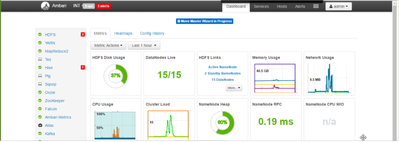
PROBLEM STATEMENT: Ambari not displaying and service action buttons after login. It displays "Move Master Wizard In Progress". Not able to perform any operation from ambari and same is affecting for all users.

ERROR:

9633-move-master-wizard-inprogress.png

ROOT CAUSE: The issue seems that the user who logged inn to ambari UI[acting as admin], has tried to perform operation which was left in middle and just logged off from UI. The operation was cached in ambari UI and hence is reflected for other users in UI.

RESOLUTION: Take ambari server backup and run below command from Ambari node -

curl -u admin:admin -i -H 'X-Requested-By: ambari' -X POST -d '{"wizard-data":"{\"userName\":\"<username>\",\"controllerName\":\"<controller_name>\"}"}' http://<ambari_host>:8080/api/v1/persist

username = the user for which you are facing issue

Ambari_host = hostname of ambari node

controller_name = name of the controller for which ou are making request.

curl -u admin:admin -i -H 'X-Requested-By: ambari' -X POST -d '{"wizard-data":"{\"userName\":\"admin\",\"controllerName\":\"moveMasterController\"}"}'http://ambari.example.com:8080/api/v1/persist
1,435 Views
Version history
Last update:
‎08-17-2019 07:58 AM
Updated by:
Contributors