


Hosting and Ingesting Data From Web Pages (Desktop and Mobile)
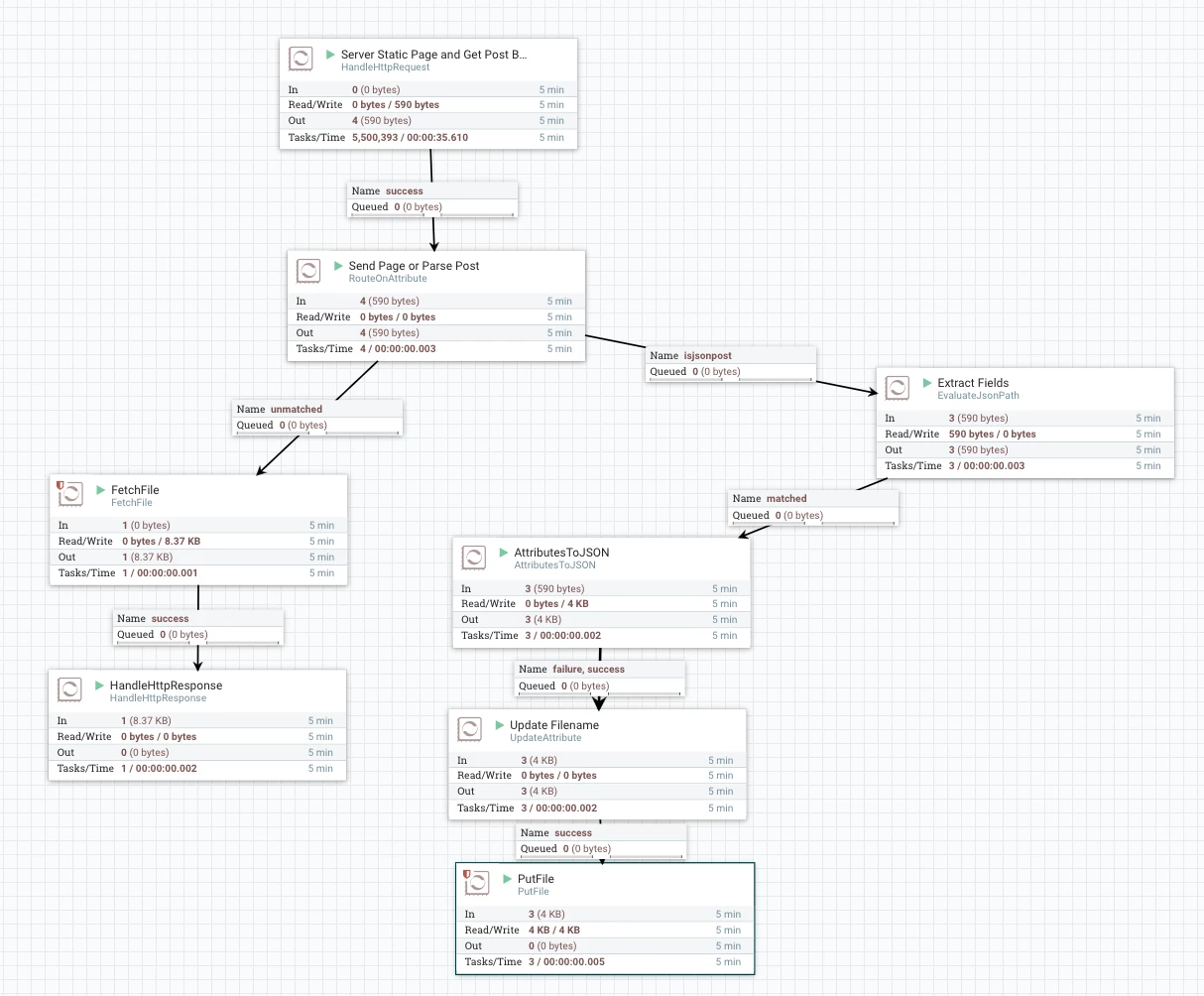
1. Host a Web Page (index.html) via HTTP GET with 200 OK Status
2. Receive POST from that page via AJAX with browser data
3. Extract Content and Attributes
4. Build a JSON file of HTTP data
5. Store it
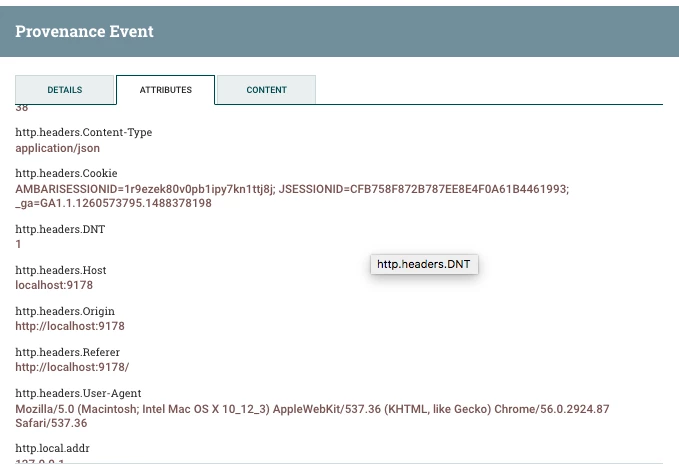
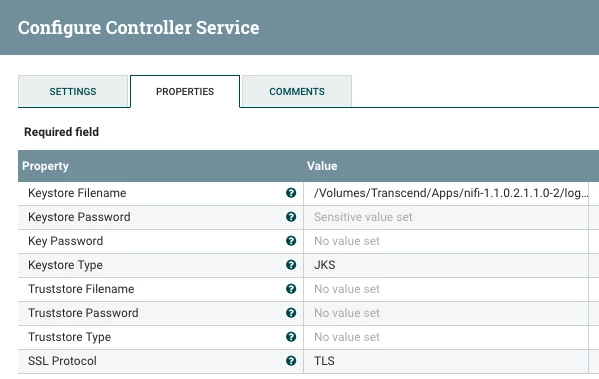
To accept location in a phone or modern browser you must be running SSL.
So I added that for this HTTP Request.
Use openssl to create your 2048 RSA X509, PKCS12, JKS Keystore, Import Trust Store and import in browser
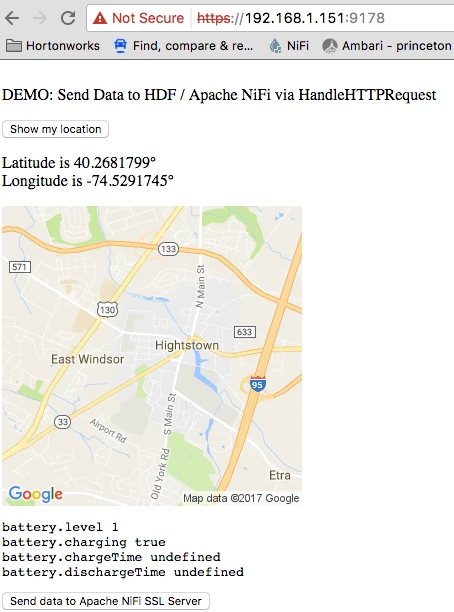
Your web page can be any web page, just POST back via AJAX or Form Submit.
<html>
<head>
<title>NiFi Browser Data Acquisition</title>
<body>
<script>
// Usage
window.onload = function() {

navigator.getBattery().then(function(battery) {
  console.log(battery.level);
  battery.addEventListener('levelchange', function() {
    console.log(this.level);
  });
});


};


////////////// print these


  var latitude = "";
  var longitude = "";
  var ips = "";
  var batteryInfo = "";
  var screenInfo = screen.width +","+ screen.height + "," +
                   screen.availWidth +","+ screen.availHeight + "," +
         screen.colorDepth + "," + screen.pixelDepth;
  var pluginsInfo = "";
  var coresInfo = "";

/////////////


////// Set Plugins
 for (var i = 0; i < 12; i++) {
   if ( typeof window.navigator.plugins[i] !== 'undefined' ) {
         pluginsInfo += window.navigator.plugins[i].name + ', ';
        }
 }


////// Set Cores
if ( window.navigator.hardwareConcurrency > 0  ) {
 coresInfo = window.navigator.hardwareConcurrency + " cores";
}


/////////////
/// send the information to the server
function loadDoc() {
  var xhttp = new XMLHttpRequest();
  xhttp.onreadystatechange = function() {
    if (this.readyState == 4 && this.status == 200) {
      document.getElementById("demo").innerHTML = 'Sent.';
    }
  };
  // /send
  xhttp.open("POST", "/send", true);
  xhttp.setRequestHeader("Content-type", "application/json");
  xhttp.send('{"plugins":"' + pluginsInfo +
               '", "screen":"' + screenInfo +
               '", "cores":"' + coresInfo +
               '", "battery":"' + batteryInfo +
               '", "ip":"' + ips +
               '", "lat":"' + latitude + '", "lng":"' + longitude + '"}')
}


////////////
function geoFindMe() {
  var output = document.getElementById("out");


  if (!navigator.geolocation){
    output.innerHTML = "<p>Geolocation is not supported by your browser</p>";
    return;
  }


  function success(position) {
     latitude  = position.coords.latitude;
     longitude = position.coords.longitude;


    output.innerHTML = '<p>Latitude is ' + latitude + '° <br>Longitude is ' + longitude + '°</p>';


    var img = new Image();
    img.src="https://maps.googleapis.com/maps/api/staticmap?center=" + latitude + "," + longitude + "&zoom=13&size=300x300&sensor=false";


    output.appendChild(img);
  }


  function error() {
    output.innerHTML = "Unable to retrieve your location";
  }


  output.innerHTML = "<p>Locating…</p>";


  navigator.geolocation.getCurrentPosition(success, error);
}


//get the IP addresses associated with an account
function getIPs(callback){
    var ip_dups = {};


    //compatibility for firefox and chrome
    var RTCPeerConnection = window.RTCPeerConnection
        || window.mozRTCPeerConnection
        || window.webkitRTCPeerConnection;
    var useWebKit = !!window.webkitRTCPeerConnection;


    //bypass naive webrtc blocking using an iframe
    if(!RTCPeerConnection){
        //NOTE: you need to have an iframe in the page right above the script tag
        //
        //<iframe id="iframe" sandbox="allow-same-origin" style="display: none"></iframe>
        //<script>...getIPs called in here...
        //
        var win = iframe.contentWindow;
        RTCPeerConnection = win.RTCPeerConnection
            || win.mozRTCPeerConnection
            || win.webkitRTCPeerConnection;
        useWebKit = !!win.webkitRTCPeerConnection;
    }


    //minimal requirements for data connection
    var mediaConstraints = {
        optional: [{RtpDataChannels: true}]
    };


    var servers = {iceServers: [{urls: "stun:stun.services.mozilla.com"}]};


    //construct a new RTCPeerConnection
    var pc = new RTCPeerConnection(servers, mediaConstraints);


    function handleCandidate(candidate){
        //match just the IP address
        var ip_regex = /([0-9]{1,3}(\.[0-9]{1,3}){3}|[a-f0-9]{1,4}(:[a-f0-9]{1,4}){7})/
        var ip_addr = ip_regex.exec(candidate)[1];


        //remove duplicates
        if(ip_dups[ip_addr] === undefined)
            callback(ip_addr);


        ip_dups[ip_addr] = true;
    }


    //listen for candidate events
    pc.onicecandidate = function(ice){


        //skip non-candidate events
        if(ice.candidate)
            handleCandidate(ice.candidate.candidate);
    };


    //create a bogus data channel
    pc.createDataChannel("");


    //create an offer sdp
    pc.createOffer(function(result){


        //trigger the stun server request
        pc.setLocalDescription(result, function(){}, function(){});


    }, function(){});


    //wait for a while to let everything done
    setTimeout(function(){
        //read candidate info from local description
        var lines = pc.localDescription.sdp.split('\n');


        lines.forEach(function(line){
            if(line.indexOf('a=candidate:') === 0)
                handleCandidate(line);
        });
    }, 1000);
}


window.addEventListener("load", function (ev) {
    "use strict";
    var log = document.getElementById("log");
    // https://dvcs.w3.org/hg/dap/raw-file/tip/sensor-api/Overview.html
    window.addEventListener("devicetemperature", function (ev) {
        log.textContent += "devicetemperature " + ev.value + "\n";
    }, false);
    window.addEventListener("devicepressure", function (ev) {
        log.textContent += "devicepressure " + ev.value + "\n";
    }, false);
    window.addEventListener("devicelight", function (ev) {
        log.textContent += "devicelight " + ev.value + "\n";
        // toy tric
        log.style.color = "rgb(" + (255 - 2*ev.value) + ",0,0)";
        log.style.backgroundColor = "rgb(0,0," + (2*ev.value) + ")";
    }, false);
    window.addEventListener("deviceproximity", function (ev) {
        log.textContent += "deviceproximity " + ev.value + "\n";
        // toy tric
        if (ev.value < 3) navigator.vibrate([300, 100, 100]);
    }, false);
    window.addEventListener("devicenoise", function (ev) {
        log.textContent += "devicenoise " + ev.value + "\n";
    }, false);
    window.addEventListener("devicehumidity", function (ev) {
        log.textContent += "devicehumidity " + ev.value + "\n";
    }, false);


    //https://wiki.mozilla.org/Magnetic_Field_Events
    window.addEventListener("devicemagneticfield", function (ev) {
        log.textContent += "devicemagneticfield " + [ev.x, ev.y, ev.x]+ "\n";
    }, false);


    // https://dvcs.w3.org/hg/dap/raw-file/default/pressure/Overview.html
    window.addEventListener("atmpressure", function (ev) {
        log.textContent += "atmpressure " + ev.value + "\n";
    }, false);

    // https://dvcs.w3.org/hg/dap/raw-file/tip/humidity/Overview.html
    window.addEventListener("humidity", function (ev) {
        log.textContent += "humidity " + ev.value + "\n";
    }, false);

    // https://dvcs.w3.org/hg/dap/raw-file/tip/temperature/Overview.html
    window.addEventListener("temperature", function (ev) {
        log.textContent += "temperature " + [ev.f, ev.c, ev.k, ev.value] + "\n";
    }, false);

    // https://dvcs.w3.org/hg/dap/raw-file/tip/battery/Overview.html
    try {
        if (typeof navigator.getBattery === "function") {
            navigator.getBattery().then(function (battery) {
                log.textContent += "battery.level " + battery.level + "\n";
                log.textContent += "battery.charging " + battery.charging + "\n";

                batteryInfo = "battery.level=" + battery.level + "," +
                               "battery.charging=" + battery.charging;

                log.textContent += "battery.chargeTime " + battery.chargeTime + "\n";
                log.textContent += "battery.dischargeTime " + battery.dischargeTime + "\n";
                battery.addEventListener("levelcharge", function (ev) {
                    log.textContent += "change battery.level " + battery.level + "\n";
                }, false);
            }).catch(function (err) {
                log.textContent += err.toString() + "\n";
            });
        } else {
            log.textContent += "";
        }
    } catch (ex) {
        log.textContent += ex.toString() + "\n";
    }
}, false);


</script>


<p>
<br>
DEMO:  Send Data to HDF /  Apache NiFi via HandleHTTPRequest
<br>


<p><button onclick="geoFindMe()">Show my location</button></p>


<div id="out"></div>


<div id="demo"></div>


<pre id="log"></pre>

<button type="button" onclick="loadDoc()">Send data to Apache NiFi SSL Server</button>


<iframe id="iframe" sandbox="allow-same-origin" style="display: none"></iframe>
<script>


getIPs(function(ip){ips = ip;});


</script>
</body>
</html>
index.html : A web page to grab user information.
mobile-ingest-v3.xml : Apache NiFi 1.1.x template.
Note: Different browsers, devices, phones, tables and versions will send different values. Users should get a location request pop-up.
JSON Result File
{
  "http.request.uri" : "/send",
  "http.context.identifier" : "a4f9ae25-5f49-463e-97eb-c8a6bf3be8a7",
  "http.remote.host" : "192.xxx.1.xxx",
  "http.headers.Host" : "192.xxx.1.xxx:9178",
  "http.local.name" : "192.xxx.1.xxx",
  "http.headers.DNT" : "1",
  "plugins" : "Widevine Content Decryption Module, Shockwave Flash, Chrome PDF Viewer, Native Client, Chrome PDF Viewer, ",
  "latitude" : "40.2681799",
  "http.headers.Accept" : "*/*",
  "battery" : "battery.level=1,battery.charging=true",
  "uuid" : "a2f299ae-6ef6-480d-a359-1362d25abe76",
  "http.request.url" : "https://192.168.1.151:9178/send",
  "http.server.name" : "192.168.1.151",
  "http.character.encoding" : "UTF-8",
  "path" : "./",
  "cores" : "8 cores",
  "http.remote.addr" : "192.168.1.151",
  "http.headers.User-Agent" : "Mozilla/5.0 (Macintosh; Intel Mac OS X 10_12_3) AppleWebKit/537.36 (KHTML, like Gecko) Chrome/56.0.2924.87 Safari/537.36",
  "http.method" : "POST",
  "http.headers.Connection" : "keep-alive",
  "longitude" : "-74.5291745",
  "http.server.port" : "9178",
  "ip" : "192.168.1.151",
  "mime.type" : "application/json",
  "http.locale" : "en_US",
  "http.headers.Accept-Encoding" : "gzip, deflate, br",
  "http.headers.Origin" : "https://192.168.1.151:9178",
  "http.servlet.path" : "",
  "http.local.addr" : "192.168.1.151",
  "filename" : "1082639525534467",
  "http.headers.Referer" : "https://192.168.1.151:9178/",
  "http.headers.Accept-Language" : "en-US,en;q=0.8",
  "http.headers.Content-Length" : "253",
  "http.headers.Content-Type" : "application/json",
  "RouteOnAttribute.Route" : "isjsonpost"
}
References:
- https://github.com/tspannhw/webdataingest
- http://webkay.robinlinus.com/
- https://github.com/RobinLinus/autofill-phishing
- https://github.com/RobinLinus/ubercookie
- https://github.com/RobinLinus/socialmedia-leak
- https://www.w3schools.com/jsref/prop_screen_availheight.asp
- https://community.hortonworks.com/articles/27033/https-endpoint-in-nifi-flow.html
- http://www.batchiq.com/nifi-configuring-ssl-auth.html
- https://community.hortonworks.com/articles/886/securing-nifi-step-by-step.html
- http://mobilehtml5.org/
- https://gist.github.com/bellbind/c60d7008e86c34a76aa1
- https://github.com/coremob/camera
- http://www.girliemac.com/presentation-slides/html5-mobile-approach/deviceAPIs.html?full#23
- https://github.com/girliemac/sushi-compass/blob/master/js/app.js
- https://github.com/noipfraud/IPLock
- http://www.tomanthony.co.uk/blog/detect-visitor-social-networks/
- https://appsec-labs.com/html5/#toggle-id-5
- https://mobiforge.com/design-development/sense-and-sensor-bility-access-mobile-device-sensors-with-javascript
- https://www.html5rocks.com/en/tutorials/device/orientation/
- http://qnimate.com/html5-proximity-api/

