Our Community is getting an upgrade! To get everything ready for the relaunch, we’ll be placing the site in read-only mode starting September 21st.
We really appreciate your understanding while we get things set up behind the scenes. Catch up on all the exciting details about the move here.
Need help or have questions? Drop us a line at [email protected]

Community Articles

Find and share helpful community-sourced technical articles.
Announcements
Share your experience with Cloudera on G2 and get a $25 Amazon Gift card.
Hi, I'm CLEO! Something exciting is coming to the Community. Stay Tuned!

avatar

It's all about simplicity and cohesion.  With the multiple services within CDP, today I'll focus on finding actively running queries in CDW (Impala) from CML.  With the three steps below, you'll be able to find actively running query progress:

Step 1: Find the coordinator URL within CDW (Impala)

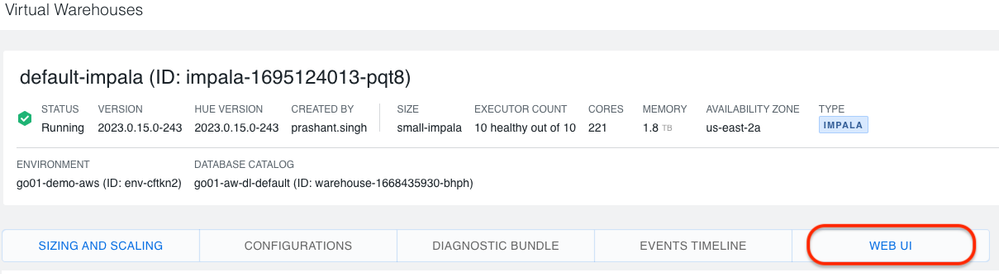
  1. Within CDW, go to your Virtual Warehouse and select "Edit":step_1_a_vw_edit.png
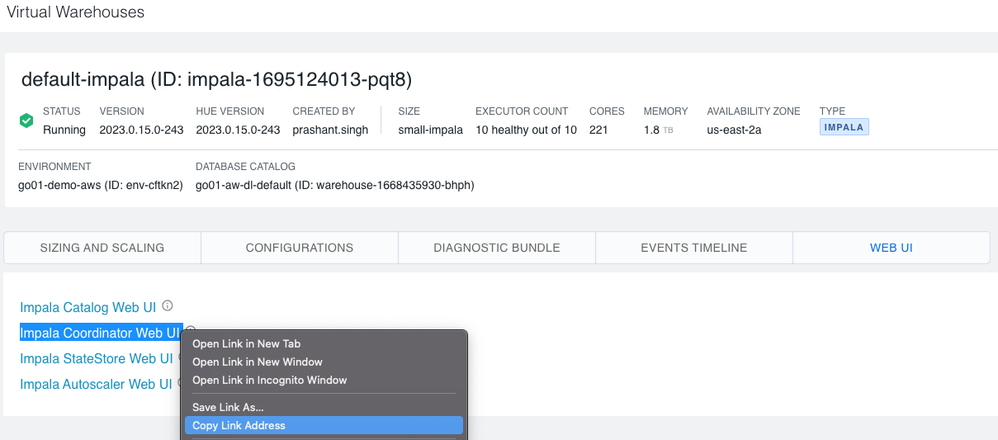
  2. Within the Virtual Warehouse, go to the "WEB UI" page:step_1_b_web_ui_screen.png
  3. Copy the Coordinator Web UI address, in my example I'll remove the https://
    "coordinator-web-default-impala.dw-go01-demo-aws.ylcu-atmi.cloudera.site"​

    step_1_c_coordinator_web_ui_copy.png

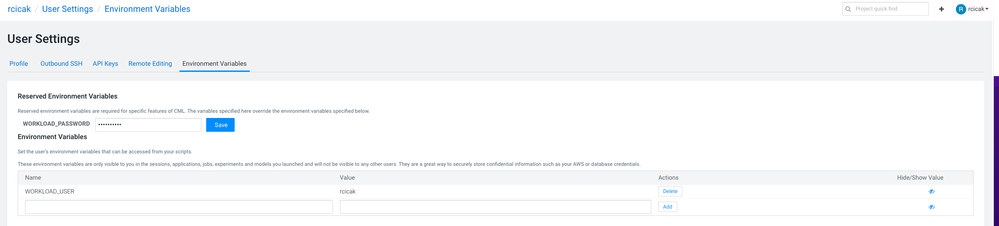
Step 2: Since we're connecting to CDW (Impala) from within CML, I'll set my project's Environment Variables to include my username/password

  1. Setting the WORKLOAD_PASSWORD to my workload password
  2. Setting the variable WORKLOAD_USER to my usernameenvironment_variables.png

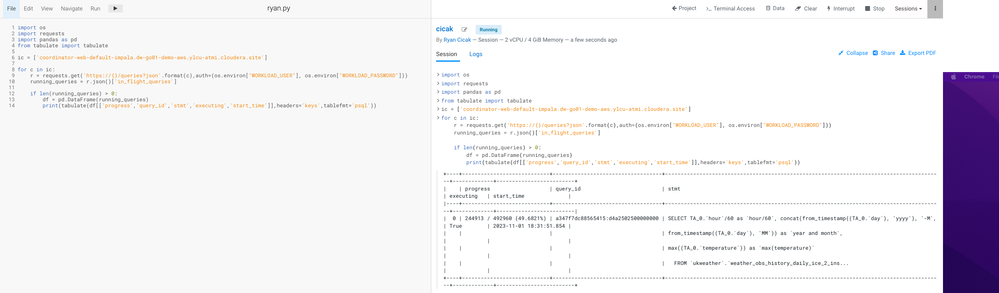
Step 3: Within my CML Notebook (in my case PBJ), I'll copy the following code, replacing the coordinator with the coordinator from Step 1:


import os
import requests
import pandas as pd
from tabulate import tabulate

ic = ['coordinator-web-default-impala.dw-go01-demo-aws.ylcu-atmi.cloudera.site']

for c in ic:
    r = requests.get('https://{}/queries?json'.format(c),auth=(os.environ["WORKLOAD_USER"], os.environ["WORKLOAD_PASSWORD"]))
    running_queries = r.json()['in_flight_queries']
    
    if len(running_queries) > 0:
        df = pd.DataFrame(running_queries)
        print(tabulate(df[['progress','query_id','stmt','executing','start_time']],headers='keys',tablefmt='psql'))


working_python_to_cdw.png

I can add more columns if necessary such as 'stmt_type','resource_pool','state','default_db','effective_user'. 

It's just that easy!

2,082 Views
0 Kudos
Version history
Last update:
‎04-20-2026 11:46 PM
Updated by: