

MaarufB
Silver ⭐️⭐️⭐️
October 24, 2022
Solved

Controlling Apache NiFi components(ex. processor) via NiFi API call from Postman

I was trying to control apache nifi processors to start/stop by calling apache nifi-api. I am using Postman to make the call, for example to start a GenerateFlowFile processor:

https://localhost:8443/processors/{processor id} (PUT Request)

But I got the response status 403(forbidden) as shown in the image below.
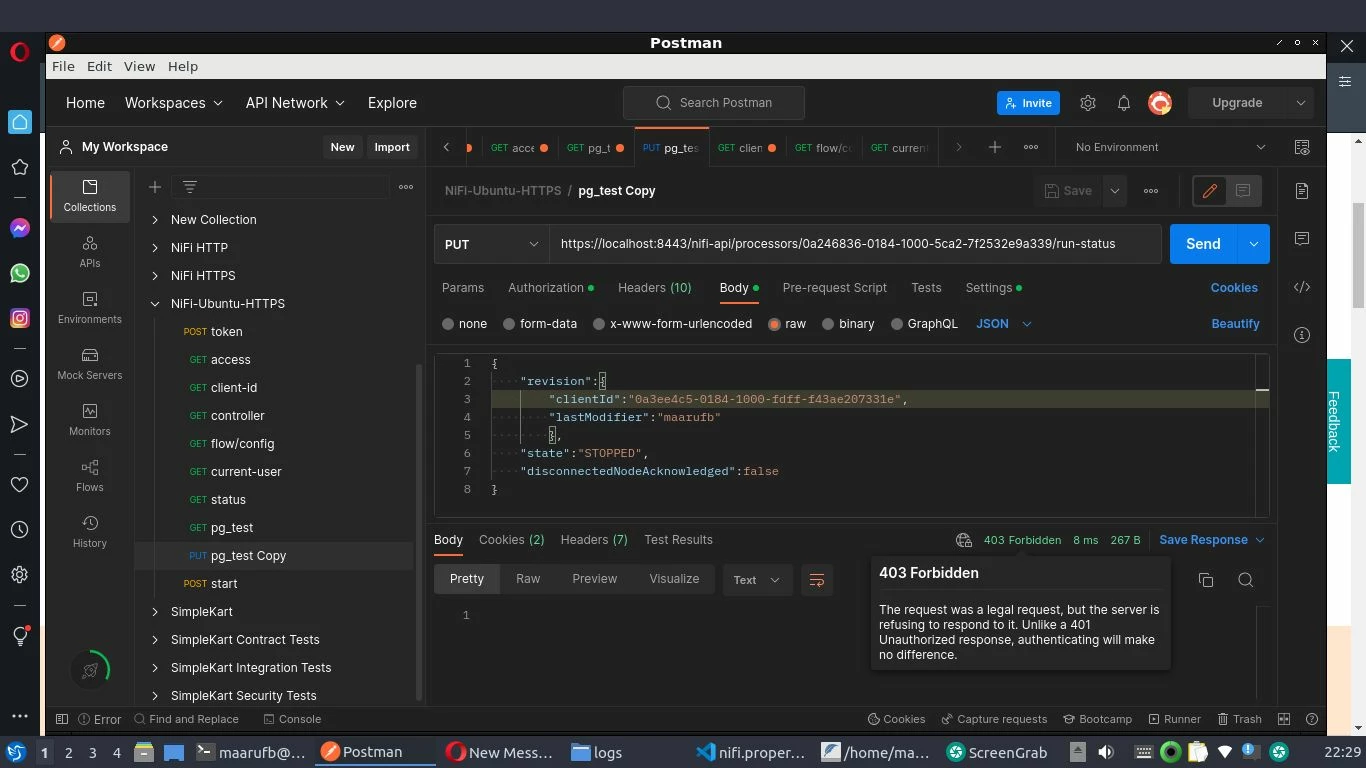
 

nifi-403.jpg


I was able to make a get request.


I have also a client self-signed certificate generated using nifi-toolkit by following this https://kylo.readthedocs.io/en/v0.10.0/security/ConfigureNiFiWithSSL.html


from nifi.properties file:

ifi.security.autoreload.enabled=false
nifi.security.autoreload.interval=10 secs
nifi.security.keystore=./conf/kylo/localhost/keystore.jks
nifi.security.keystoreType=jks
nifi.security.keystorePasswd=.............
nifi.security.keyPasswd=.............
nifi.security.truststore=./conf/kylo/localhost/truststore.jks
nifi.security.truststoreType=jks
nifi.security.truststorePasswd=.............
nifi.security.user.authorizer=single-user-authorizer
nifi.security.allow.anonymous.authentication=true
nifi.security.user.login.identity.provider=single-user-provider
nifi.security.user.jws.key.rotation.period=PT1H
nifi.security.ocsp.responder.url=
nifi.security.ocsp.responder.certificate=
 
NOTE: I did not change anything in the authorizations.xml and the authorizers.xml

 
@steven-matison thanks by the way for telling me to post this concern. I am new to NiFi also.  
steven-matison
Platinum ⭐️⭐️
October 28, 2022

If you are able to get the token and communicate with the api from postman, thats a great start.   The PUT request must have some other issue.   Are you passing the token correctly?


Have you made sure that you are able to get the token, and make the put request from nifi node with command line?    You always want to make sure you have working samples for any api system before you try to convert them to postman.  


7 replies

steven-matison
Platinum ⭐️⭐️
Platinum ⭐️⭐️
October 24, 2022

@MaarufB Using nifi-cli outside of curl on a nifi node is definitely a challenge.  There are a lot of things you need to check.  Most of them are addressed in a similar post here:


https://community.cloudera.com/t5/Support-Questions/Calling-nifi-Api-using-Postman/td-p/343993


Hopefully you can find the solution within that post.  

Translate
MaarufB
MaarufBAuthor
Silver ⭐️⭐️⭐️
October 25, 2022

Thanks, I'll be back here if I can solve my issue. 

Translate
MaarufB
MaarufBAuthor
Silver ⭐️⭐️⭐️
October 26, 2022

@steven-matison Is it possible for single-user (default setup) to control the dataflow via API call from Postman?

Translate
steven-matison
Platinum ⭐️⭐️
Platinum ⭐️⭐️
October 26, 2022

I believe so.  Were you able to get a token using that user?

Translate
MaarufB
MaarufBAuthor
Silver ⭐️⭐️⭐️
October 27, 2022

Yes  @steven-matison  I was able to use a token in Postman. I put the access token in Authorization Tab > Bearer Token every time I make a request. However, when I used PUT request I just got 403(forbidden request). 

Translate
steven-matison
Platinum ⭐️⭐️
Platinum ⭐️⭐️
October 28, 2022

If you are able to get the token and communicate with the api from postman, thats a great start.   The PUT request must have some other issue.   Are you passing the token correctly?


Have you made sure that you are able to get the token, and make the put request from nifi node with command line?    You always want to make sure you have working samples for any api system before you try to convert them to postman.  


Translate
MaarufB
MaarufBAuthor
Silver ⭐️⭐️⭐️
November 16, 2022

Sorry my bad, I forgot to reply here. Anyways I was able to fix the issue by clearing the cookies in the Postman and Put my Bearer token to the Authorization Header. Thanks for the help by the way.

Translate

