
Our Community is getting an upgrade! To get everything ready for the relaunch, we’ll be placing the site in read-only mode starting September 21st.
We really appreciate your understanding while we get things set up behind the scenes. Catch up on all the exciting details about the move here.
Need help or have questions? Drop us a line at [email protected]

Support Questions
 Hi, I'm CLEO! Something exciting is coming to the Community. Stay Tuned!
- Cloudera Community
- Support
- Support Questions
- Re: Manage CM using Rest API
- Subscribe to RSS Feed
- Mark Question as New
- Mark Question as Read
- Float this Question for Current User
- Bookmark
- Subscribe
- Mute
- Printer Friendly Page
- Subscribe to RSS Feed
- Mark Question as New
- Mark Question as Read
- Float this Question for Current User
- Bookmark
- Subscribe
- Mute
- Printer Friendly Page
Manage CM using Rest API
- Labels:
-
Apache Impala
-
Cloudera Manager


- Mark as New
- Bookmark
- Subscribe
- Mute
- Subscribe to RSS Feed
- Permalink
- Report Inappropriate Content
Hello,
I recently discovered the CM Rest API and how I can restart services and obtain some information just using the Linux console and not using the CM UI.
I'm looking for some examples to delete and create the Impala Catalog Server and State Store (in a diferent node) by only using this feature.
I did not find any information about it in the internet, just some poor youtube videos to do simple actions.
I'm using
CDP 7.1.6
CM 7.3.1
API v43
This is the Cloudera documentation I could get from my installation
http://my-CMhost.com:7180/static/apidocs/resource_RolesResource.html
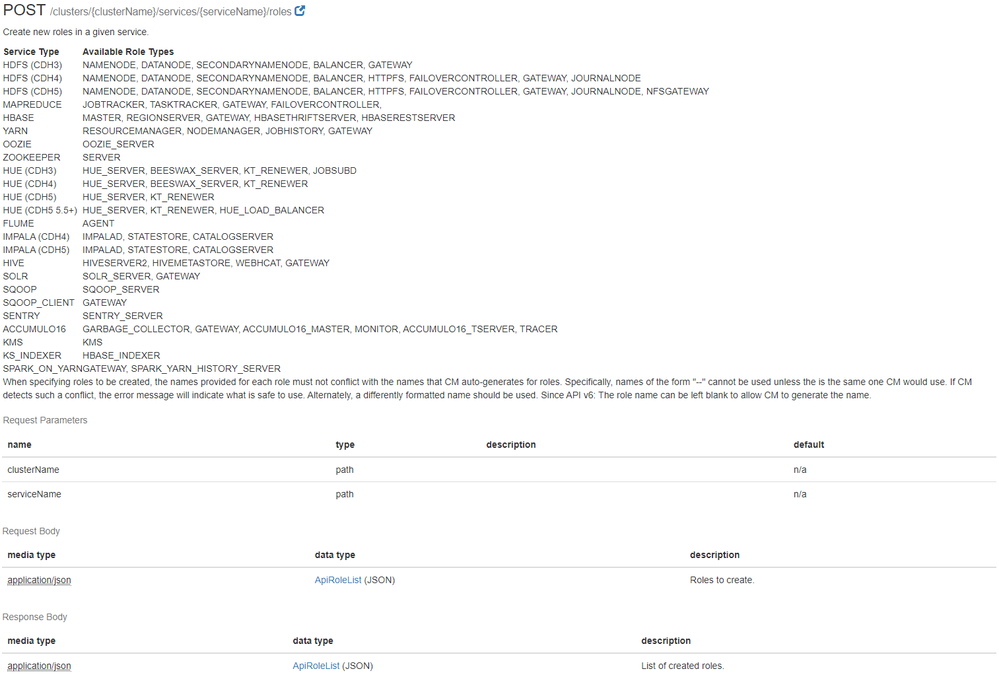
I would really appreciate if anyone used this and could share some examples 🙂



Created 03-02-2022 04:43 AM
- Mark as New
- Bookmark
- Subscribe
- Mute
- Subscribe to RSS Feed
- Permalink
- Report Inappropriate Content
Hi @Juanes ,
Here are a couple of examples:
To delete a role:
curl \
  -u admin:admin \
  -X DELETE \
  "http://cm-host:7180/api/v45/clusters/cluster1/services/impala1/roles/impala-CATALOGSERVER-3b111e1a47149ce566f7225d1120cf85"
To create a role for a service in a particular host:
❯ cat role.json
{
  "items": [
    {
      "name" : "impala-CATALOGSERVER-myrole",
      "type" : "CATALOGSERVER",
      "serviceRef" : {
        "clusterName" : "cluster1",
        "serviceName" : "impala1",
        "serviceDisplayName" : "Impala",
        "serviceType" : "IMPALA"
      },
      "hostRef" : {
        "hostId" : "21fd5c51-0fd2-4eb6-97d2-0e498639eb07",
        "hostname" : "host-2"
      }
    }
  ]
}

❯ curl \
   -u admin:admin \
   -X POST \
   "http://cm-host:7180/api/v45/clusters/cluster1/services/impala1/roles" \
   -H 'Content-Type: application/json' \
   -d @role.json
Cheers,
André
Was your question answered? Please take some time to click on "Accept as Solution" below this post.
If you find a reply useful, say thanks by clicking on the thumbs up button.
Created 03-02-2022 04:43 AM
- Mark as New
- Bookmark
- Subscribe
- Mute
- Subscribe to RSS Feed
- Permalink
- Report Inappropriate Content
Hi @Juanes ,
Here are a couple of examples:
To delete a role:
curl \
  -u admin:admin \
  -X DELETE \
  "http://cm-host:7180/api/v45/clusters/cluster1/services/impala1/roles/impala-CATALOGSERVER-3b111e1a47149ce566f7225d1120cf85"
To create a role for a service in a particular host:
❯ cat role.json
{
  "items": [
    {
      "name" : "impala-CATALOGSERVER-myrole",
      "type" : "CATALOGSERVER",
      "serviceRef" : {
        "clusterName" : "cluster1",
        "serviceName" : "impala1",
        "serviceDisplayName" : "Impala",
        "serviceType" : "IMPALA"
      },
      "hostRef" : {
        "hostId" : "21fd5c51-0fd2-4eb6-97d2-0e498639eb07",
        "hostname" : "host-2"
      }
    }
  ]
}

❯ curl \
   -u admin:admin \
   -X POST \
   "http://cm-host:7180/api/v45/clusters/cluster1/services/impala1/roles" \
   -H 'Content-Type: application/json' \
   -d @role.json
Cheers,
André
Was your question answered? Please take some time to click on "Accept as Solution" below this post.
If you find a reply useful, say thanks by clicking on the thumbs up button.

Created 03-02-2022 09:01 AM
- Mark as New
- Bookmark
- Subscribe
- Mute
- Subscribe to RSS Feed
- Permalink
- Report Inappropriate Content
Whow, this worked perfect!
You make my day, my best wishes to you my friend! 😎


