- Subscribe to RSS Feed
- Mark Question as New
- Mark Question as Read
- Float this Question for Current User
- Bookmark
- Subscribe
- Mute
- Printer Friendly Page
No show Users and Policies in Global Menu
- Labels:
-
Apache NiFi
Created 03-22-2022 09:34 AM
- Mark as New
- Bookmark
- Subscribe
- Mute
- Subscribe to RSS Feed
- Permalink
- Report Inappropriate Content
Hi..
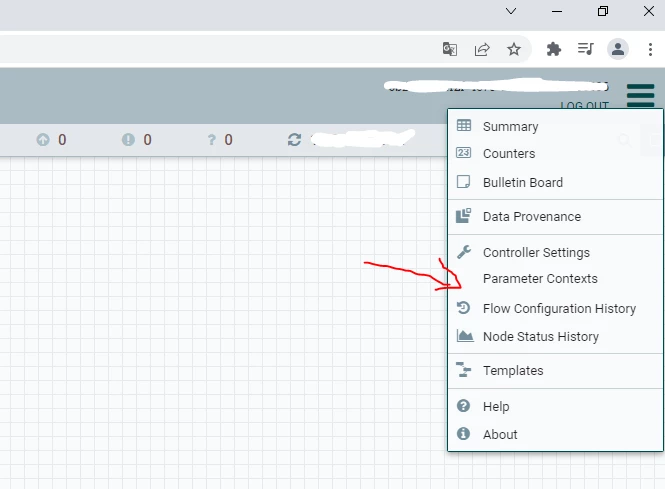
I don't see the Users and Policies items in the Global Menu
Google Chrome ver99
Apache NiFi 1.15.3
Created on 03-23-2022 02:59 AM - edited 03-23-2022 03:05 AM
- Mark as New
- Bookmark
- Subscribe
- Mute
- Subscribe to RSS Feed
- Permalink
- Report Inappropriate Content
Hi @AndreDre1 ,
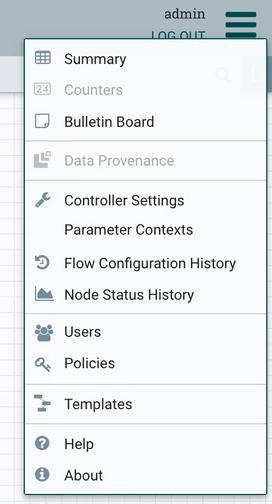
You probably have a default NiFi configuration, which uses the single-user-authorizer. This authorizer doesn't have a Users menu in the UI. To see the Users menu you need to switch to another authorizer.
For example, if you have a brand new installation of NiFi with the default configuration, follow the steps below:
- Edit the conf/nifi.properties file and update the following property:
nifi.security.user.authorizer=managed-authorizer - Add the name of your initial admin in the following two places in conf/authorizers.xml:
...
<userGroupProvider>
<identifier>file-user-group-provider</identifier>
<class>org.apache.nifi.authorization.FileUserGroupProvider</class>
<property name="Users File">./conf/users.xml</property>
<property name="Legacy Authorized Users File"></property>
<property name="Initial User Identity 1">ADMIN_USERNAME_HERE</property>
</userGroupProvider>
...
<accessPolicyProvider>
<identifier>file-access-policy-provider</identifier>
<class>org.apache.nifi.authorization.FileAccessPolicyProvider</class>
<property name="User Group Provider">file-user-group-provider</property>
<property name="Authorizations File">./conf/authorizations.xml</property>
<property name="Initial Admin Identity">ADMIN_USERNAME_HERE</property>
<property name="Legacy Authorized Users File"></property>
<property name="Node Identity 1"></property>
<property name="Node Group"></property>
</accessPolicyProvider>
... - Stop NiFi:
./bin/nifi.sh stop - Remove users.xml and authorizations.xml:
rm conf/users.xml conf/authorizations.xml - Start NiFi:
./bin/nifi.sh start - After you login to NiFi you should now be able to see the Users menu:
Cheers,
André
--
Was your question answered? Please take some time to click on "Accept as Solution" below this post.
If you find a reply useful, say thanks by clicking on the thumbs up button.

Was your question answered? Please take some time to click on "Accept as Solution" below this post.
If you find a reply useful, say thanks by clicking on the thumbs up button.
Created on 03-23-2022 02:59 AM - edited 03-23-2022 03:05 AM
- Mark as New
- Bookmark
- Subscribe
- Mute
- Subscribe to RSS Feed
- Permalink
- Report Inappropriate Content
Hi @AndreDre1 ,
You probably have a default NiFi configuration, which uses the single-user-authorizer. This authorizer doesn't have a Users menu in the UI. To see the Users menu you need to switch to another authorizer.
For example, if you have a brand new installation of NiFi with the default configuration, follow the steps below:
- Edit the conf/nifi.properties file and update the following property:
nifi.security.user.authorizer=managed-authorizer - Add the name of your initial admin in the following two places in conf/authorizers.xml:
...
<userGroupProvider>
<identifier>file-user-group-provider</identifier>
<class>org.apache.nifi.authorization.FileUserGroupProvider</class>
<property name="Users File">./conf/users.xml</property>
<property name="Legacy Authorized Users File"></property>
<property name="Initial User Identity 1">ADMIN_USERNAME_HERE</property>
</userGroupProvider>
...
<accessPolicyProvider>
<identifier>file-access-policy-provider</identifier>
<class>org.apache.nifi.authorization.FileAccessPolicyProvider</class>
<property name="User Group Provider">file-user-group-provider</property>
<property name="Authorizations File">./conf/authorizations.xml</property>
<property name="Initial Admin Identity">ADMIN_USERNAME_HERE</property>
<property name="Legacy Authorized Users File"></property>
<property name="Node Identity 1"></property>
<property name="Node Group"></property>
</accessPolicyProvider>
... - Stop NiFi:
./bin/nifi.sh stop - Remove users.xml and authorizations.xml:
rm conf/users.xml conf/authorizations.xml - Start NiFi:
./bin/nifi.sh start - After you login to NiFi you should now be able to see the Users menu:
Cheers,
André
--
Was your question answered? Please take some time to click on "Accept as Solution" below this post.
If you find a reply useful, say thanks by clicking on the thumbs up button.

Was your question answered? Please take some time to click on "Accept as Solution" below this post.
If you find a reply useful, say thanks by clicking on the thumbs up button.

Created 04-15-2023 09:17 AM
- Mark as New
- Bookmark
- Subscribe
- Mute
- Subscribe to RSS Feed
- Permalink
- Report Inappropriate Content
Thank you very much @araujo !!!👏
Created 08-09-2025 08:12 AM
- Mark as New
- Bookmark
- Subscribe
- Mute
- Subscribe to RSS Feed
- Permalink
- Report Inappropriate Content
Hello I am confused on one point why are you asking to
Remove users.xml and authorizations.xml:
rm conf/users.xml conf/authorizations.xml
If we remove them then how will changes that we had done in previous steps to the authorizations.xml remain?
Also I believe step 1
Created 03-24-2022 05:18 PM
- Mark as New
- Bookmark
- Subscribe
- Mute
- Subscribe to RSS Feed
- Permalink
- Report Inappropriate Content
@AndreDre1 , did the above answer your question?
André
--
Was your question answered? Please take some time to click on "Accept as Solution" below this post.
If you find a reply useful, say thanks by clicking on the thumbs up button.

Was your question answered? Please take some time to click on "Accept as Solution" below this post.
If you find a reply useful, say thanks by clicking on the thumbs up button.

Created on 09-26-2022 07:10 AM - edited 09-26-2022 07:11 AM
- Mark as New
- Bookmark
- Subscribe
- Mute
- Subscribe to RSS Feed
- Permalink
- Report Inappropriate Content
Hi @araujo this link was really useful . But where can i get the password for newly created users. Without password how can new users access it . I am not able to find any documentation for that. i have checked in all the files as well and couldn't find any passwords
Created 04-17-2023 01:03 PM
- Mark as New
- Bookmark
- Subscribe
- Mute
- Subscribe to RSS Feed
- Permalink
- Report Inappropriate Content
The single-user-provider used by NiFi out of the box does not support multiple users. It simply sets up a single user to access the secured NiFi suing the out of the box NiFi setup. Only the very first time NiFi is launched with this setup will the generated username and password be output in the nifi-app.log. You can use the following command to change that username and password:
$ ./bin/nifi.sh set-single-user-credentials <username> <password>This single user username and password has full access to everything, so NiFi does not expose "policies" as setting up additional users is not possible.
NiFi provides no other provider for local users. NiFi historically has left user management as an external dependency. In order tp support multiple users with and various level of authorization, you will need to switch to using a different authorizer and authentication method.
Switching to another authentication method will require you establish an external means for user authentication. NiFi has numerous supported methods (User certificate, LDAP, Kerberos, etc.)
https://nifi.apache.org/docs/nifi-docs/html/administration-guide.html#user_authentication
Once you have selected the method you will use to authenticate your users that is not the "single-user-provider", you need to change your authorizer from "single-user-authorizer" to "standard-managed-authorizer":
https://nifi.apache.org/docs/nifi-docs/html/administration-guide.html#standardmanagedauthorizer
If you found that any of the provided solution(s) assisted you with your query, please take a moment to login and click Accept as Solution below each response that helped.
Thank you,
Matt
Created 08-10-2025 03:53 AM
- Mark as New
- Bookmark
- Subscribe
- Mute
- Subscribe to RSS Feed
- Permalink
- Report Inappropriate Content
Hi @MattWho Is there any support for OIDC now?
Created 08-11-2025 10:26 AM
- Mark as New
- Bookmark
- Subscribe
- Mute
- Subscribe to RSS Feed
- Permalink
- Report Inappropriate Content
User authentication using OpenID Connect:
OpenID Connect
If you found that any of the provided solution(s) assisted you with your query, please take a moment to login and click Accept as Solution below each response that helped.
Thank you,
Matt