Our Community is getting an upgrade! To get everything ready for the relaunch, we’ll be placing the site in read-only mode starting September 21st.
We really appreciate your understanding while we get things set up behind the scenes. Catch up on all the exciting details about the move here.
Need help or have questions? Drop us a line at [email protected]

Support Questions

Find answers, ask questions, and share your expertise
Announcements
Share your experience with Cloudera on G2 and get a $25 Amazon Gift card.
Hi, I'm CLEO! Something exciting is coming to the Community. Stay Tuned!

how do Add attributes to a json file

avatar
Contributor

Hey everyone,

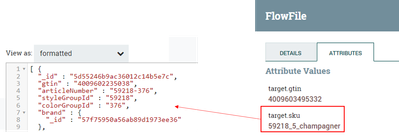
I would like to add an attribute to a json file. The json file is a result of an api query with the Invoke HTTP procesor. As a next step I want to add an attribute to the json file to the existing fields

MarioFRS_0-1661975374654.png

I expected this:

[ {
"_id" : "5d55246b9ac36012c14b5e7c",
"gtin" : "4009602235038",
"target.sku : "59218_5_champagner", <- added attribute value
"articleNumber" : "59218-376",
"styleGroupId" : "59218",
"colorGroupId" : "376",
"brand" : {
"_id" : "57f75950a56ab89d1973ee36"
},


Does anyone have any ideas?

1 ACCEPTED SOLUTION

avatar
Super Guru

Hi ,

You can use JoltJsonTransform Processor for that. So lets assume we have the following input:

[
  {
    "_id": "5d55246b9ac36012c14b5e7c",
    "gtin": "4009602235038",
    "articleNumber": "59218-376",
    "styleGroupId": "59218",
    "colorGroupId": "376",
    "brand": {
      "_id": "57f75950a56ab89d1973ee36"
    }
  }
]


Add JoltTranformJson processor and set the Jolt Specification property to the following, notice this property allows you to use Expression Language therefore you can reference attributes in the flowfile:


[
  {
    "operation": "modify-default-beta", //for modify-overwrite-beta 
    "spec": { 
      "*": {
        "target.sku": "${target.sku}"
      }
    }
  }
]


This will produce the following Json:

[ {
  "_id" : "5d55246b9ac36012c14b5e7c",
  "gtin" : "4009602235038",
  "articleNumber" : "59218-376",
  "styleGroupId" : "59218",
  "colorGroupId" : "376",
  "brand" : {
    "_id" : "57f75950a56ab89d1973ee36"
  },
  "target.sku" : "someValue"
} ]

If you find this helpful please accept solution.

Thanks


View solution in original post

2 REPLIES 2

avatar
Super Guru

Hi ,

You can use JoltJsonTransform Processor for that. So lets assume we have the following input:

[
  {
    "_id": "5d55246b9ac36012c14b5e7c",
    "gtin": "4009602235038",
    "articleNumber": "59218-376",
    "styleGroupId": "59218",
    "colorGroupId": "376",
    "brand": {
      "_id": "57f75950a56ab89d1973ee36"
    }
  }
]


Add JoltTranformJson processor and set the Jolt Specification property to the following, notice this property allows you to use Expression Language therefore you can reference attributes in the flowfile:


[
  {
    "operation": "modify-default-beta", //for modify-overwrite-beta 
    "spec": { 
      "*": {
        "target.sku": "${target.sku}"
      }
    }
  }
]


This will produce the following Json:

[ {
  "_id" : "5d55246b9ac36012c14b5e7c",
  "gtin" : "4009602235038",
  "articleNumber" : "59218-376",
  "styleGroupId" : "59218",
  "colorGroupId" : "376",
  "brand" : {
    "_id" : "57f75950a56ab89d1973ee36"
  },
  "target.sku" : "someValue"
} ]

If you find this helpful please accept solution.

Thanks


avatar
Contributor

Thanks Mr @SAMSAL for the insight. I learned from it because i was even thinking of telling him to use EvaluateJsonPath & ReplaceText processor.