

Created on 09-06-201807:41 PM - edited 08-17-201906:30 AM
Short Description:
Often times there will be a need to ingest binary files to Hadoop (like PDF, JPG, PNG) where you will want to store them in HBase directly and not on HDFS itself. This article describes an example how this could be achieved.
Article
The maximum number of files in HDFS depends on the amount of memory available for the NameNode.
Each file object and each block object takes about 150 bytes of the memory. For example, if you have 10 million files and each file has 1 one block each, then you would need about 3GB of memory for the NameNode. This could pose a problem if you would like to store trillions of files, where you will run out of RAM on the NameNode trying to track all of these files.
One option to resolve this issue is to store your blobs in an Object store. There are many to choose from, especially if you use your favorite cloud provider. Another alternative would be to look at Ozone: https://hortonworks.com/blog/ozone-object-store-hdfs/
Hortonworks Dataflow (HDF), can be used to visually design a flow whereby you can ingest from a directly continuously, add extra fields, compress, encrypt, hash and then store this data in HBase. Any application can then connect to HBase and retrieve these objects at high speed. For example, a document system, images for a website's catalog etc.
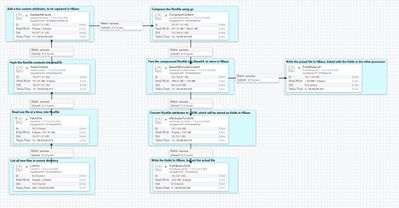
Here is a high level overview of the flow (also attached as a template file at the end of this article):
Let's break this down, each step:
ListFile: Watches a configured directory, and generates a list of filenames when new files arrives
FetchFile: Uses the list generated from the first processor, and reads those files from disk and streams into HDF
HashFile: (Optional step) Hash the contents of the file, with md5, sha1, sha2 etc
UpdateAttribute: (Optional step) Add additional attributes to the file read, for example author name, date ingested etc
CompressContent: Compresses the file, using bzip, gz, snappy etc
Base64EncodeContent: Changes the binary data to base64 representation for easier storage in HBase
AttributesToJSON: Convert all attributes of the FlowFile (like filename, date, extra attributes etc) as as JSON file
PutHBaseJSON: Take the JSON from the previous step, and store as key=>value in a column family
Also, one last processor which splits out from Base64EncodeContent to PutHBaseCell, which stores the actual file/object in HBase, also part of the column family.
To create your HBase table (called 't1' in this example):