

Optimize your CDSW pods
- October 5, 2026 at 8:44 AM
- 0 replies
- 1926 views
- Translate All
Summary
In another blog, we highlight how to manage your CDSW pods with k9s, but additional optimizations can enable better utilization of some core pod resources and make the service run smoother.
Investigation & Resolution
Pods to be amended
There are a number of pods that respond well to non-default amendments, although we recommend using the default settings for those pods marked ‘n/a.’
| Pod | No. of Replicas | Limits | Requests - CPU | Requests - Memory |
| web | 6 | 8Gi | 500m | 2Gi |
| ingress-controller | n/a | n/a | 800m | 1Gi |
| tcp-ingress-controller | n/a | 4Gi | 500m | 2Gi |
| livelog | n/a | n/a | 500m | 8Gi |
| ds-vfs | n/a | 4Gi | 100m | 4Gi |
| ds-operator | n/a | 2Gi | 500m | 1Gi |
| ds-reconciler | n/a | 5Gi | 500m | 5Gi |
k9s Deployments
Before starting k9s make sure to export the KUBECONFIG environment variable to point to the right Kubernetes cluster.
export KUBECONFIG=<path to admin.conf>
Using k9s, navigate to the deployments page.
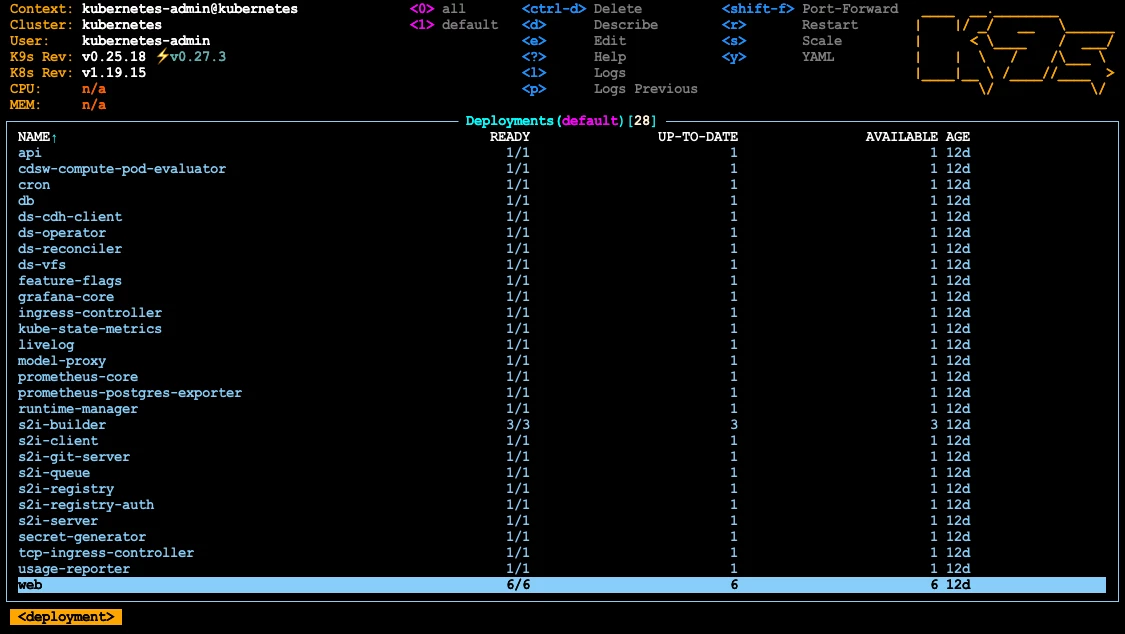
Edit a Deployment - Example
The screenshot above highlighted the ‘web’ deployment. Press ‘e’ to begin editing the web deployment settings. Then, using the recommended settings from Pods to be amended, navigate to, and amend the parameters within the deployment configuration for the web pods.
Examples of where the replicas, limits, requests CPU & requests memory parameters:
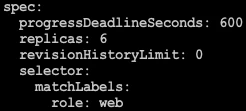
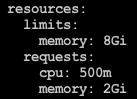
The terminal that you are using is the Vi editor within the k9s application. Save and exit to commit the parameter amendments:
| :wq! |
Repeat the process for every item in the Pods to be amended section. You will notice that new pods will spawn with the updated configuration settings. Now you have an optimized CDSW!

