Optimize your HDFS Rebalancer
- October 5, 2026 at 8:44 AM
- 0 replies
- 3703 views
- Translate All
Summary
It is always a good idea to tune your HDFS Rebalancer away from the raw default values so that the overall hardware will be utilized at an optimal level when HDFS Rebalancing activities are being performed.
Investigation
Configuration Properties
Based on the recommended configurations for the HDFS balancer, we recommend these parameters which we have tested thoroughly in a live production cluster without issue.
DataNode configuration properties
| Property | Default | Cloudera Chosen Value |
| dfs.datanode.balance.max.concurrent.moves | 50 | 100 |
| dfs.datanode.balance.bandwidthPerSec | 10MiB | 1GiB |
Balancer configuration properties
| Property | Default | Cloudera Chosen Value |
| dfs.balancer.moverThreads | 1000 | 4000 |
| dfs.balancer.max-size-to-move | 10GB | 25GiB |
| dfs.balancer.getBlocks.min-block-size | 10MB | 512KiB |
| rebalancer_threshold | 10 | 5 |
NameNode Block Placement configuration properties
Based on Block Placement Policies, we also recommend modifying how the NameNode chooses to place blocks during HDFS configuration and rebalancing testing of a heavily heterogeneous cluster.
| Property | Default | Cloudera Chosen Value |
| dfs.block.replicator.classname | n/a | org.apache.hadoop.hdfs.server.blockmanagement.AvailableSpaceBlockPlacementPolicy |
| dfs.namenode.available-space-block-placement-policy.balanced-space-preference-fraction | 0.5 | 0.7 |
| dfs.namenode.available-space-block-placement-policy.balance-local-node | n/a | false |
Avoid Landmines
Some key notes about performing the rebalancing activities after setting the services/disks up:
- Never run both the HDFS && Kudu Rebalancers at the same time
- The contention between both may cause issues
- Perform the Rebalancing activities in the order of Kudu first, HDFS second
- Due to Kudu being unable to track capacity utilization
Performing HDFS Rebalancing Activities
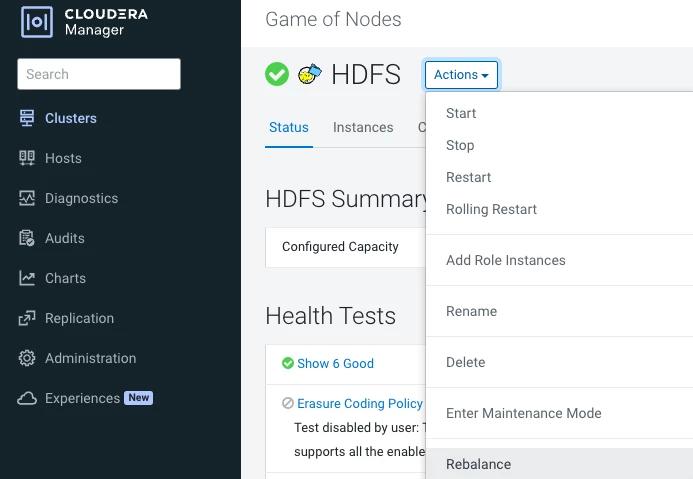
There are corresponding CLI related commands for rebalancing HDFS. We recommend that you perform these actions from within CM for visibility into the active status of the Rebalancer and to see when the action has been started and completed.
HDFS
Go to CM - Kudu - Actions - Rebalance