

Adding Livy Server as service to Apache Knox
Update 10.12.2016: Added filter to rewrite proxyUser as authenticated user Update 25.01.2017: Improved service.xml and rewrite.xml
1 Configure a new service for Livy Server in Knox
1.1 Create a service definition
$ sudo mkdir -p /usr/hdp/current/knox-server/data/services/livy/0.1.0/
$ sudo chown -R knox:knox /usr/hdp/current/knox-server/data/services/livy
Create a file /usr/hdp/current/knox-server/data/services/livy/0.1.0/service.xml with
<service role="LIVYSERVER" name="livy" version="0.1.0">
  <routes>
    <route path="/livy/v1/sessions">
        <rewrite apply="LIVYSERVER/livy/addusername/inbound" to="request.body"/>
    </route>
    <route path="/livy/v1/**?**"/>
    <route path="/livy/v1"/>
    <route path="/livy/v1/"/>
  </routes>
</service>
Note that the name "livy" attribute and the path .../services/livy/... need to be the same.
The route /livy/v1/sessions is a special treatment for the POST request to create a Livy session. The request body e.g. looks like:
{"driverMemory":"2G","executorCores":4,"executorMemory":"8G","proxyUser":"bernhard","conf":{"spark.master":"yarn-cluster","spark.jars.packages":"com.databricks:spark-csv_2.10:1.5.0"}
Livy server will use proxUser to run the Spark session. To avoid that a user can provide here any user (e.g. a more privileged), Knox will need to rewrite the the json body to replace what so ever is the value of proxyUser is with the username of the authenticated user, see next section.
1.2 Create a rewrite rule definition
Create a file /usr/hdp/current/knox-server/data/services/livy/0.1.0/rewrite.xml with
<rules>
  <rule name="LIVYSERVER/livy/user-name">
    <rewrite template="{$username}"/>
  </rule>
  <rule dir="IN" name="LIVYSERVER/livy/root/inbound" pattern="*://*:*/**/livy/v1">
    <rewrite template="{$serviceUrl[LIVYSERVER]}"/>
  </rule>
  <rule dir="IN" name="LIVYSERVER/livy/path/inbound" pattern="*://*:*/**/livy/v1/{path=**}?{**}">
    <rewrite template="{$serviceUrl[LIVYSERVER]}/{path=**}?{**}"/>
  </rule>
  <filter name="LIVYSERVER/livy/addusername/inbound">
    <content type="*/json">
      <apply path="$.proxyUser" rule="LIVYSERVER/livy/user-name"/>
    </content>
  </filter>
</rules>
Note: The "v1" is only introduced to allow calls to Livy-server without any path. (Seems to be a limitation in Knox that at least one path element nees to be present in mapped URL.
The rule LIVYSERVER/livy/user-name and the filter LIVYSERVER/livy/addusername/inbound are responsible to inject the authenticated user name as described in the last section.
1.3 Publish the new service via Ambari
Goto Knox Configuration and add at the end of Advanced Topology:
    <topology>
    ...
        <service>
            <role>LIVYSERVER</role>
            <url>http://<livy-server>:8998</url>
        </service>
    </topology>
2 Use with Sparkmagic
Sparkmagic can be configured to use Livy Server in HDP 2.5, see Using Jupyter with Sparkmagic and Livy Server on HDP 2.5
To connect via Knox, change endpoint definition in %manage_spark
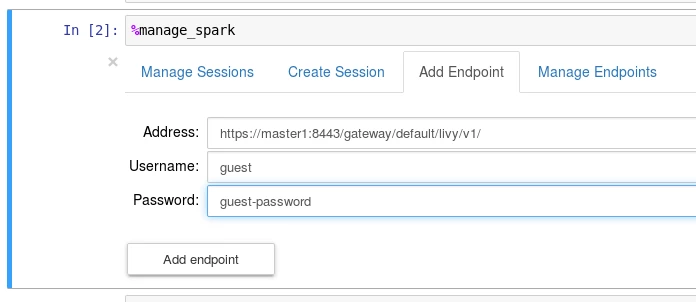
Just replace Livy server URL with Knox gateway URL Thanks to Kevin Minder for the article About Adding a service to Apache Knox "ignore_ssl_errors": falseCredits

