

Ambari Single Sign On with Okta and KnoxSSO, part II
In part I of this series, we reviewed preliminaries related to SSO, including LDAP authentication for Ambari, and we set up an application in Okta that would correspond to our KnoxSSO service provider for the SAML authentication flow. We are now ready to configure Knox within Ambari.
We will replace the Form-based IdP configuration that Knox comes with out of the box with the pac4j federation provider. Pac4j is a Java security library and it is used as a federation provider within Knox to support the OAuth, CAS, SAML and OpenID Connect protocols. It must be used for SSO, in association with the KnoxSSO service (and optionally with the SSOCookieProvider for access to REST APIs).
In Ambari, we'll navigate to Knox > Config > Advanced knoxsso-topology and add XML similar to the following:
<topology>
   <gateway>
     <provider>
         <role>federation</role>
         <name>pac4j</name>
         <enabled>true</enabled>
         <param>
           <name>pac4j.callbackUrl</name>
      <value>https://sslka-123-master2-1.field.hortonworks.com:8443/gateway/knoxsso/api/v1/websso</value>
         </param>
         <param>
           <name>clientName</name>
           <value>SAML2Client</value>
         </param>

         <param>
           <name>saml.identityProviderMetadataPath</name>
           <value>https://dev-999.oktapreview.com/app/redacted/sso/saml/metadata</value>
         </param>

         <param>
           <name>saml.serviceProviderMetadataPath</name>
           <value>/tmp/sp-metadata.xml</value>
         </param>

         <param>
           <name>saml.serviceProviderEntityId</name>
<value>https://sslka-123-master2-1.field.hortonworks.com:8443/gateway/knoxsso/api/v1/websso?pac4jCallback=true&client_name=SAML2Client</value>
         </param>
     </provider>

     <provider>
         <role>identity-assertion</role>
         <name>Default</name>
         <enabled>true</enabled>
         <param>
           <name>principal.mapping</name>
           <value>slachterman@hortonworks.com=slachterman;</value>
         </param>
     </provider>
   </gateway>

   <service>
              <role>KNOXSSO</role>
              <param>
                  <name>knoxsso.cookie.secure.only</name>
                  <value>true</value>
              </param>
              <param>
                  <name>knoxsso.token.ttl</name>
                  <value>30000</value>
              </param>
              <param>
                 <name>knoxsso.redirect.whitelist.regex</name>
                <value>^https:\/\/(knox-host-fqdn\.example\.com|localhost|127\.0\.0\.1|0:0:0:0:0:0:0:1|::1):[0-9].*$</value>
  </param>
          </service>
      </topology>
A couple of things to note here:
- The callback URL for KnoxSSO is the WebSSO endpoint without the URL parameter
- The identity provider metadata path points to the metadata for the Okta application you configured in part I
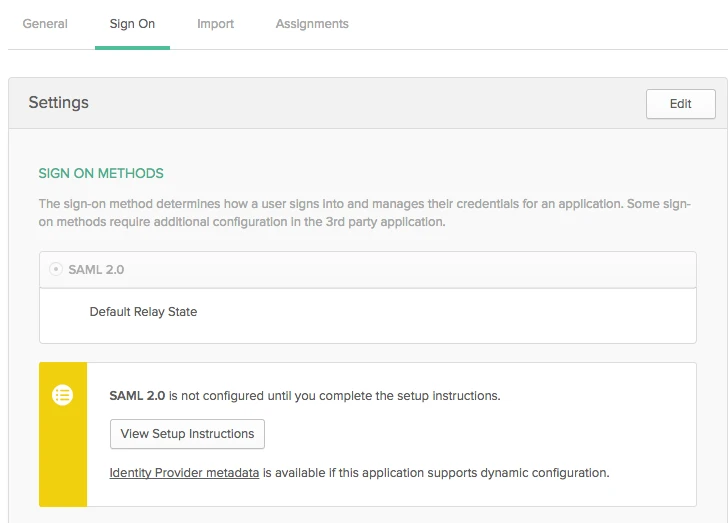
- You can find this URL in Okta, within your Application configuration on the Sign On tab. See Identity Provider metadata in the screenshot below (under the View Setup Instructions button)
- The service provider metadata path is a dummy location, this can't be NULL or you will see an exception in the current release
- The principal mapping converts the username that Okta presents to the shortname used throughout HDP. A regex mapping is available and be more manageable for Produciton
- Note the knoxsso.cookie.secure.only setting. It's important that the session cookie only be served for HTTPS to protect from session hijacking.
- The knoxsso.redirect.whitelist.regex must match your environment, knox-host-fqdn.example.com is a dummy placeholder in the topology file above
After Knox has been configured, the last step is to configure Ambari for SSO and we'll do this from the command line. You'll need to SSH to the host where Ambari Server is running.
As a preliminary step, you'll need the public certificate for Knox. You can use this snippet, where ${knoxserver} is the host running the Knox Gateway:
openssl s_client -connect ${knoxserver}:8443 < /dev/null | openssl x509 -out /tmp/knox.crt
To configure Ambari, we'll run
sudo ambari-server setup-sso
For the provider URL, enter you callback URL

