


Apache Metron Tech Preview 1 - Come and Get It!
Metron TP1 Features
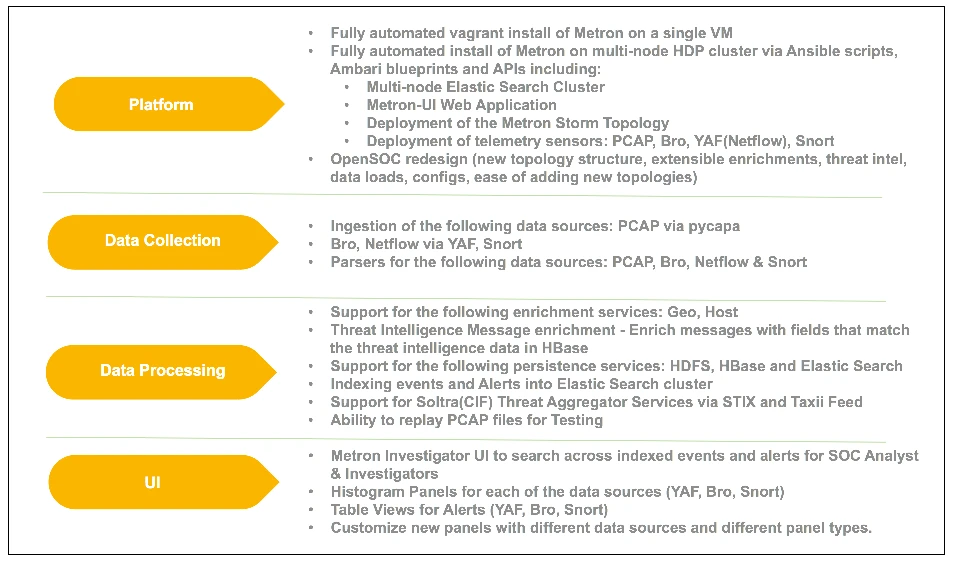
The following are key capabilities available in Metron TP1 broken up across its four key functional themes.
How do I get Started?
You can spin up the Metron TP1 in two ways:
- Ansible based Vagrant Single Node VM Install
- This the best place to play with Metron First.
- Detailed instructions how to do the install can be found in the following HCC Article: Apache Metron TP 1 Install Instructions- Single Node Vagrant Deployment
- Fully Automated 10 Node Ansible Based Install on AWS using Ambari Blueprints and AWS APIs
- If you want a more realistic setup of the Metron app, use this approach. Keep in mind that this install will spin up 10 m4.xlarge EC2 instance by default
- Detailed instructions how to do the install can be found in the following HCC Article: Apache Metron - First Steps in the Cloud
Where do I get Help?
Hortonworks has created new Track called CyberSecurity in the Hortonworks Community Connection (HCC). The link to the this new track in HCC is the following: HCC CyberSecurity Track.
Apache Metron committers are subscribed to this track and are constantly monitoring it for any questions the community has on TP1.
When asking a question about Metron TP1, please select the “CyberSecurity” Track and add the following tags: “Metron” and “tech-preview”.
Platform Theme Features of Metron TP1
The below is a summary of the key platform features added in TP1:
| Feature | Related Apache Metron JIRAS |
| Support for HDP 2.3 | |
| Refactor Metron Topologies for Performance, Easier Manageability & Supportability | |
| Fully Automated Install of Metron on AWS on multi-node HDP cluster via Ansible scripts, Ambari blueprints and APIs. | METRON-59 METRON-77 METRON-76 METRON-69 METRON-63 METRON-61 METRON-43 METRON-2 |
| Single Node Vagrant Support for Metron for Development | |
| Unit and Integration Testing Frameworks, Code Test Coverage | METRON-82 METRON-58 METRON-37 METRON-28 |
Telemetry Data Source Theme Features of Metron TP1
Metron TP1 focus is network telemetry data sources as described below. They represent the most valuable granular data one can collect and perform next generation analytics on.
The Key Data collection features for Metron TP1 are the following:
| Feature | Related Apache Metron JIRAS |
| PCAP Ingest Data Services - Performant C++ probe that captures network packet and streams them into Kafka and gets bulk loaded into Metron | METRON-79 METRON-79 METRON-73 METRON-55 METRON-39 |
| YAF/Netflow Ingest Data Services - Ingests netflow data into Metron | METRON-67 METRON-60 |
| Bro Ingest Data Services - Custom BRO plugin that pushes out DPI (Deep Packet Inspection) metadata into Metron | METRON-25 METRON-73 METRON-64 |
| Snort Ingest Data Services - Stream snort generated alerts via Flume into Metron | METRON-57 |
| Grok Framework - Ability to add new Data Sources to Metron without writing new Parsing Topologies. For each new data source, grok expression file can be provided to normalized into Metron Event. | METRON-66 |
Real-time Data Processing Theme Features of Metron TP1
For this theme, the key features in Metron TP1 are the following:
| Feature | Related Apache Metron JIRAS |
| Enrichment Services - OOO support for GeoIP and Host enrichments, extensible framework to plug-in new enrichments, & management Utilities for Enrichment Data | METRON-32 METRON-43 |
| Threat Intel Services - Integration with Soltra (Threat Intel Aggregrator) and Hail a Taxii, management Utilities for Threat Intel (Streaming and Bulk Load, aging out of data) | |
| Alerting Services - Alerts can be fired via a snort event or intel threat feed hit Indexing Services - Support for indexing via ElasticSearch | |
| Storage Services - persisting all enrichment telemetry data in HDFS and or HBase | METRON-62 METRON-22 |
UI Theme Features of Metron TP1
There was less focus on the UI Theme but Metron TP1 does provide the following new UI features:
| Feature | Related Apache Metron JIRAS |
| Metron Investigator IO Dashboard for the SOC Analyst and Investigator Personas built on top of Kibana | METRON-72 METRON-77 METRON-81 |
| Histogram Panels for each of the data sources (YAF, Bro, Snort, PCAP) | METRON-60 METRON-52 |
| PCAP panel allow you to search for and download PCAP files | METRON-72 METRON-77 METRON-81 |
| Ability to customize the Metron UI with different data sources and different panel types. | METRON-72 METRON-77 METRON-81 |

