


CDP DataHub - PySpark Structured Streaming reading from secure Kafka
security.protocol=SASL_SSL
sasl.mechanism=PLAIN
ssl.truststore.location=/home/sunilemanjee/kafka.client.truststore.jks
ssl.truststore.password=password
sasl.jaas.config=org.apache.kafka.common.security.plain.PlainLoginModule required username="machine-user" password="password;
- Create a Kafka jaas file called jaas.conf (this can be named whatever you like)
KafkaClient {
org.apache.kafka.common.security.plain.PlainLoginModule required
username="machine-user"
password="password";
};
Create a Kafka topic
The easiest way to create a Kafka topic is via SMM (Streamings Messaging Manager) which is shipped with Streams Messaging cluster. Click on the SMM URL within DataHub and the click on "Topics" located on the right menu bar. Click on "Add New" to create a new Kafka topic.

Enter the topic name "demo", set partitions to 1, and clean up policy to "delete".
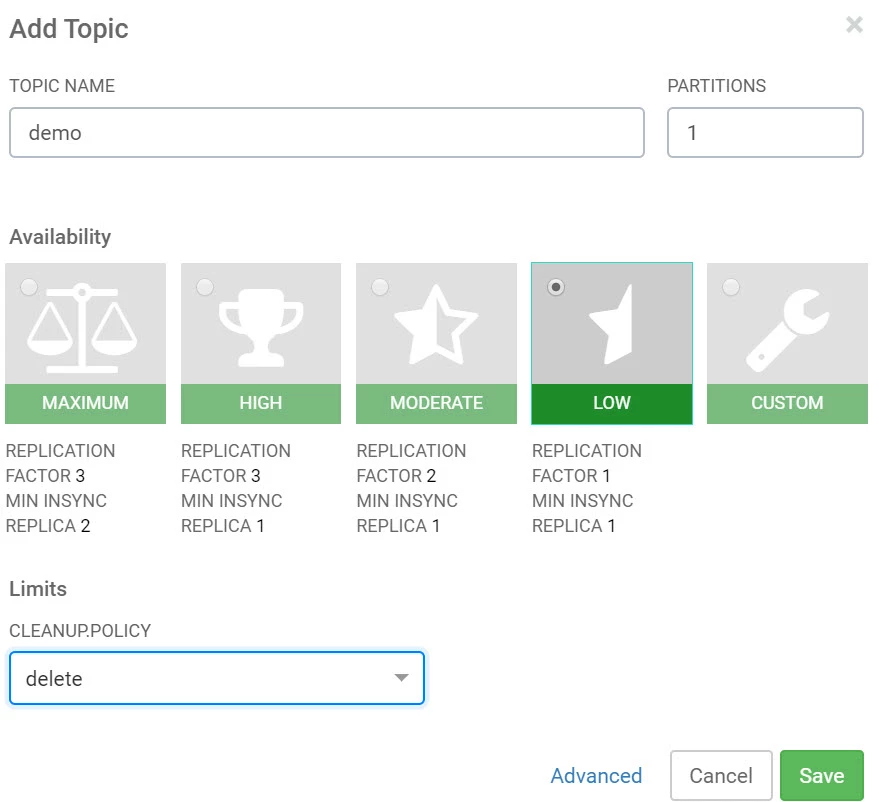
The demo topic should now be available.
Generate Data
For PySpark to consume from a secured instance of Kafka, we need the ability to write to Kafka. Here we will use Kafka console.
- SSH into one of the broker nodes
- Update k*.cloudera.com:9093 with your broker list and ports
- Upload kafka.properties (created early) onto this node
- Update the location of your kafka.properties file
After the below command is executed, you can start to write data (messages) to Kafka. We will come back to this in a moment.
kafka-console-producer --broker-list k1.cloudera.com:9093, k2.cloudera.com:9093,k3.cloudera.com:9093 --producer.config /home/c
sunilemanjee/kafka.properties --topic demo
Read from Kafka using PySpark
- SSH into any node within the DE cluster
- Uploaded jaas.conf and kafka.client.truststore
- Update the location of jaas.conf and kafka.client.truststore
- Launch PySpark shell using the following command
pyspark --files "/home/csunilemanjee/jaas.conf#jaas.conf,/home/sunilemanjee/kafka.client.truststore.jks#kafka.client.truststore.jks" --driver-java-options "-Djava.security.auth.login.config=/home/sunilemanjee/jaas.conf" --conf "spark.executor.extraJavaOptions=-Djava.security.auth.login.config=/home/sunilemanjee/jaas.conf"
Once PySpark shell is up, it may be easier to store the Kafka brokers in a variable like this:
KAFKA_BROKERS = "k1.cloudera.com:9093,k2.cloudera.com:9093,k3.cloudera.com:9093"
Create a structured stream to read from Kafka. Update the following
- kafka.ssl.truststore.location
- kafka.ssl.truststore.password
- username
- password
df_kafka = spark.readStream.format("kafka").option("kafka.bootstrap.servers", KAFKA_BROKERS).option("subscribe", "demo").option("kafka.security.protocol", "SASL_SSL").option("kafka.sasl.mechanism", "PLAIN").option("kafka.ssl.truststore.location", "./kafka.client.truststore.jks").option("kafka.ssl.truststore.password", "password").option("kafka.sasl.jaas.config", "org.apache.kafka.common.security.plain.PlainLoginModule required username=\"machine-user\" password=\"password\"serviceName=\"kafka\";").load().selectExpr("CAST(key AS STRING)", "CAST(value AS STRING)").writeStream.format("console").trigger(continuous="1 second").start()
To start viewing Kafka message on the console (pyspark shell) from the "demo" topic
stream = df_kafka.writeStream.format("console").start()
stream.awaitTermination()

##once you are finished, to kill the stream run this
stream.stop()
Go back to your kafka console and start write messaging (anything you like). You will see those messages show up in your PySpark Shell console.
That's it. Again this is one (not the only way) to use PySpark to consume from a secured Kafka instance. I see as an emerging pattern in the CDP for streaming use cases. Enjoy.

