Configuring an external ZooKeeper to work with Apache NiFi
Objective
Apache NiFi provides the option of starting an embedded ZooKeeper server. However, NiFi can also be configured to run with an external ZooKeeper server. This article describes how to install and configure a 3 host ZooKeeper ensemble to work with a 2 node NiFi cluster.
Environment
This tutorial was tested using the following environment and components:
- Mac OS X 10.11.6
- Apache ZooKeeper 3.4.6
- Apache NiFi 1.3.0
ZooKeeper
ZooKeeper Version
The version of ZooKeeper chosen for this tutorial is Release 3.4.6.
Note: ZooKeeper 3.4.6 is the version supported by the latest and previous versions of Hortonworks HDF as shown in the "Component Availability In HDF" table of the HDF 3.0.1.1 Release Notes.
ZooKeeper Download
Go to http://www.apache.org/dyn/closer.cgi/zookeeper/ to determine the best Apache mirror site to download a stable ZooKeeper distribution. From that mirror site, select the zookeeper-3.4.6 directory and download the zookeeper-3.4.6.tar.gz file.
Unzip the tar.gz file and create 3 copies of the distribution directory, one for each host in the ZooKeeper ensemble. For example:
 /zookeeper-1
 /zookeeper-2
 /zookeeper-3
Note: In this tutorial, we are running multiple servers on the same machine.
ZooKeeper Configuration
"zoo.cfg" file
Next we need to create three config files. In the conf directory of zookeeper-1, create a zoo.cfg file with the following contents:
 tickTime=2000
 dataDir=/usr/local/zookeeper1
 clientPort=2181
 initLimit=5
 syncLimit=2
 server.1=localhost:2888:3888
 server.2=localhost:2889:3889
 server.3=localhost:2890:3890
Because we are running multiple ZooKeeper servers on a single machine, we specified the servername as localhost with unique quorum & leader election ports (i.e. 2888:3888, 2889:3889, 2890:3890) for each server.X.
Create similar zoo.cfg files in the conf directories of zookeeper-2 and zookeeper-3 with modified values for dataDir and clientPort properties as separate dataDirs and distinct clientPorts are necessary.
"myid" file
Every machine that is part of the ZooKeeper ensemble needs to know about every other machine in the ensemble. As such, we need to attribute a server id to each machine by creating a file named myid, one for each server, which resides in that server's data directory, as specified by the configuration file parameter dataDir.
For example, create a myid file in /usr/local/zookeeper1 that consists of a single line with the text "1" and nothing else. Create the other myid files in the /usr/local/zookeeper2 and /usr/local/zookeeper3 directories with the contents of "2" and "3" respectively.
Note: More information about ZooKeper configuration settings can be found in the ZooKeeper Getting Started Guide.
ZooKeeper Startup
Start up each ZooKeeper host, by navigating to the /bin directory of each and applying the following command:
./zkServer.sh start
NiFi
NiFi Configuration
For a two node NiFi cluster, in each conf directory modify the following properties in the nifi.properties file:
 nifi.state.management.embedded.zookeeper.start=false
 nifi.zookeeper.connect.string=localhost:2181,localhost:2182,localhost:2183
The first property configures NiFi to not use its embedded ZooKeeper. As a result, the zookeeper.properties and state-management.xml files in the conf directory are ignored. The second property must be specified to join the cluster as it lists all the ZooKeeper instances in the ensemble.
NiFi Startup
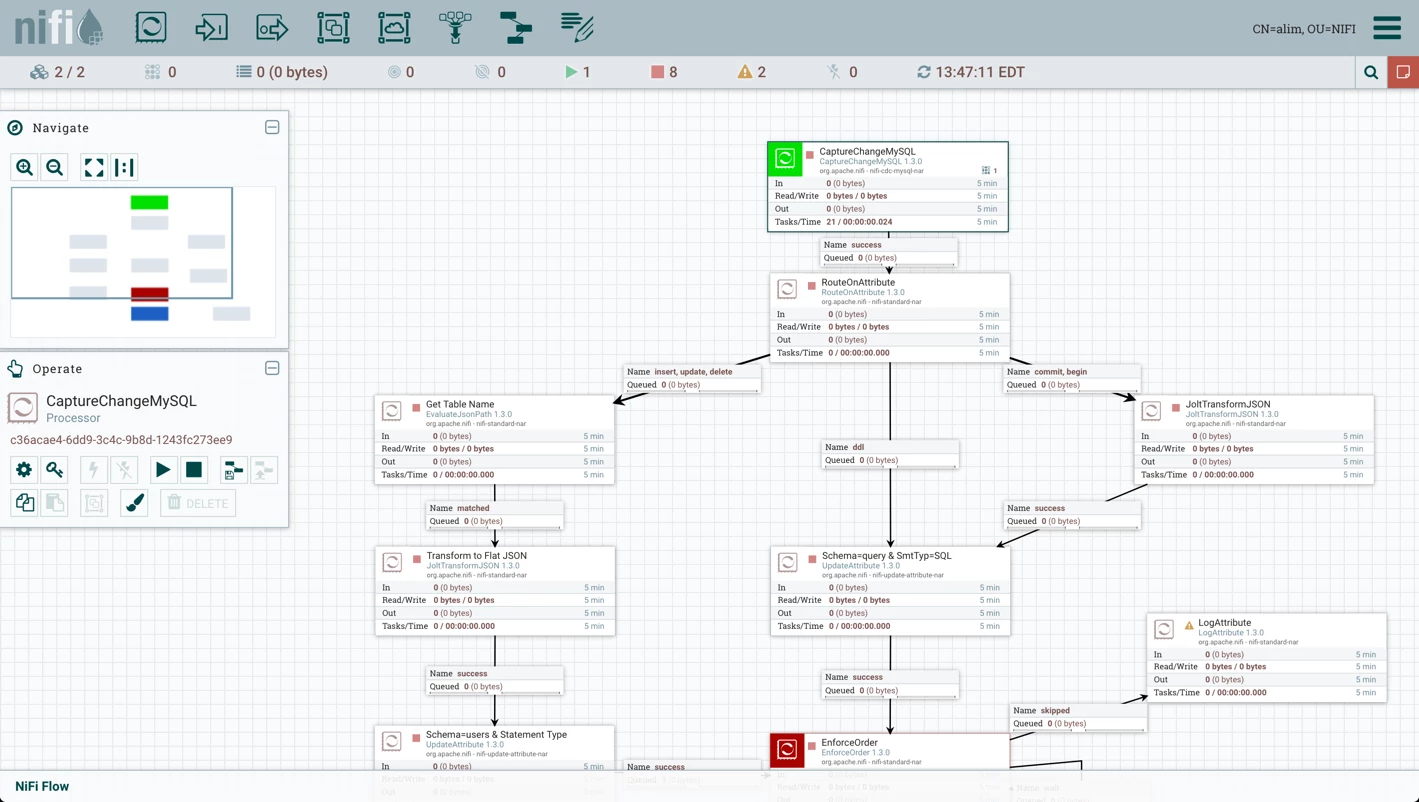
You can now start up each NiFi node. When the UI is available, create or upload a flow that has processors that capture state information. For example, import and setup the flow from the Change Data Capture (CDC) with Apache NiFi series:
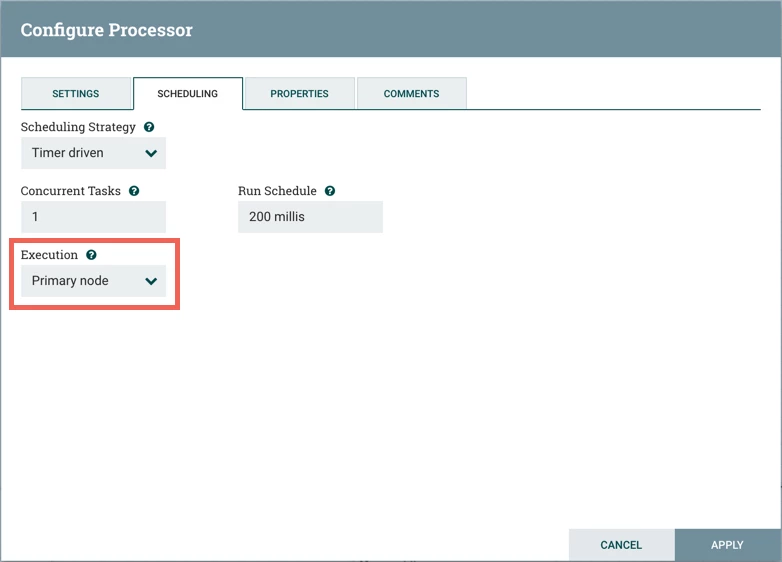
In addition to the other setup steps from the CDC article, since this environment is a cluster, for the CaptureChangeMySQL processor, go to the Scheduling tab on the Configure Processor dialog. Change the Execution setting to "Primary node" from "All nodes":
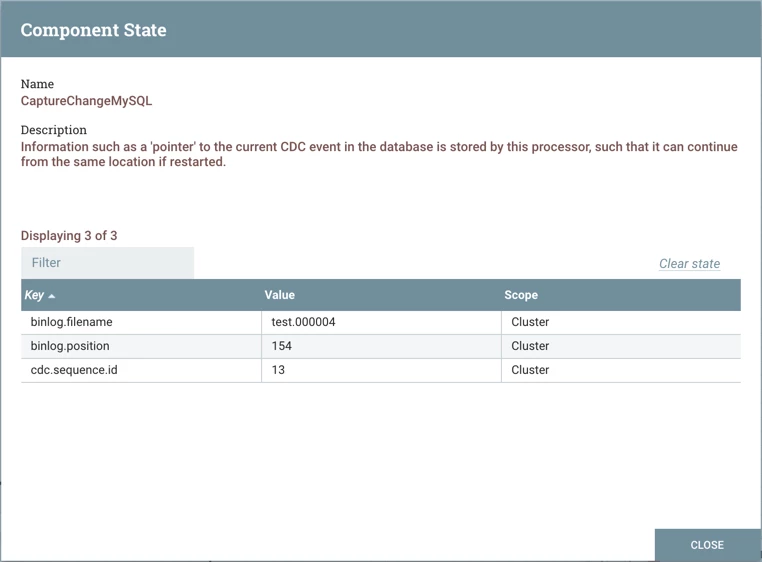
Run the flow and select "View State" from the CaptureChangeMySQL and/or EnforceOrder processors to verify that state information is managed properly by the external ZooKeeper ensemble: