Deploying Custom Parcels and CSDs on CDP Public Cloud
{
  "cdhVersion": "7.2.12",
  "displayName": "dataengineering",
  "blueprintUpgradeOption": "MAINTENANCE_UPGRADE_GA",
  "services": [
    {
      "refName": "$partner_solution",
      "serviceType": "$custom_solution_name",
      "serviceConfigs": [
        {
          "name": "partner_solution_license_specification",
          "value": "XXXXXXXXX"
        },
        {
          "name": "$partner_solution_dashboard_realm",
          "value": "cloudera-cdp-test-1"
        }
      ],
      "roleConfigGroups": [
        {
          "refName": "$partner_solution-AGENT-BASE",
          "roleType": "$partner_solution_AGENT",
          "base": true
        },
        {
          "refName": "$partner_solution-SUPERVISOR-BASE",
          "roleType": "$partner_solution_SUPERVISOR",
          "base": true
        },
        {
          "refName": "$partner_solution-COLLECTOR-BASE",
          "roleType": "$partner_solution_COLLECTOR",
          "base": true
        }
      ]
    },
 {
      "refName": "worker", --- Modify compute, master, worker, gatewat hostgroups as needed --
      "cardinality": 3,
      "roleConfigGroupsRefNames": [
        "hdfs-DATANODE-BASE",
        "yarn-NODEMANAGER-WORKER",
        "$partner_solution_AGENT-BASE",
        "$partner_solution_COLLECTOR-BASE"
      ]
    },
Note the cluster template name.(e.g: 7.2.12 Data Engineering: Customer template)
Get the Image Catalog ID
- Get the AMI-ID of the DataLake. Log on the CDP > DataLake > Image Details (for a new/recently created environments). Create a temporary Datahub to get the AMI-ID, if the DL was created a while ago.

- Open the Image Catalog json
- Search for AMI-ID in the Image Catalog json

- Note the UUID. Make sure the image is in the right region and the cloud provider (AWS/Azure).
Create a Custom Request Template
Add environment name: This is where the cluster will be deployed.
BlueprintName - from the first step(7.2.12 Data Engineering: Customer template)
"name": “DEFINITION_NAME”,
"environmentName": “CDP_ENV_NAME”,
"cluster": {
"databases": [],
"blueprintName": “7.2.12 Data Engineering: Customer template"
Add CM base url, products: name, version and Parcels.
CM:
"cm": {
     "enableAutoTls": true,
       "repository": {
       "baseUrl": "http://cloudera-build-us-west-1.vpc.cloudera.com/cdh/7.x/parcels/",
       "version": “7.2.2”
       },
Add Products: CDH, FLINK, Custom Parcels and CSDs
        "products": [
                {
          "name": "CDH",
           "version": "7.2.2-1.cdh7.2.2.p1.6575992",
           "parcel": "https://archive.cloudera.com/p/cdp-public/7.2.2.1/parcels/"
          },
          {
           "name": "FLINK",
           "version": "1.10.0-csa1.2.1.0-cdh7.2.1.0-240-4844562",
           "parcel": "http://XXXXXXXXXXXXX/parcels/",
           "csd": [ "http://XXXXXXXXXX/parcels/FLINK-1.10.0-csa1.2.1.0-cdh7.2.1.0-240-4844562.jar”

             ]}}
Add image ID at the end.
         "image": {
         "catalog": "cdp-default",
         "id": "eb1d458a-bf82-434b-bc2a-ac06b8cd6c0a"
A Sample request-template:
{
  "instanceGroups": [
    {
      "nodeCount": 1,
      "name": "manager",
      "type": "GATEWAY",
      "recoveryMode": "MANUAL",
      "template": {
        "aws": {
          "encryption": {
            "type": "NONE",
            "key": null
          }
        },
        "instanceType": "m5.2xlarge",
        "rootVolume": {
          "size": 50
        },
        "attachedVolumes": [
          {
            "size": 100,
            "count": 1,
            "type": "standard"
          }
        ],
        "cloudPlatform": "AWS"
      },
      "recipeNames": []
    },
    {
      "nodeCount": 2,
      "name": "master",
      "type": "CORE",
      "recoveryMode": "MANUAL",
      "template": {
        "aws": {
          "encryption": {
            "type": "NONE",
            "key": null
          }
        },
        "instanceType": "m5.2xlarge",
        "rootVolume": {
          "size": 50
        },
        "attachedVolumes": [
          {
            "size": 100,
            "count": 1,
            "type": "standard"
          }
        ],
        "cloudPlatform": "AWS"
      },
      "recipeNames": []
    },
    {
      "nodeCount": 3,
      "name": "worker",
      "type": "CORE",
      "recoveryMode": "MANUAL",
      "template": {
        "aws": {
          "encryption": {
            "type": "NONE",
            "key": null
          }
        },
        "instanceType": "m5.2xlarge",
        "rootVolume": {
          "size": 50
        },
        "attachedVolumes": [
          {
            "size": 100,
            "count": 1,
            "type": "standard"
          }
        ],
        "cloudPlatform": "AWS"
      },
      "recipeNames": []
    }
  ],
  "name": "pse-flink-cust",
  "environmentName": "pse-722-cdp-env",
  "cluster": {
    "databases": [],
    "exposedServices": [
      "ALL"
    ],
    "blueprintName": "7.2.2 - Streaming Analytics Light Duty with Apache Flink",
    "validateBlueprint": false,
    "cm": {
        "enableAutoTls": true,
        "repository": {
          "baseUrl": "http://cloudera-build-us-west-1.vpc.cloudera.com/s3/build/4763198/cdh/7.x/parcels/",
          "version": "7.2.2"
        },
        "products": [
          {
            "name": "CDH",
            "version": "7.2.2-1.cdh7.2.2.p1.6575992",
            "parcel": "https://archive.cloudera.com/p/cdp-public/7.2.2.1/parcels/"
          },
          {
            "name": "FLINK",
            "version": "1.10.0-csa1.2.1.0-cdh7.2.1.0-240-4844562",
            "parcel": "http://54.153.84.214/parcels/",
            "csd": [
              "http://54.153.84.214/parcels/FLINK-1.10.0-csa1.2.1.0-cdh7.2.1.0-240-4844562.jar"
            ]
          }
        ]
    },
    "Xcm": {
        "enableAutoTls": true,
        "repository": {
          "baseUrl": "https://archive.cloudera.com/p/cm-public/7.2.2-6458542/redhat7/yum/",
          "version": "7.2.2"
        },
        "products": [
          {
            "name": "CDH",
              "version": "7.2.2-1.cdh7.2.2.p1.6575992",
              "parcel": "https://archive.cloudera.com/p/cdp-public/7.2.2.1/parcels/"
          }
        ]
    }
  },
  "image": {
      "catalog": "cdp-default",
      "id": "eb1d458a-bf82-434b-bc2a-ac06b8cd6c0a"
  },
  "inputs": {}
}
CDP CLI Provision to Cluster
$ cdp datahub --profile pse-demo create-aws-cluster --request-template file:///Users/njlamsal/flink-pse-demo.json --cluster-name Custom-flink-1215
profile: Configure profile using cdpcli.
request-template: Template created above. Note to use file://
cluster-name: Name of the cluster
NOTE: Manifest File And Naming Of The Parcel
Parcel filenames must follow a specific format: [name]-[version]-[distro suffix].parcel. The list of valid distro suffixes is available here. Otherwise, improper naming will lead to parcel not being recognized during the cluster installation.
It is also necessary to have a manifest file in the parcel directory. The manifest creator will create a manifest.json file for a directory of parcels, so that directory can be served as a parcel repository.
Manifest Creator : https://github.com/cloudera/cm_ext/blob/master/make_manifest/README.md
Cloudera Schema/Parcel Validator : https://github.com/cloudera/cm_ext/blob/master/validator/README.md
Cloudera Manager Extensions Wiki : https://github.com/cloudera/cm_ext/wiki
ERROR(s):
- An error occurred: {"message":"Image or image catalog settings are incorrect: CloudbreakImageCatalogException: Inconsistent request, base images are disabled but custom repo information is submitted!"} (Status Code: 400; Error Code: INVALID_ARGUMENT; Service: datahub; Operation: createAWSCluster; Request ID: a7feb7a9-5547-43b2-8cfd-9543067677cc;)
Check DL and DH image IDs. If they are different, take the DH AMI-ID and find the catalog ID (UUID).
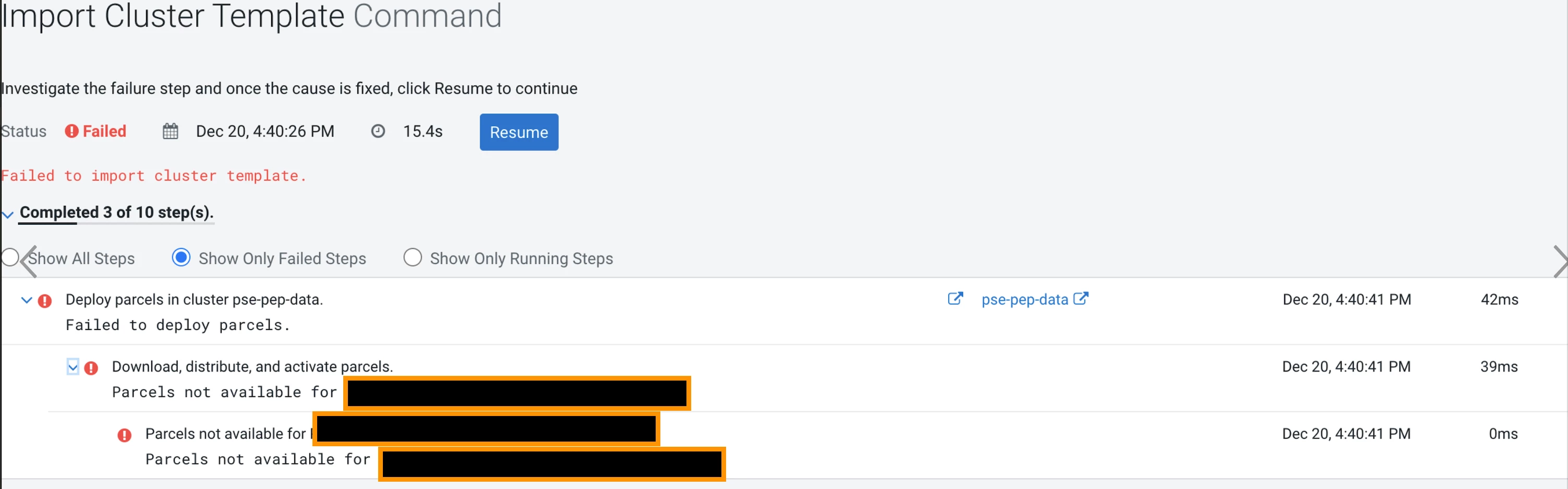
- Failed to deploy parcels(see the section above on manifest and the naming of the parcel)