Edge to AI 101: Deploy HDP, HDF, and CDSW on Azure using Cloudbreak
Introduction
Overview
Cloudera/Hortonworks offers today one of the most comprehensive data management platform, with components allowing you data flow management to governed and distributed Data Science workloads.
With so many toys to play with, I thought I'd share an easy way to setup a simple cluster that will, using Cloudbreak, setup the following main components on Azure cloud:
- Hortonworks Data Platform 3.1
- Hortonworks Data Flow 3.3
- Data Platform Search 4.0
- Cloudera Data Science Workbench 1.5
Note: This is not a production-ready setup, but merely a first step to customizing your deployment using the Cloudera toolkit.
Pre-Requisites
- Account on Azure with permission to assign roles
- Cloudbreak 2.9 (you can always set one up on your machine using: https://community.hortonworks.com/articles/194076/using-vagrant-and-virtualbox-to-create-a-local-ins.html)
Tutorial steps
- Step 1: Setup Azure Credentials
- Step 2: Setup blueprint and cluster extensions
- Step 3: Create cluster
Step 1: Setup Azure Credentials
Find your Azure subscription and tenant ID
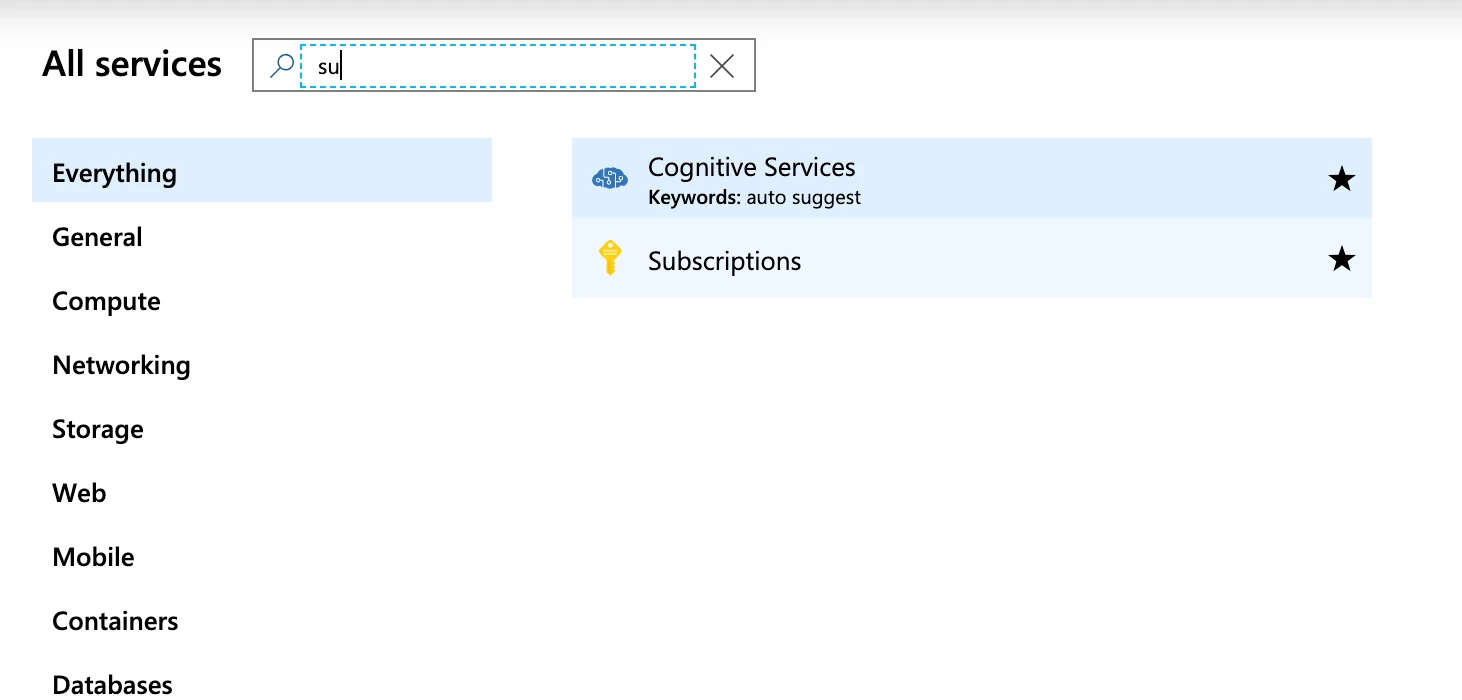
To find your subscription ID, go to the search box and look for subscription; you should find it as such:
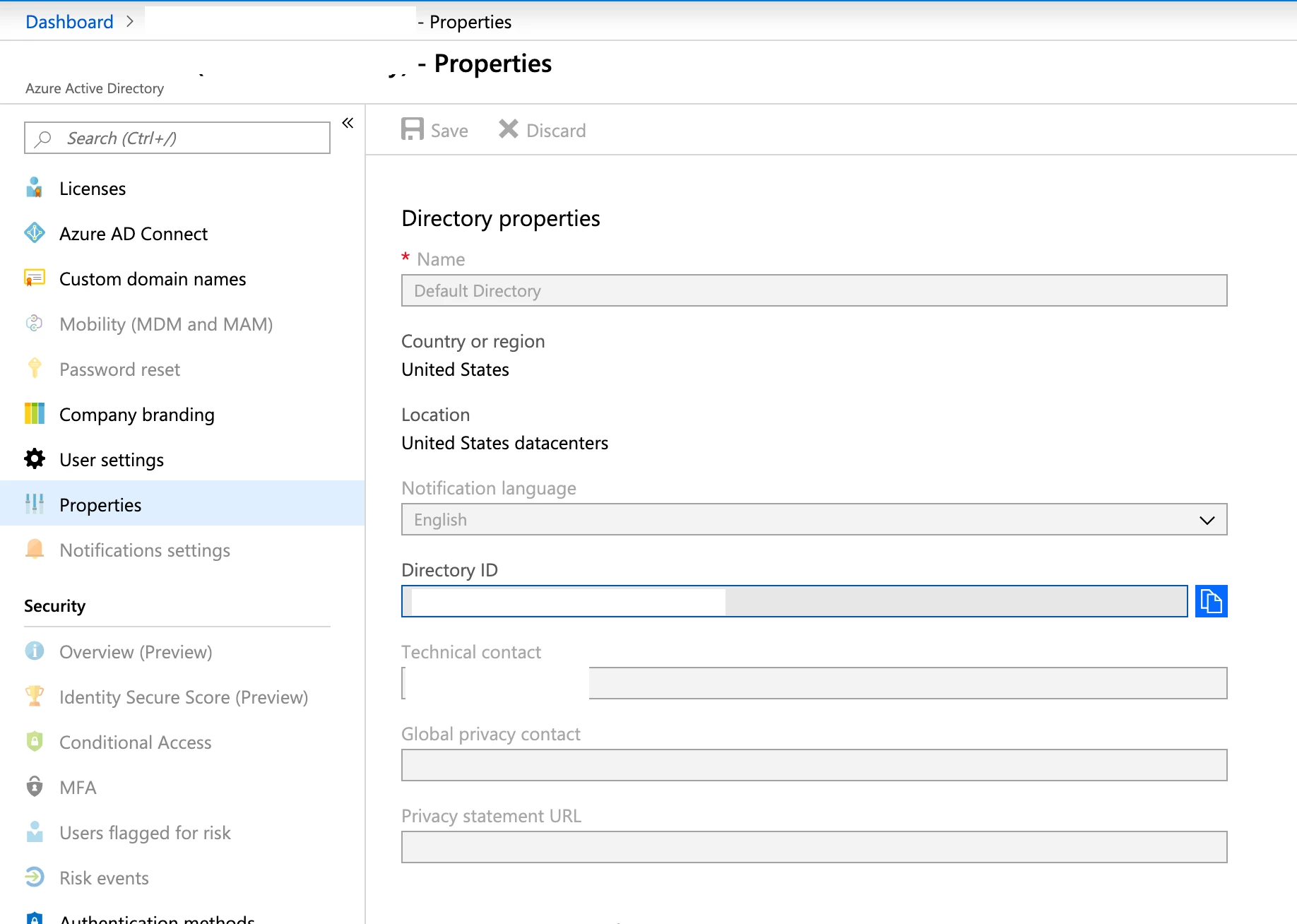
For the tenant ID, use the Azure AD Directory ID:
Setup your credentials in Cloudbreak
This part is extremely well documented in Cloudbreak's documentation portal: https://docs.hortonworks.com/HDPDocuments/Cloudbreak/Cloudbreak-2.9.0/create-credential-azure/content/cb_create-app-based-credential.html.
Note: Because of IT restrictions on my side, I chose to use an app based credential setup, but if you have enough privileges, Cloudbreak creates the app and assigns roles automagically for you.
Step 2: Setup blueprint and cluster extensions
Blueprint
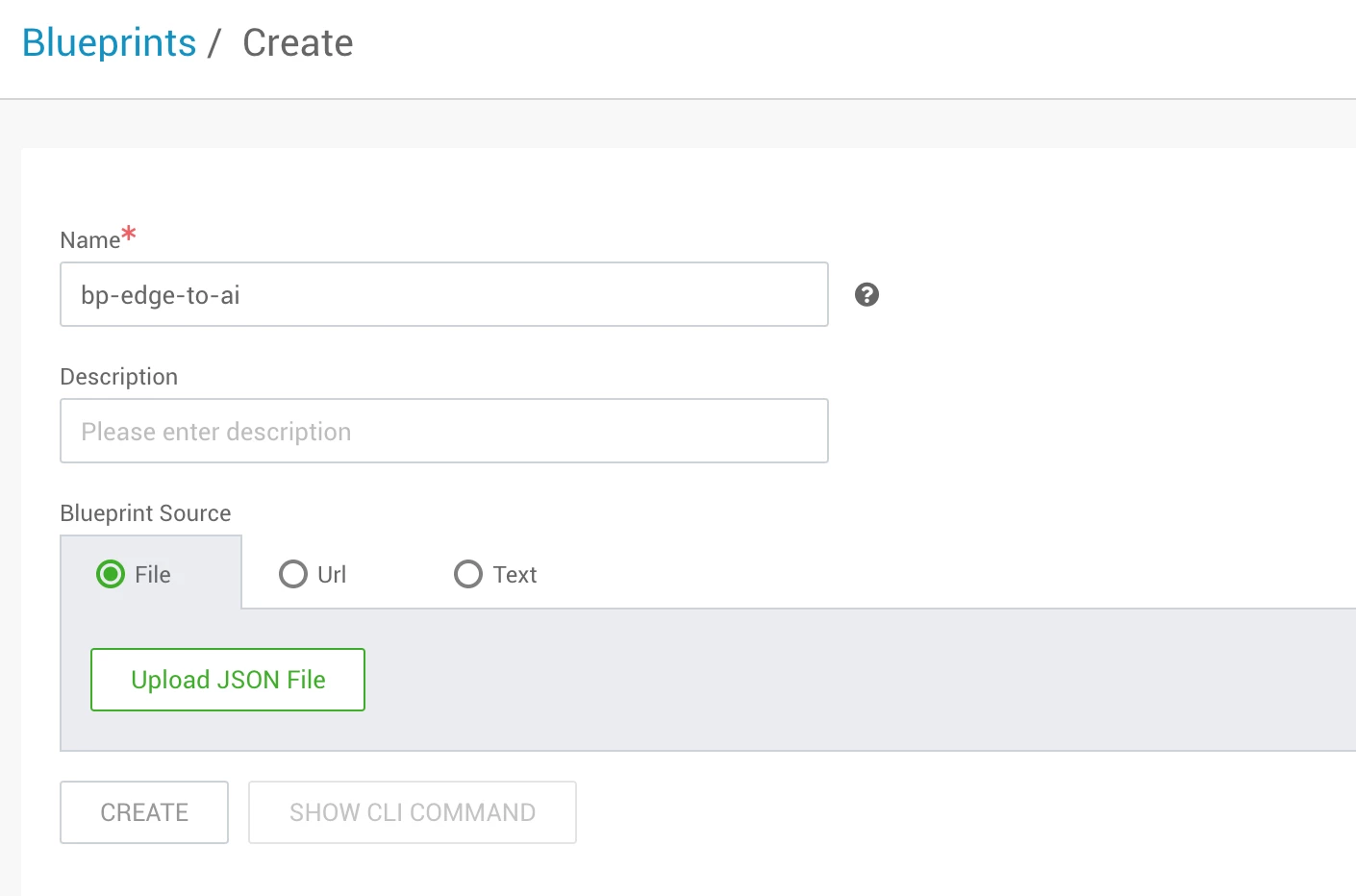
First upload the blueprint below:
{
"Blueprints": {
"blueprint_name": "edge-to-ai-3.1",
"stack_name": "HDP",
"stack_version": "3.1"
},
"configurations": [
{
"yarn-site": {
"properties": {
"yarn.nodemanager.resource.cpu-vcores": "6",
"yarn.nodemanager.resource.memory-mb": "60000",
"yarn.scheduler.maximum-allocation-mb": "14"
}
}
},
{
"hdfs-site": {
"properties": {
"dfs.cluster.administrators": "hdfs"
}
}
},
{
"capacity-scheduler": {
"properties": {
"yarn.scheduler.capacity.maximum-am-resource-percent": "0.4",
"yarn.scheduler.capacity.root.capacity": "67",
"yarn.scheduler.capacity.root.default.capacity": "67",
"yarn.scheduler.capacity.root.default.maximum-capacity": "67",
"yarn.scheduler.capacity.root.llap.capacity": "33",
"yarn.scheduler.capacity.root.llap.maximum-capacity": "33",
"yarn.scheduler.capacity.root.queues": "default,llap"
}
}
},
{
"ranger-hive-audit": {
"properties": {
"xasecure.audit.destination.hdfs.file.rollover.sec": "300"
},
"properties_attributes": {}
}
},
{
"hive-site": {
"hive.exec.compress.output": "true",
"hive.merge.mapfiles": "true",
"hive.metastore.dlm.events": "true",
"hive.metastore.transactional.event.listeners": "org.apache.hive.hcatalog.listener.DbNotificationListener",
"hive.repl.cm.enabled": "true",
"hive.repl.cmrootdir": "/apps/hive/cmroot",
"hive.repl.rootdir": "/apps/hive/repl",
"hive.server2.tez.initialize.default.sessions": "true",
"hive.server2.transport.mode": "http"
}
},
{
"hive-interactive-env": {
"enable_hive_interactive": "true",
"hive_security_authorization": "Ranger",
"num_llap_nodes": "1",
"num_llap_nodes_for_llap_daemons": "1",
"num_retries_for_checking_llap_status": "50"
}
},
{
"hive-interactive-site": {
"hive.exec.orc.split.strategy": "HYBRID",
"hive.llap.daemon.num.executors": "5",
"hive.metastore.rawstore.impl": "org.apache.hadoop.hive.metastore.cache.CachedStore",
"hive.stats.fetch.bitvector": "true"
}
},
{
"spark2-defaults": {
"properties": {
"spark.datasource.hive.warehouse.load.staging.dir": "/tmp",
"spark.datasource.hive.warehouse.metastoreUri": "thrift://%HOSTGROUP::master1%:9083",
"spark.hadoop.hive.zookeeper.quorum": "{{zookeeper_quorum_hosts}}",
"spark.sql.hive.hiveserver2.jdbc.url": "jdbc:hive2://{{zookeeper_quorum_hosts}}:2181/;serviceDiscoveryMode=zooKeeper;zooKeeperNamespace=hiveserver2-interactive",
"spark.sql.hive.hiveserver2.jdbc.url.principal": "hive/_HOST@EC2.INTERNAL"
},
"properties_attributes": {}
}
},
{
"gateway-site": {
"properties": {
"gateway.path": "{{cluster_name}}"
},
"properties_attributes": {}
}
},
{
"admin-topology": {
"properties": {
"content": "\n \n\n \n\n \n authentication\n ShiroProvider\n true\n
Recipes
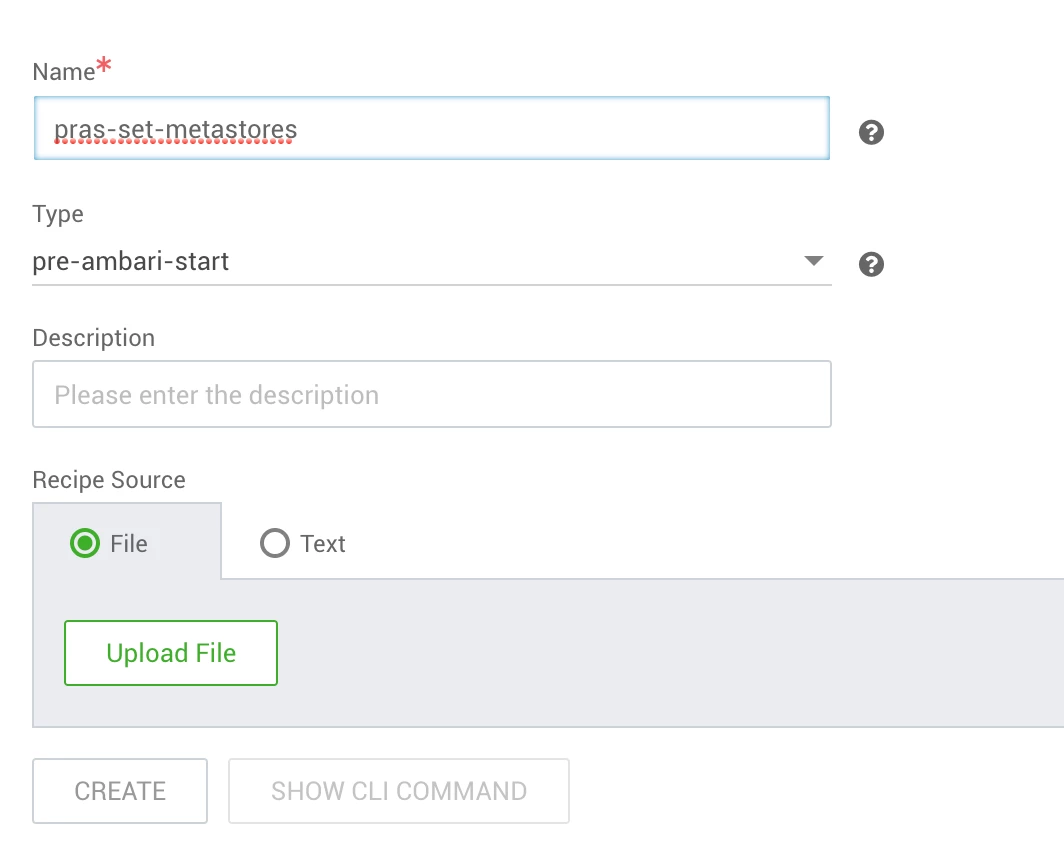
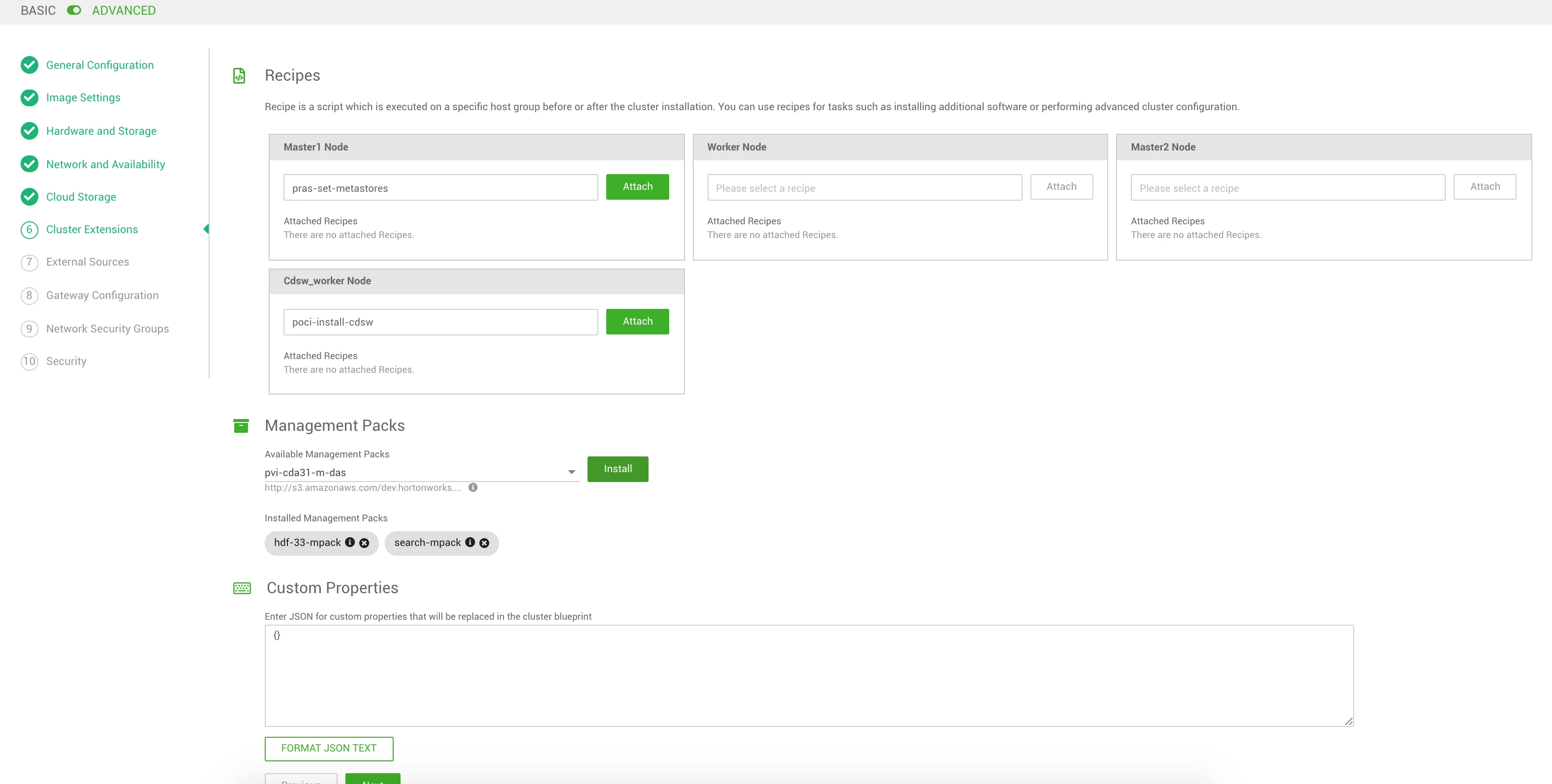
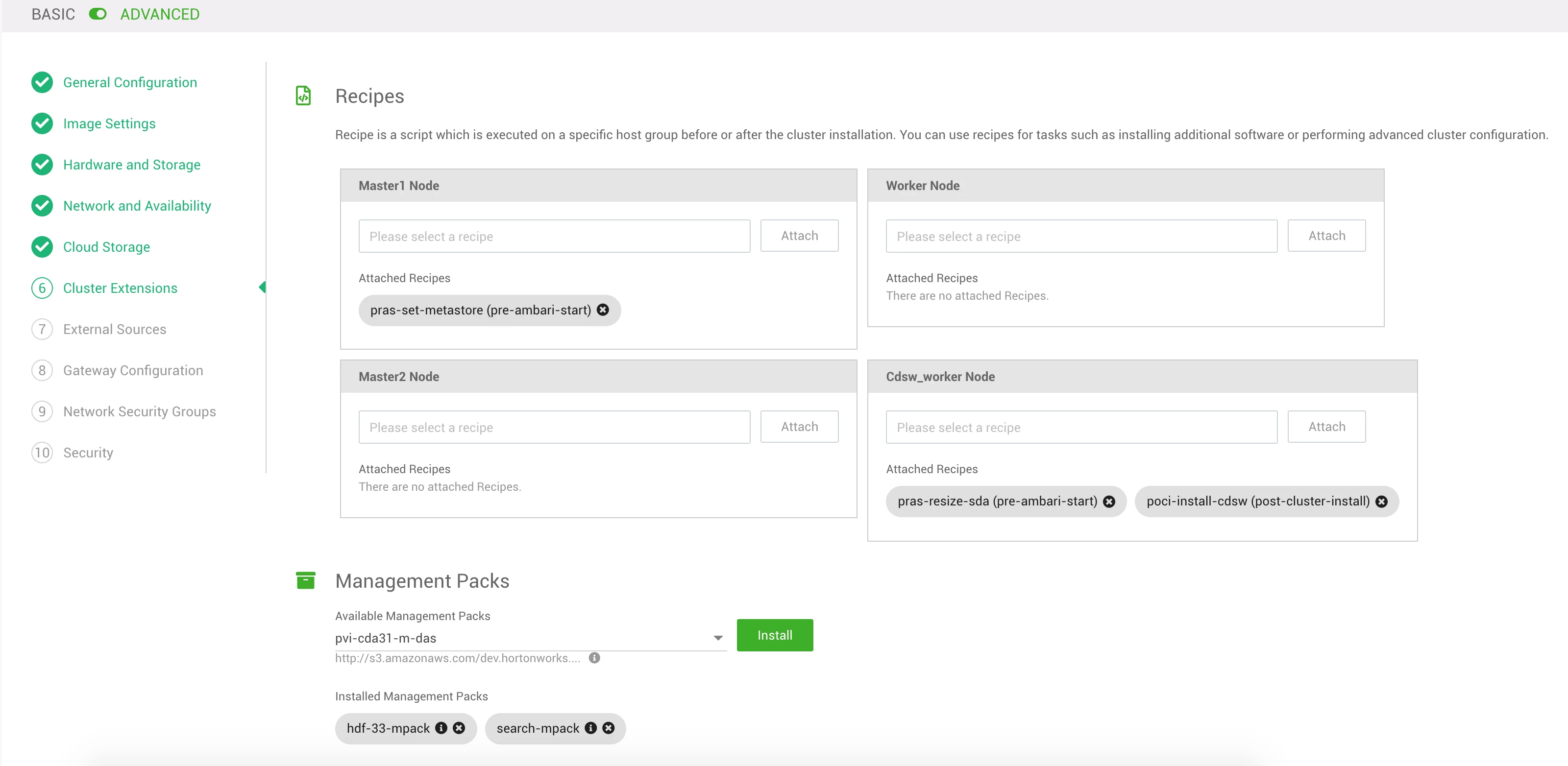
Pre Ambari start recipe to setup metastores
#!/usr/bin/env bash

# Intialize MetaStores

yum install -y https://download.postgresql.org/pub/repos/yum/9.6/redhat/rhel-7-x86_64/pgdg-redhat96-9.6-3.noarch.rpm
yum install -y postgresql96-server
yum install -y postgresql96-contrib
/usr/pgsql-9.6/bin/postgresql96-setup initdb
sed -i 's,#port = 5432,port = 5433,g' /var/lib/pgsql/9.6/data/postgresql.conf

echo '' >  /var/lib/pgsql/9.6/data/pg_hba.conf
echo 'local all das,streamsmsgmgr,cloudbreak,registry,ambari,postgres,hive,ranger,rangerdba,rangeradmin,rangerlogger,druid           trust  ' >> /var/lib/pgsql/9.6/data/pg_hba.conf
echo 'host  all das,streamsmsgmgr,cloudbreak,registry,ambari,postgres,hive,ranger,rangerdba,rangeradmin,rangerlogger,druid 0.0.0.0/0 trust  ' >> /var/lib/pgsql/9.6/data/pg_hba.conf
echo 'host  all das,streamsmsgmgr,cloudbreak,registry,ambari,postgres,hive,ranger,rangerdba,rangeradmin,rangerlogger,druid ::/0      trust  ' >> /var/lib/pgsql/9.6/data/pg_hba.conf
echo 'local all             all                                              peer  ' >> /var/lib/pgsql/9.6/data/pg_hba.conf
echo 'host  all             all             127.0.0.1/32                      ident  ' >> /var/lib/pgsql/9.6/data/pg_hba.conf
echo 'host  all             all             ::1/128                           ident  ' >> /var/lib/pgsql/9.6/data/pg_hba.conf

systemctl enable postgresql-9.6.service
systemctl start postgresql-9.6.service

echo "CREATE DATABASE streamsmsgmgr;" | sudo -u postgres psql -U postgres -h localhost -p 5433
echo "CREATE USER streamsmsgmgr WITH PASSWORD 'streamsmsgmgr';" | sudo -u postgres psql -U postgres -h localhost -p 5433
echo "GRANT ALL PRIVILEGES ON DATABASE streamsmsgmgr TO streamsmsgmgr;" | sudo -u postgres psql -U postgres -h localhost -p 5433

echo "CREATE DATABASE druid;" | sudo -u postgres psql -U postgres
echo "CREATE DATABASE ranger;" | sudo -u postgres psql -U postgres
echo "CREATE DATABASE registry;" | sudo -u postgres psql -U postgres
echo "CREATE USER druid WITH PASSWORD 'druid';" | sudo -u postgres psql -U postgres
echo "CREATE USER registry WITH PASSWORD 'registry';" | sudo -u postgres psql -U postgres
echo "CREATE USER rangerdba WITH PASSWORD 'rangerdba';" | sudo -u postgres psql -U postgres
echo "CREATE USER rangeradmin WITH PASSWORD 'ranger';" | sudo -u postgres psql -U postgres
echo "GRANT ALL PRIVILEGES ON DATABASE druid TO druid;" | sudo -u postgres psql -U postgres
echo "GRANT ALL PRIVILEGES ON DATABASE registry TO registry;" | sudo -u postgres psql -U postgres
echo "GRANT ALL PRIVILEGES ON DATABASE ranger TO rangerdba;" | sudo -u postgres psql -U postgres
echo "GRANT ALL PRIVILEGES ON DATABASE ranger TO rangeradmin;" | sudo -u postgres psql -U postgres

#ambari-server setup --jdbc-db=postgres --jdbc-driver=/usr/share/java/postgresql-jdbc.jar

if [[ $(cat /etc/system-release|grep -Po Amazon) == "Amazon" ]]; then
 echo '' >  /var/lib/pgsql/9.5/data/pg_hba.conf
 echo 'local all cloudbreak,ambari,postgres,hive,ranger,rangerdba,rangeradmin,rangerlogger,druid,registry           trust  ' >> /var/lib/pgsql/9.5/data/pg_hba.conf
 echo 'host  all cloudbreak,ambari,postgres,hive,ranger,rangerdba,rangeradmin,rangerlogger,druid,registry 0.0.0.0/0 trust  ' >> /var/lib/pgsql/9.5/data/pg_hba.conf
 echo 'host  all cloudbreak,ambari,postgres,hive,ranger,rangerdba,rangeradmin,rangerlogger,druid,registry ::/0      trust  ' >> /var/lib/pgsql/9.5/data/pg_hba.conf
 echo 'local all             all                                         peer   ' >> /var/lib/pgsql/9.5/data/pg_hba.conf
 echo 'host  all             all             127.0.0.1/32                 ident  ' >> /var/lib/pgsql/9.5/data/pg_hba.conf
 echo 'host  all             all             ::1/128                      ident  ' >> /var/lib/pgsql/9.5/data/pg_hba.conf

 sudo -u postgres /usr/pgsql-9.5/bin/pg_ctl -D /var/lib/pgsql/9.5/data/ reload
else
 echo '' >  /var/lib/pgsql/data/pg_hba.conf
 echo 'local all cloudbreak,ambari,postgres,hive,ranger,rangerdba,rangeradmin,rangerlogger,druid,registry           trust  ' >> /var/lib/pgsql/data/pg_hba.conf
 echo 'host  all cloudbreak,ambari,postgres,hive,ranger,rangerdba,rangeradmin,rangerlogger,druid,registry 0.0.0.0/0 trust  ' >> /var/lib/pgsql/data/pg_hba.conf
 echo 'host  all cloudbreak,ambari,postgres,hive,ranger,rangerdba,rangeradmin,rangerlogger,druid,registry ::/0      trust  ' >> /var/lib/pgsql/data/pg_hba.conf
 echo 'local all             all                                          peer   ' >> /var/lib/pgsql/data/pg_hba.conf
 echo 'host  all             all             127.0.0.1/32                 ident  ' >> /var/lib/pgsql/data/pg_hba.conf
 echo 'host  all             all             ::1/128                      ident  ' >> /var/lib/pgsql/data/pg_hba.conf

 sudo -u postgres pg_ctl -D /var/lib/pgsql/data/ reload
fi


yum remove -y mysql57-community*
yum remove -y mysql56-server*
yum remove -y mysql-community*
rm -Rvf /var/lib/mysql

yum install -y epel-release
yum install -y libffi-devel.x86_64
ln -s /usr/lib64/libffi.so.6 /usr/lib64/libffi.so.5

yum install -y mysql-connector-java*
ambari-server setup --jdbc-db=mysql --jdbc-driver=/usr/share/java/mysql-connector-java.jar

if [ $(cat /etc/system-release|grep -Po Amazon) == Amazon ]; then
 yum install -y mysql56-server
 service mysqld start
else
 yum localinstall -y https://dev.mysql.com/get/mysql-community-release-el7-5.noarch.rpm
 yum install -y mysql-community-server
 systemctl start mysqld.service
fi
chkconfig --add mysqld
chkconfig mysqld on

ln -s /usr/share/java/mysql-connector-java.jar /usr/hdp/current/hive-client/lib/mysql-connector-java.jar
ln -s /usr/share/java/mysql-connector-java.jar /usr/hdp/current/hive-server2-hive2/lib/mysql-connector-java.jar

mysql --execute="CREATE DATABASE druid DEFAULT CHARACTER SET utf8"
mysql --execute="CREATE DATABASE registry DEFAULT CHARACTER SET utf8"
mysql --execute="CREATE DATABASE streamline DEFAULT CHARACTER SET utf8"
mysql --execute="CREATE DATABASE streamsmsgmgr DEFAULT CHARACTER SET utf8"
mysql --execute="CREATE USER 'das'@'localhost' IDENTIFIED BY 'dasuser'"
mysql --execute="CREATE USER 'das'@'%' IDENTIFIED BY 'dasuser'"
mysql --execute="CREATE USER 'ranger'@'localhost' IDENTIFIED BY 'ranger'"
mysql --execute="CREATE USER 'ranger'@'%' IDENTIFIED BY 'ranger'"
mysql --execute="CREATE USER 'rangerdba'@'localhost' IDENTIFIED BY 'rangerdba'"
mysql --execute="CREATE USER 'rangerdba'@'%' IDENTIFIED BY 'rangerdba'"
mysql --execute="CREATE USER 'registry'@'localhost' IDENTIFIED BY 'registry'"
mysql --execute="CREATE USER 'registry'@'%' IDENTIFIED BY 'registry'"
mysql --execute="CREATE USER 'streamsmsgmgr'@'localhost' IDENTIFIED BY 'streamsmsgmgr'"
mysql --execute="CREATE USER 'streamsmsgmgr'@'%' IDENTIFIED BY 'streamsmsgmgr'"
mysql --execute="CREATE USER 'druid'@'%' IDENTIFIED BY 'druid'"
mysql --execute="CREATE USER 'streamline'@'%' IDENTIFIED BY 'streamline'"
mysql --execute="CREATE USER 'streamline'@'localhost' IDENTIFIED BY 'streamline'"
mysql --execute="GRANT ALL PRIVILEGES ON *.* TO 'das'@'localhost'"
mysql --execute="GRANT ALL PRIVILEGES ON *.* TO 'das'@'%'"
mysql --execute="GRANT ALL PRIVILEGES ON *.* TO 'das'@'localhost' WITH GRANT OPTION"
mysql --execute="GRANT ALL PRIVILEGES ON *.* TO 'das'@'%' WITH GRANT OPTION"
mysql --execute="GRANT ALL PRIVILEGES ON *.* TO 'ranger'@'localhost'"
mysql --execute="GRANT ALL PRIVILEGES ON *.* TO 'ranger'@'%'"
mysql --execute="GRANT ALL PRIVILEGES ON *.* TO 'ranger'@'localhost' WITH GRANT OPTION"
mysql --execute="GRANT ALL PRIVILEGES ON *.* TO 'ranger'@'%' WITH GRANT OPTION"
mysql --execute="GRANT ALL PRIVILEGES ON *.* TO 'rangerdba'@'localhost'"
mysql --execute="GRANT ALL PRIVILEGES ON *.* TO 'rangerdba'@'%'"
mysql --execute="GRANT ALL PRIVILEGES ON *.* TO 'rangerdba'@'localhost' WITH GRANT OPTION"
mysql --execute="GRANT ALL PRIVILEGES ON *.* TO 'rangerdba'@'%' WITH GRANT OPTION"
mysql --execute="GRANT ALL PRIVILEGES ON druid.* TO 'druid'@'%' WITH GRANT OPTION"
mysql --execute="GRANT ALL PRIVILEGES ON *.* TO 'registry'@'localhost'"
mysql --execute="GRANT ALL PRIVILEGES ON *.* TO 'registry'@'%'"
mysql --execute="GRANT ALL PRIVILEGES ON *.* TO 'registry'@'localhost' WITH GRANT OPTION"
mysql --execute="GRANT ALL PRIVILEGES ON *.* TO 'registry'@'%' WITH GRANT OPTION"
mysql --execute="GRANT ALL PRIVILEGES ON *.* TO 'streamsmsgmgr'@'localhost'"
mysql --execute="GRANT ALL PRIVILEGES ON *.* TO 'streamsmsgmgr'@'%'"
mysql --execute="GRANT ALL PRIVILEGES ON *.* TO 'streamsmsgmgr'@'localhost' WITH GRANT OPTION"
mysql --execute="GRANT ALL PRIVILEGES ON *.* TO 'streamsmsgmgr'@'%' WITH GRANT OPTION"
mysql --execute="GRANT ALL PRIVILEGES ON streamline.* TO 'streamline'@'%' WITH GRANT OPTION"

mysql --execute="CREATE DATABASE beast_mode_db DEFAULT CHARACTER SET utf8"
mysql --execute="CREATE USER 'bmq_user'@'localhost' IDENTIFIED BY 'Be@stM0de'"
mysql --execute="CREATE USER 'bmq_user'@'%' IDENTIFIED BY 'Be@stM0de'"
mysql --execute="GRANT ALL PRIVILEGES ON beast_mode_db.* TO 'bmq_user'@'localhost'"
mysql --execute="GRANT ALL PRIVILEGES ON beast_mode_db.* TO 'bmq_user'@'%'"
mysql --execute="GRANT ALL PRIVILEGES ON beast_mode_db.* TO 'bmq_user'@'localhost' WITH GRANT OPTION"
mysql --execute="GRANT ALL PRIVILEGES ON beast_mode_db.* TO 'bmq_user'@'%' WITH GRANT OPTION"
mysql --execute="FLUSH PRIVILEGES"
mysql --execute="COMMIT"


#remount tmpfs to ensure NOEXEC is disabled
if grep -Eq '^[^ ]+ /tmp [^ ]+ ([^ ]*,)?noexec[, ]' /proc/mounts; then
  echo "/tmp found as noexec, remounting..."
  mount -o remount,size=10G /tmp
  mount -o remount,exec /tmp
else
  echo "/tmp not found as noexec, skipping..."
fi
Pre Ambari start recipe to grow the root volume for the CDSW worker
#!/usr/bin/env bash

# WARNING: This script is only for RHEL7 on Azure

# growing the /dev/sda2 partition


sed -e 's/\s*\([\+0-9a-zA-Z]*\).*/\1/' << EOF | fdisk /dev/sda
  d # delete
  2 # delete partition 2
  n # new
  p # partition
  2 # partition 2
  # default
  # default
  w # write the partition table
  q # and we're done
EOF

reboot
Post cluster install recipe to setup CDSW
#!/usr/bin/env bash

# WARNING: This script is only for RHEL7 on Azure

# growing the /dev/sda2 partition


xfs_growfs /dev/sda2


# Some of these installs may be unecessary but are included for completeness against documentation
yum -y install nfs-utils libseccomp lvm2 bridge-utils libtool-ltdl ebtables rsync policycoreutils-python ntp bind-utils nmap-ncat openssl e2fsprogs redhat-lsb-core socat selinux-policy-base selinux-policy-targeted

# CDSW wants a pristine IPTables setup
iptables -P INPUT ACCEPT
iptables -P FORWARD ACCEPT
iptables -P OUTPUT ACCEPT
iptables -t nat -F
iptables -t mangle -F
iptables -F
iptables -X

# set java_home on centos7
#echo 'export JAVA_HOME=$(readlink -f /usr/bin/javac | sed "s:/bin/javac::")' >> /etc/profile
#export JAVA_HOME=$(readlink -f /usr/bin/javac | sed "s:/bin/javac::")
echo 'export JAVA_HOME=/usr/lib/jvm/java' >> /etc/profile
export JAVA_HOME='/usr/lib/jvm/java'

# Fetch public IP
export MASTER_IP=$(hostname --ip-address)

# Fetch public FQDN for Domain
export DOMAIN=$(curl https://ipv4.icanhazip.com)


cd /hadoopfs/
mkdir cdsw

# Install CDSW
#wget -q --no-check-certificate https://s3.eu-west-2.amazonaws.com/whoville/v2/temp.blob
#mv temp.blob cloudera-data-science-workbench-1.5.0.818361-1.el7.centos.x86_64.rpm
wget -q https://archive.cloudera.com/cdsw1/1.5.0/redhat7/yum/RPMS/x86_64/cloudera-data-science-workbench-1.5.0.849870-1.el7.centos.x86_64.rpm
yum install -y cloudera-data-science-workbench-1.5.0.849870-1.el7.centos.x86_64.rpm

# Install Anaconda
curl -Ok https://repo.anaconda.com/archive/Anaconda2-5.2.0-Linux-x86_64.sh
chmod +x ./Anaconda2-5.2.0-Linux-x86_64.sh
./Anaconda2-5.2.0-Linux-x86_64.sh -b -p /anaconda

# create unix user
useradd tutorial
echo "tutorial-password" | passwd --stdin tutorial

su - hdfs -c 'hdfs dfs -mkdir /user/tutorial'
su - hdfs -c 'hdfs dfs -chown tutorial:hdfs /user/tutorial'

# CDSW Setup
sed -i "s@MASTER_IP=\"\"@MASTER_IP=\"${MASTER_IP}\"@g" /etc/cdsw/config/cdsw.conf
sed -i "s@JAVA_HOME=\"/usr/java/default\"@JAVA_HOME=\"$(echo ${JAVA_HOME})\"@g" /etc/cdsw/config/cdsw.conf
sed -i "s@DOMAIN=\"cdsw.company.com\"@DOMAIN=\"${DOMAIN}.xip.io\"@g" /etc/cdsw/config/cdsw.conf
sed -i "s@DOCKER_BLOCK_DEVICES=\"\"@DOCKER_BLOCK_DEVICES=\"${DOCKER_BLOCK}\"@g" /etc/cdsw/config/cdsw.conf
sed -i "s@APPLICATION_BLOCK_DEVICE=\"\"@APPLICATION_BLOCK_DEVICE=\"${APP_BLOCK}\"@g" /etc/cdsw/config/cdsw.conf
sed -i "s@DISTRO=\"\"@DISTRO=\"HDP\"@g" /etc/cdsw/config/cdsw.conf
sed -i "s@ANACONDA_DIR=\"\"@ANACONDA_DIR=\"/anaconda/bin\"@g" /etc/cdsw/config/cdsw.conf

# CDSW will break default Amazon DNS on 127.0.0.1:53, so we use a different IP
sed -i "s@nameserver 127.0.0.1@nameserver 169.254.169.253@g" /etc/dhcp/dhclient-enter-hooks

cdsw init

echo "CDSW will shortly be available on ${DOMAIN}"


# after the init, we wait until we are able to create the tutorial user
export respCode=404

while (( $respCode != 201 ))

do
    sleep 10
 export respCode=$(curl -iX POST http://${DOMAIN}.xip.io/api/v1/users/ -H 'Content-Type: application/json' -d '{"email":"tutorial@tutorial.com","name":"tutorial","username":"tutorial","password":"tutorial-password","type":"user","admin":true}' | grep HTTP | awk '{print $2}')

done

exit 0
Note: this script is using xip.io and hacks into unix to create user and hadoop folders, not a recommendation in production!
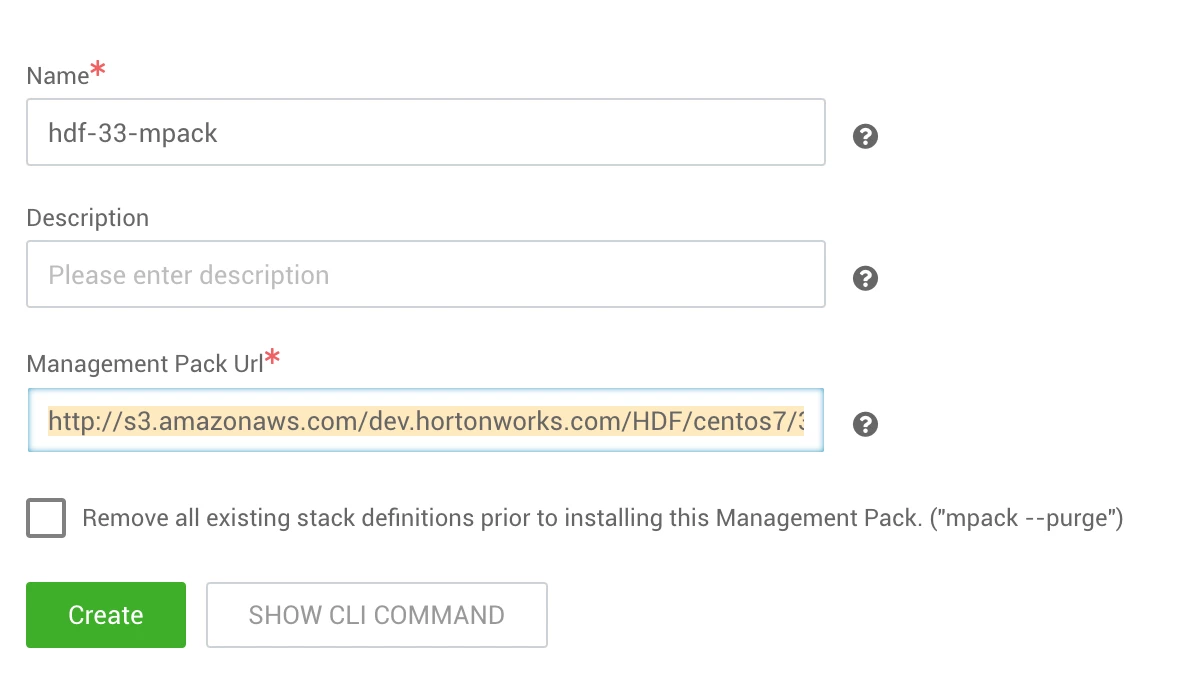
Management packs
IMAGE
You will need two management packs for this setup, using the URL detailed below:
- HDF mpack:
http://s3.amazonaws.com/dev.hortonworks.com/HDF/centos7/3.x/BUILDS/3.3.1.0-10/tars/hdf_ambari_mp/hdf-ambari-mpack-3.3.1.0-10.tar.gz - Search mpack:
http://public-repo-1.hortonworks.com/HDP-SOLR/hdp-solr-ambari-mp/solr-service-mpack-4.0.0.tar.gz
Step 3: Create cluster
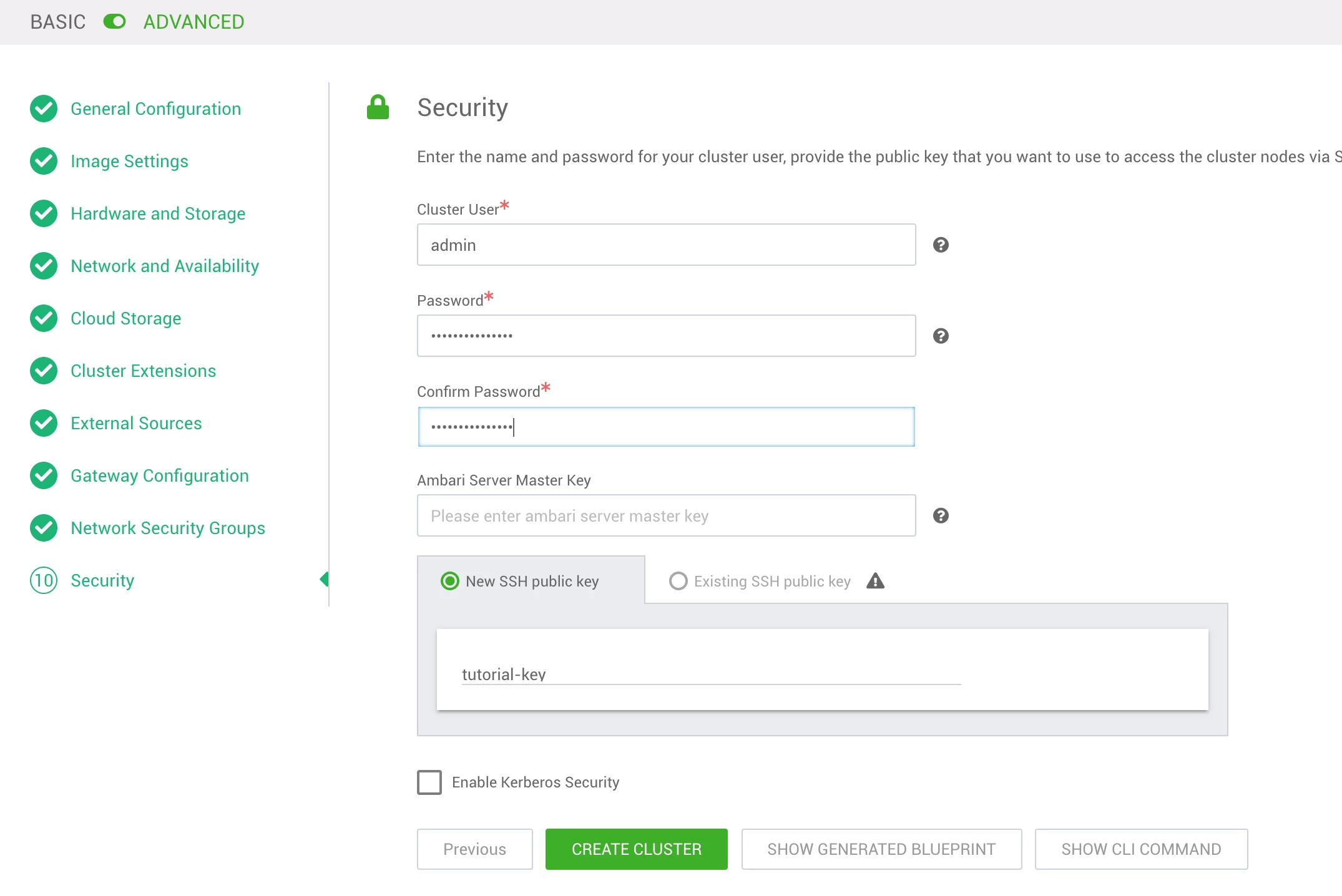
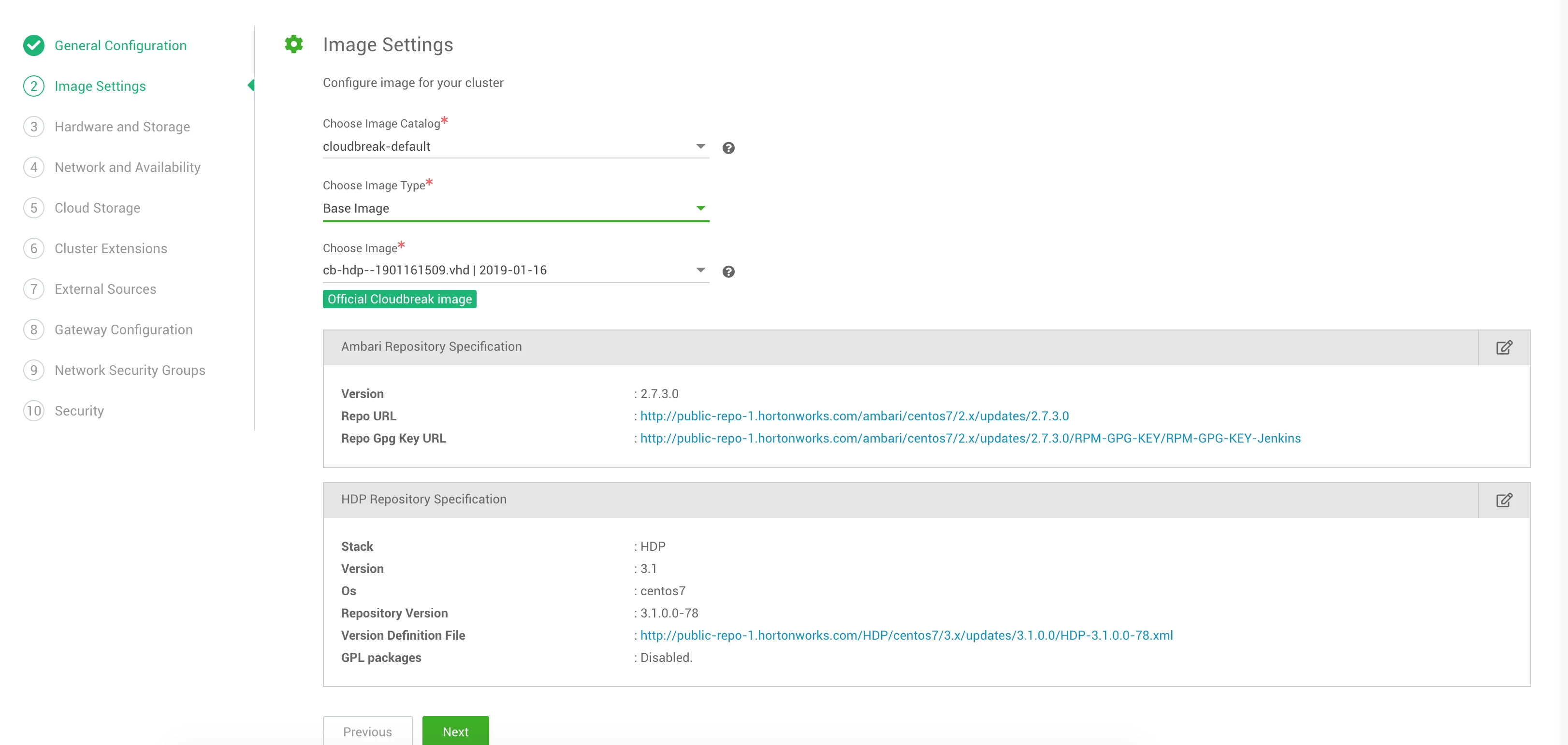
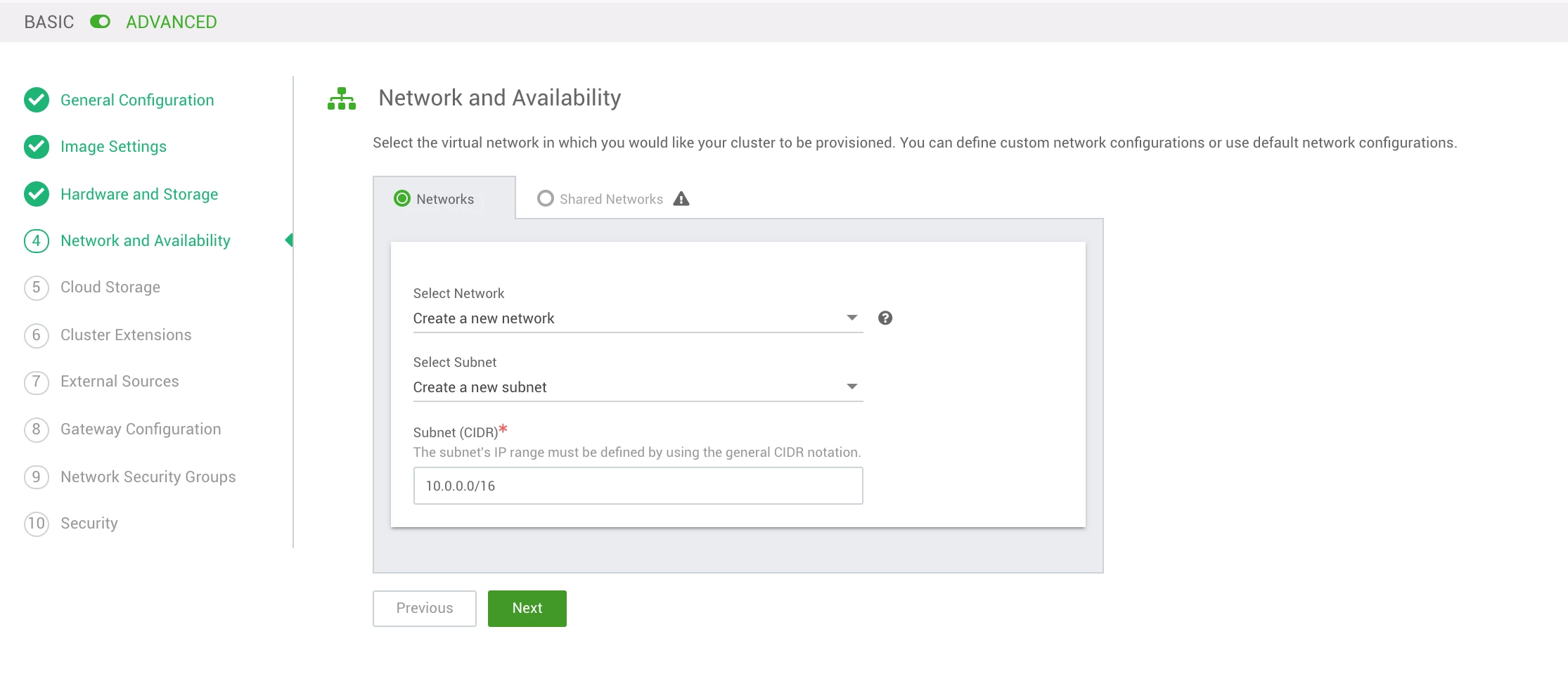
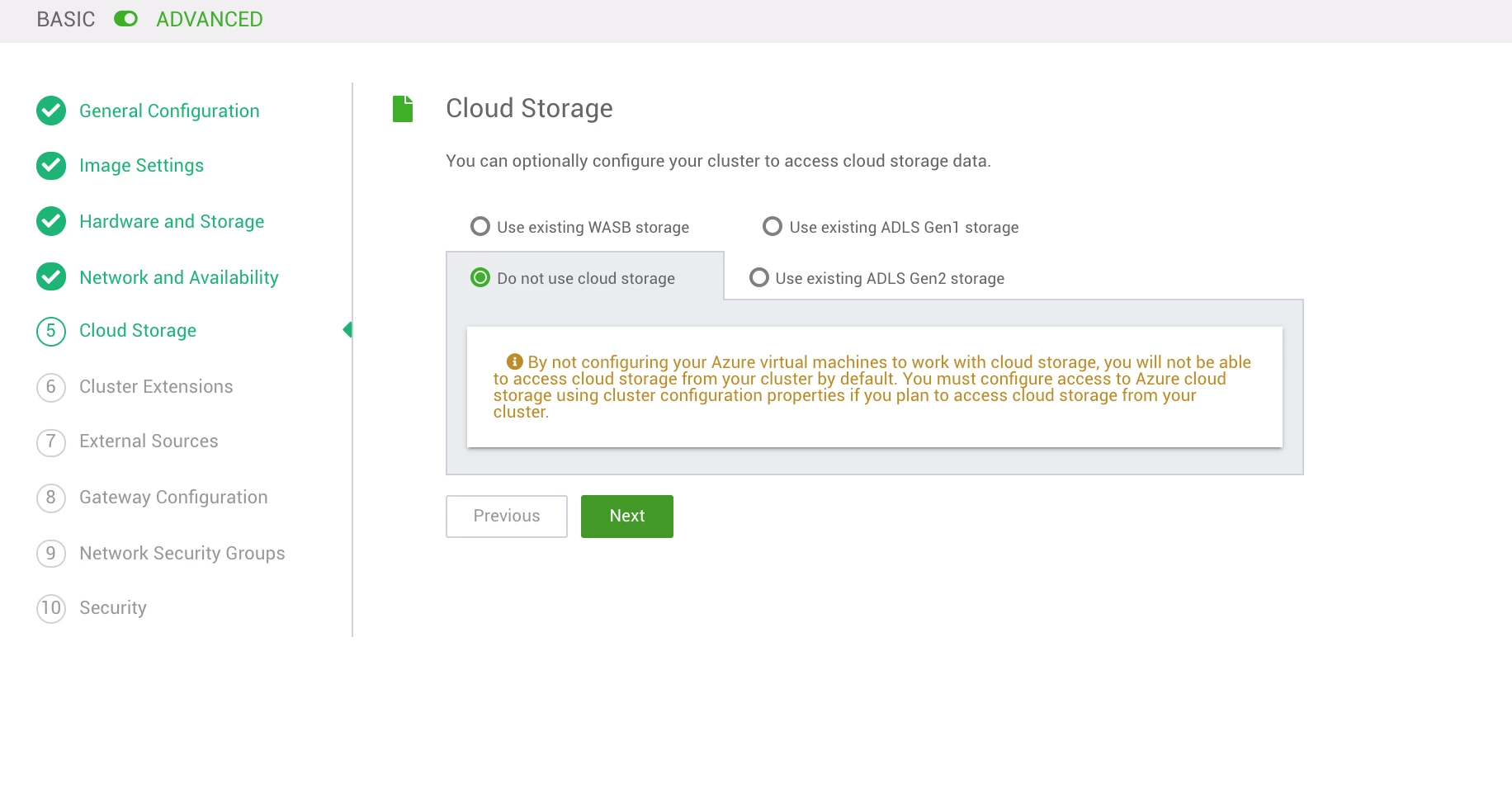
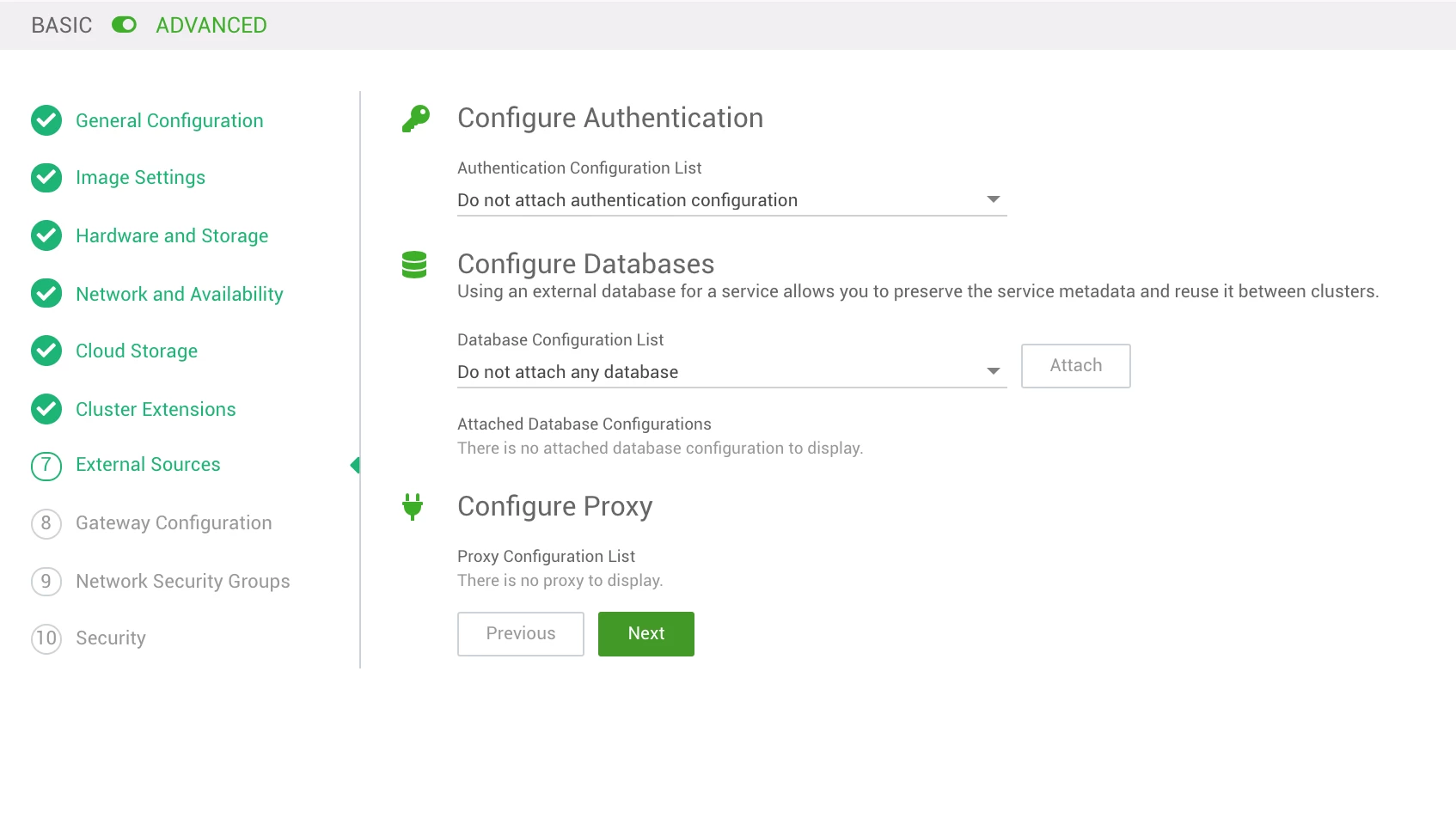
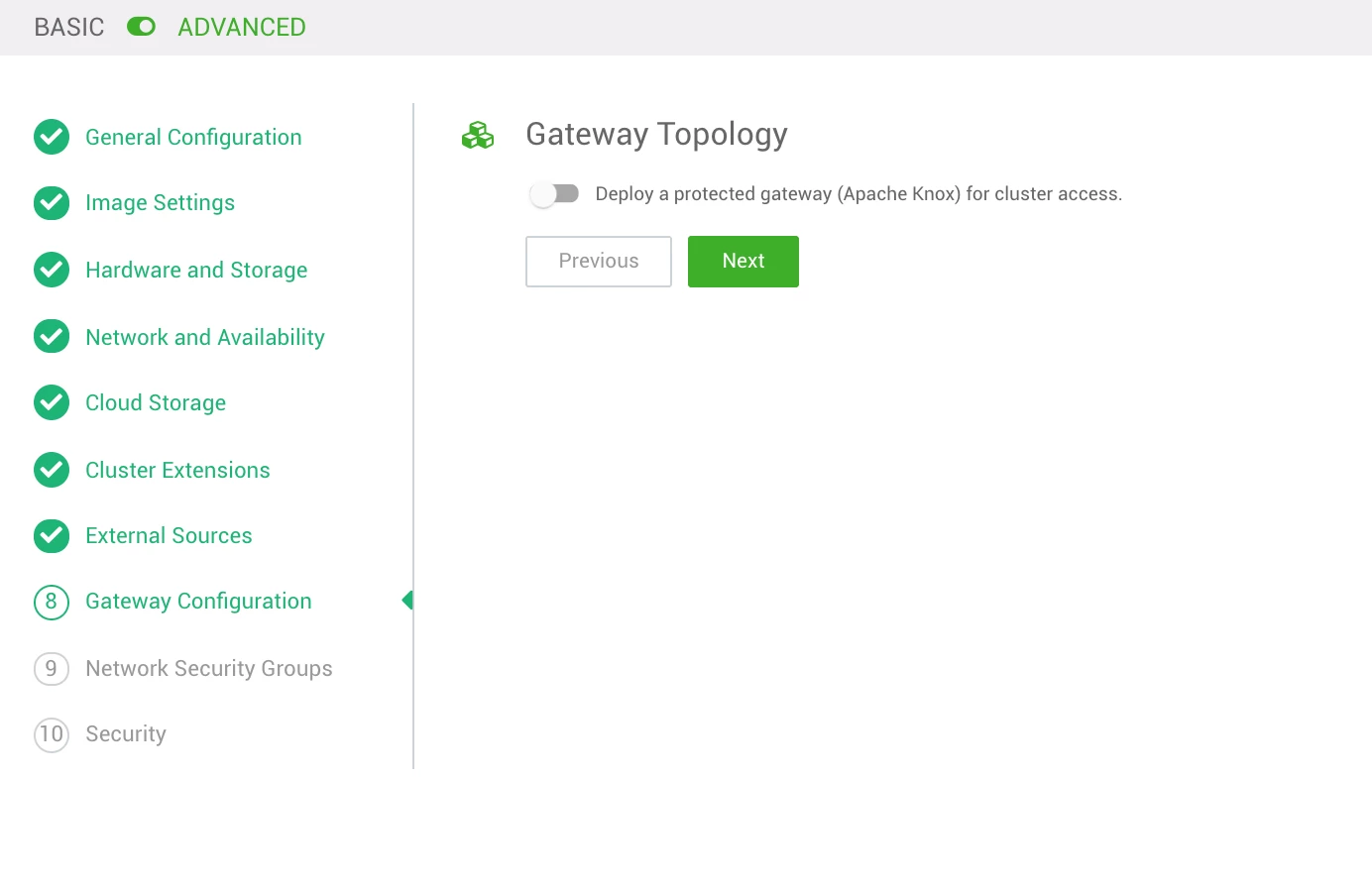
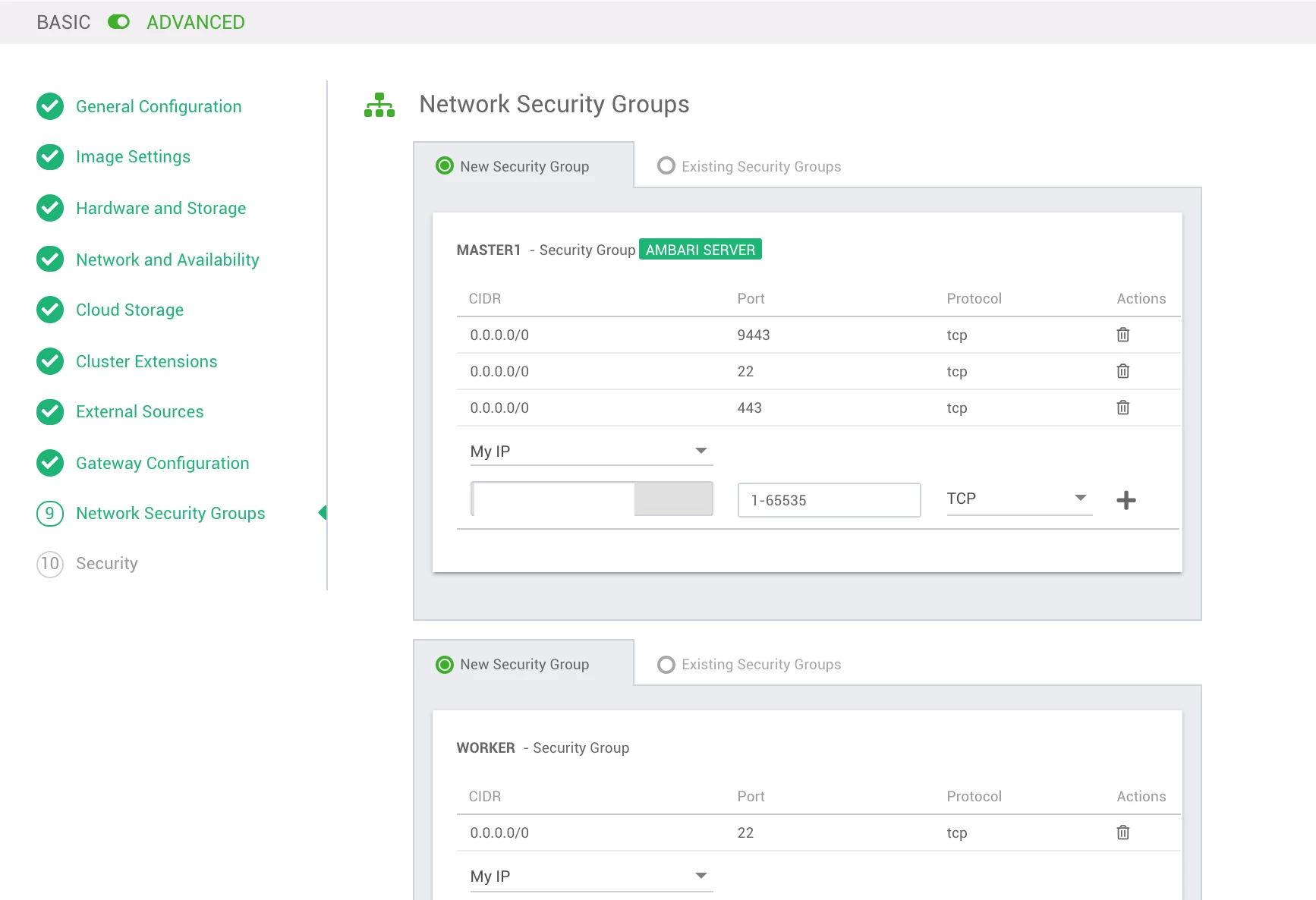
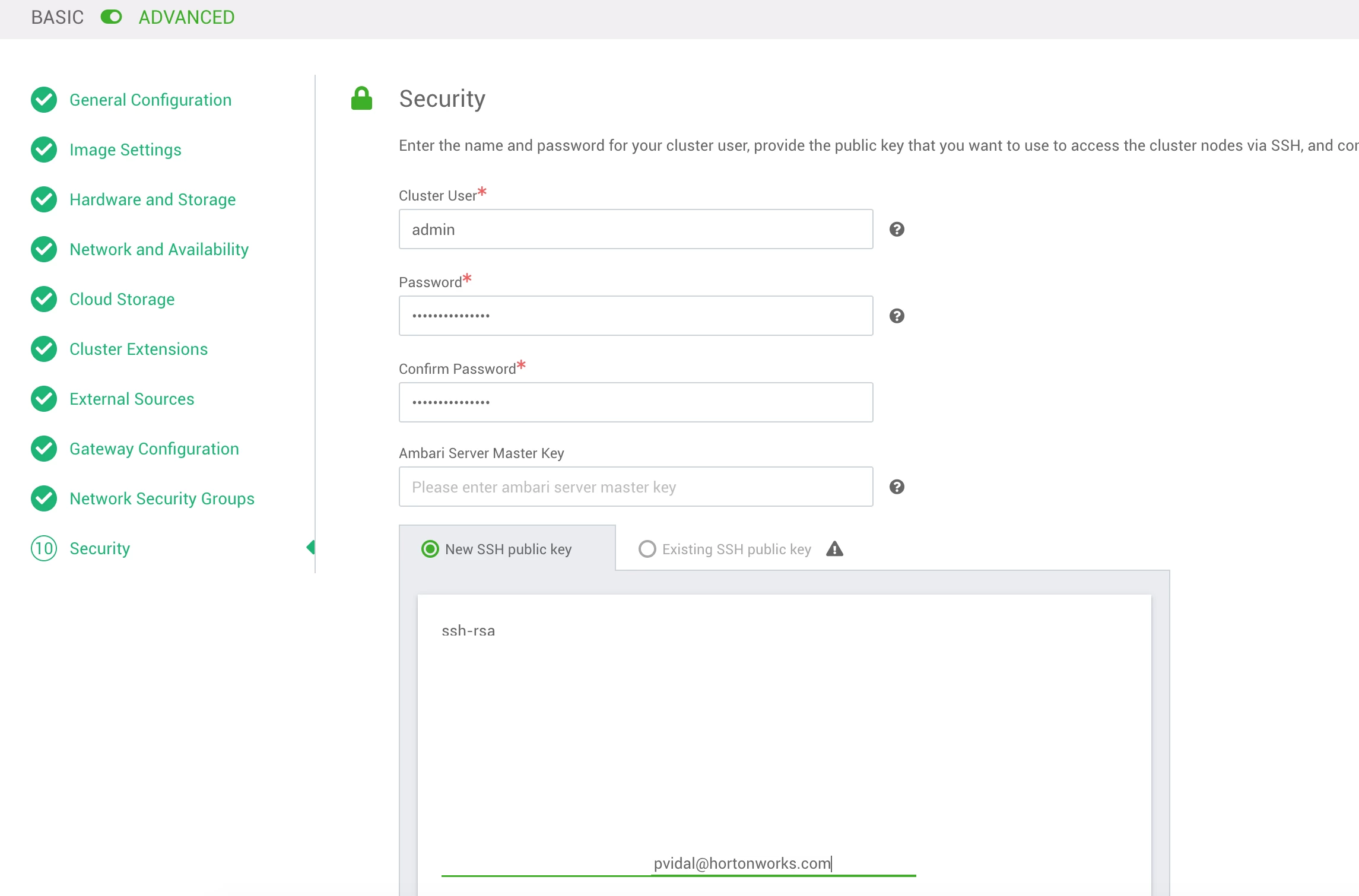
This step uses Cloudbreak's Create Cluster wizard, and is pretty self-explanatory following screenshots, but I will add specific parameters in text form for convenience
Note: Do not forget to toggle the advanced mode when running the wizard (top of the screen)
General Configuration
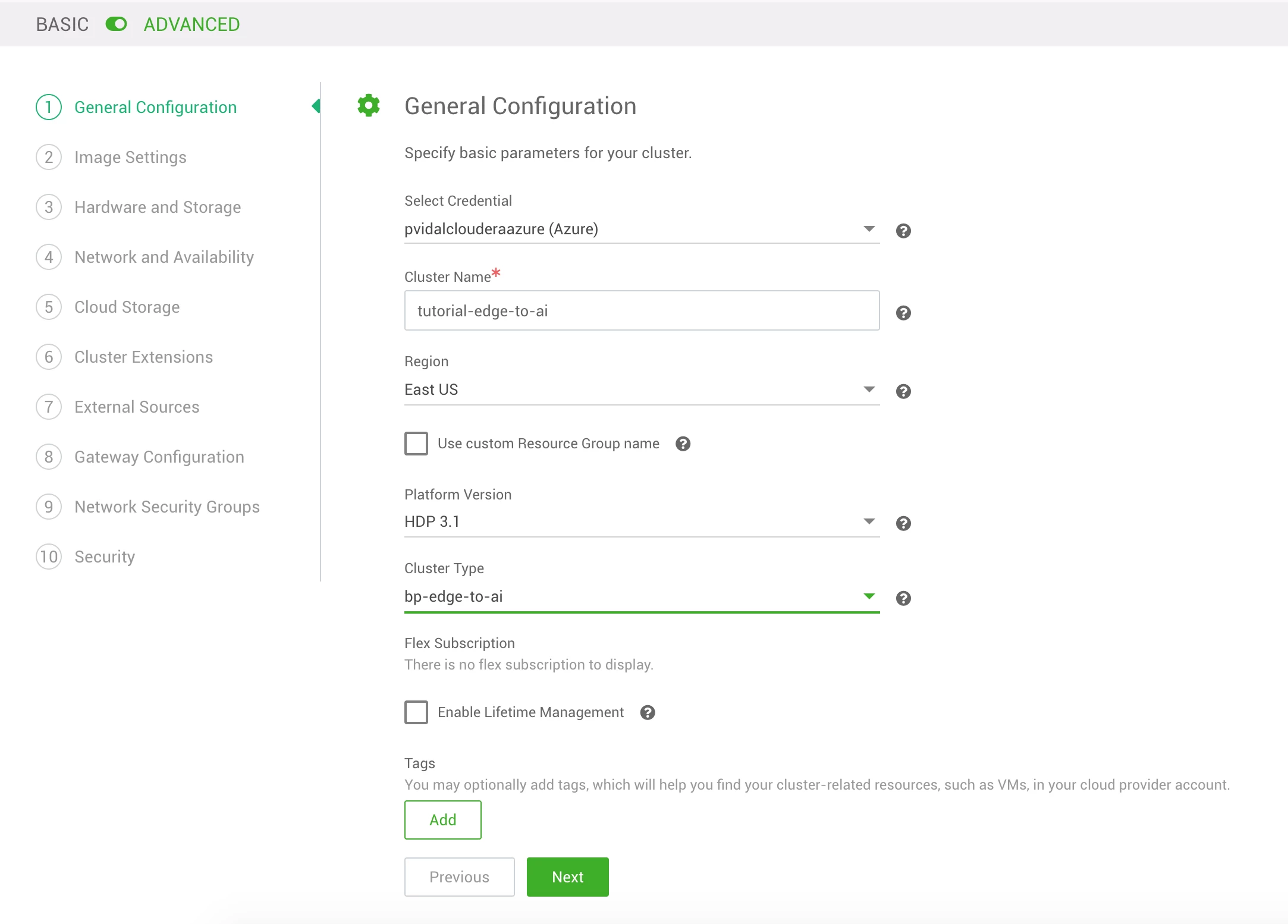
Image Settings
Hardware and Storage
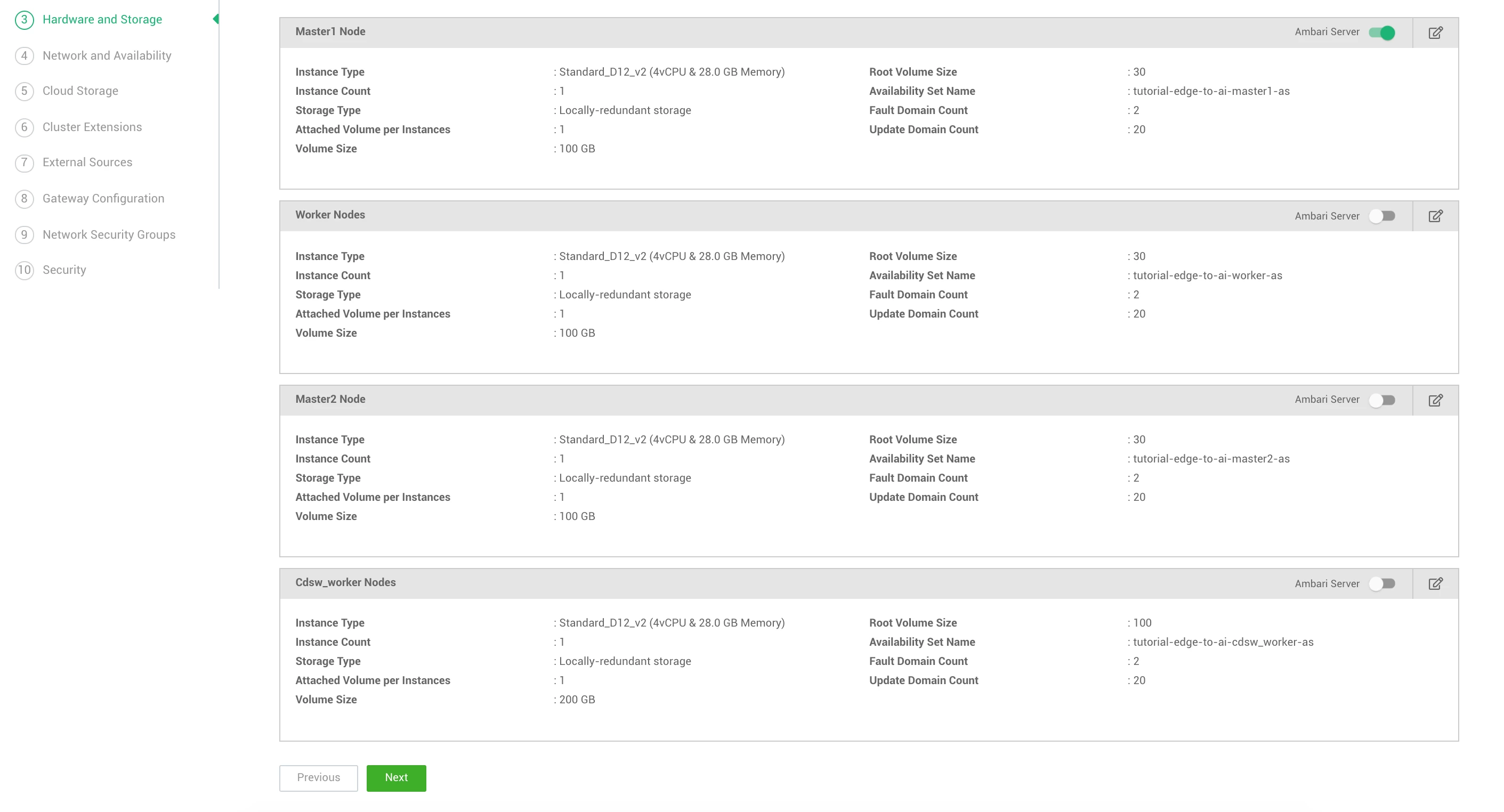
Note: Make sure to use 100 GB as the root volume size for CDSW.
Network and Availability
Cloud Storage
Cluster Extensions
External Sources
Gateway Configuration
Network Security Groups
Security
Result
After the cluster created, you should have access to the following screen in Cloudbreak:
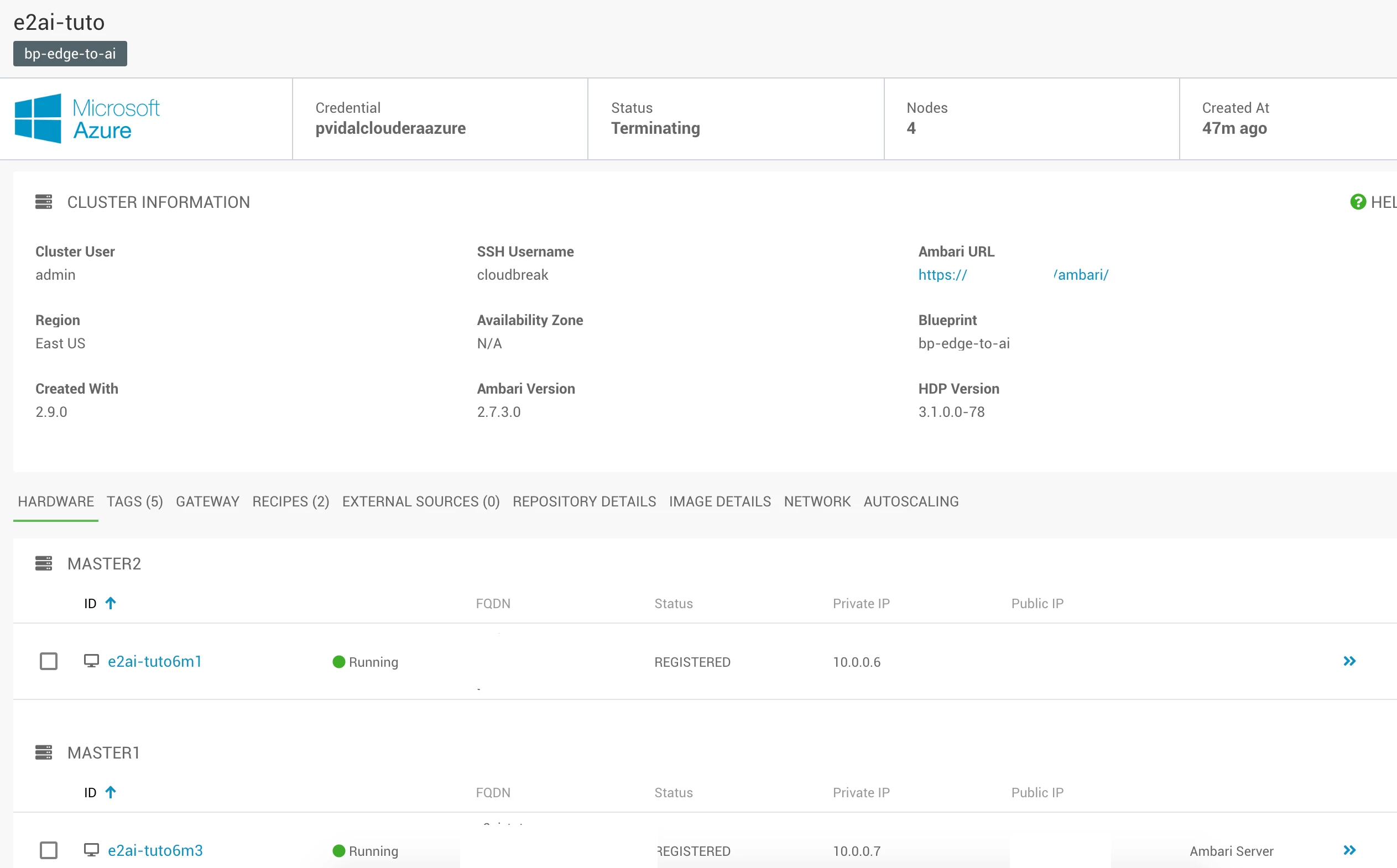
You can now access Ambari via the link provided, and CDSW using http://[CDSW_WORKER_PUBLIC_IP].xip.io