


HDFS Snapshots Basics Part II
hdfs dfs -createSnapshot /tmp/snapshot_dir/dir1 20190819v1
Next lets add another file in the same base directory that we have file1.txt in:
hdfs dfs -put file2.txt /tmp/snapshot_dir/dir1
Let's pretend that 8 hours later, you take another snapshot of the same directory. Here we named the snapshot v2:
hdfs dfs -createSnapshot /tmp/snapshot_dir/dir1 20190819v2
Let's pause and take a look at the size of the directory:
hdfs dfs -du -h /tmp/snapshot_dir

Now lets delete file1.txt:
hdfs dfs -rm /tmp/snapshot_dir/dir1/file1.txt
Take a look at the directory size now:
hdfs dfs -du -h /tmp/snapshot_dir

Only one file remains in the directory (file2.txt) but we still see the physically file represented in the second number...those phantom files!
Let's go a little bit further and load another file and take another snapshot. Let's pretend it's 8 hours later and we name the snapshot v3:
hdfs dfs -put file3.txt /tmp/snapshot_dir/dir1
Next take a look at the directory sizes for reference:
hdfs dfs -du -h /tmp/snapshot_dir
hdfs dfs -du -h /tmp/snapshot_dir/dir1


Note how the the replication number for both images above still show phantom data being present. The two files written have a combined size (with rep) of 111 bytes. The other 36 are from the phantom data that exists from the first snapshot still being live despite the data being deleted. This data will always remain UNTIL the last snapshot that references that file is deleted.
Lets next take a look at the snapshots that we just recently created (v2 and v3):
hdfs dfs -ls /tmp/snapshot_dir/dir1/.snapshot
hdfs dfs -ls /tmp/snapshot_dir/dir1/.snapshot/20190819v2
hdfs dfs -ls /tmp/snapshot_dir/dir1/.snapshot/20190819v3
hdfs dfs -ls /tmp/snapshot_dir/dir1/.snapshot/20190819v1
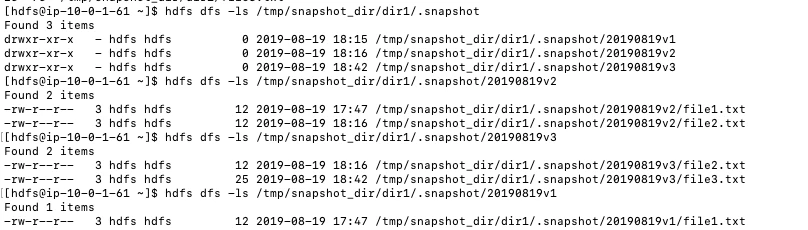
Notice how the v2 snapshot has a reference to file1.txt. Even if we delete the v1 snapshot, the phantom data will still remain. To test this, lets delete the v1 snapshot:
hdfs dfs -deleteSnapshot /tmp/snapshot_dir/dir1 20190819v1

As expected, deleting the first snapshot didn't help delete the phantom data. Now, let's delete the v2 snapshot and see what happens:
hdfs dfs -deleteSnapshot /tmp/snapshot_dir/dir1 20190819v2

As you can see, the phantom data is gone. The snapshot that was holding reference to it was deleted and with it went the data.
Conclusion
HDFS Snapshots can be a very powerful tool but one must exercise caution when using them. Protection from data deletion may be great but it comes at a cost. If implementing hdfs snapshotting you must create management framework for keeping track of snapshots to ensure proper HDFS space utilization.

