


Hide Password from ambari-infra-solr process
Problem Description:
Ambari-infra-solr is running fine but using a "ps" command shows a password like below. According to security policy, this is consider as security breach.The issue occurred because the value of property infra_solr_trust_store_password and infra_solr_key_store_password showing cleartext passwords in java Options.
$ ps -ef | grep -i 'ambari-infra'

1008 25938 1 21 07:25 ?00:00:11 /usr/jdk64/jdk1.8.0_112/bin/java -server -Xms1024m -Xmx2048m -XX:NewRatio=3 -XX:SurvivorRatio=4 -XX:TargetSurvivorRatio=90 -XX:MaxTenuringThreshold=8 -XX:+UseConcMarkSweepGC -XX:+UseParNewGC -XX:ConcGCThreads=4 -XX:ParallelGCThreads=4 -XX:+CMSScavengeBeforeRemark -XX:PretenureSizeThreshold=64m -XX:+UseCMSInitiatingOccupancyOnly -XX:CMSInitiatingOccupancyFraction=50 -XX:CMSMaxAbortablePrecleanTime=6000 -XX:+CMSParallelRemarkEnabled -XX:+ParallelRefProcEnabled -verbose:gc -XX:+PrintHeapAtGC -XX:+PrintGCDetails -XX:+PrintGCDateStamps -XX:+PrintGCTimeStamps -XX:+PrintTenuringDistribution -XX:+PrintGCApplicationStoppedTime -Xloggc:/var/log/ambari-infra-solr/solr_gc.log -Dcom.sun.management.jmxremote -Dcom.sun.management.jmxremote.local.only=false -Dcom.sun.management.jmxremote.ssl=false -Dcom.sun.management.jmxremote.authenticate=false -Dcom.sun.management.jmxremote.port=18886 -Dcom.sun.management.jmxremote.rmi.port=18886 -Djava.rmi.server.hostname=test2.example.com -DzkClientTimeout=60000 -DzkHost=test1.example.com:2181,test2.example.com:2181,test3.example.com:2181/infra-solr -Djetty.port=8886 -DSTOP.PORT=7886 -DSTOP.KEY=solrrocks -Dhost=test2.example.com -Duser.timezone=UTC -Djetty.home=/usr/lib/ambari-infra-solr/server -Dsolr.solr.home=/opt/ambari_infra_solr/data -Dsolr.install.dir=/usr/lib/ambari-infra-solr -Dlog4j.configuration=file:/etc/ambari-infra-solr/conf/log4j.properties -Dsolr.jetty.keystore=/etc/security/serverKeys/infra.solr.keyStore.jks -Dsolr.jetty.keystore.password=bigdata -Dsolr.jetty.truststore=/etc/security/serverKeys/infra.solr.trustStore.jks -Dsolr.jetty.truststore.password=bigdata -Dsolr.jetty.ssl.needClientAuth=false -Dsolr.jetty.ssl.wantClientAuth=false -Djavax.net.ssl.keyStore=/etc/security/serverKeys/infra.solr.keyStore.jks -Djavax.net.ssl.keyStorePassword=bigdata -Djavax.net.ssl.trustStore=/etc/security/serverKeys/infra.solr.trustStore.jks -Djavax.net.ssl.trustStorePassword=bigdata -Dsolr.jetty.https.port=8886 -Dsolr.authentication.httpclient.configurer=org.apache.solr.client.solrj.impl.Krb5HttpClientConfigurer -DauthenticationPlugin=org.apache.solr.security.KerberosPlugin -Djava.security.auth.login.config=/etc/ambari-infra-solr/conf/infra_solr_jaas.conf -Dsolr.kerberos.principal=HTTP/test2.example.com@EXAMPLE.COM -Dsolr.kerberos.keytab=/etc/security/keytabs/spnego.service.keytab -Dsolr.kerberos.cookie.domain=test2.example.com -Dsolr.kerberos.name.rules=DEFAULT -XX:OnOutOfMemoryError=/usr/lib/ambari-infra-solr/bin/oom_solr.sh 8886 /var/log/ambari-infra-solr -jar start.jar --module=https
Article:
This article help to set hash password instead of showing clearest passwords in java options. Using Ambari inbuilt jetty jar file, we can hash password either OBF or MD5 format and pass those value in infra-solo-env to hide password from ambari-infra solr process.
Step-1: Generate encrypt password using jetty jar file, where <password> is the password you used for the keystore/truststore
java -cp /usr/lib/ambari-infra-solr/server/lib/jetty-util-9.2.13.v20150730.jar org.eclipse.jetty.util.security.Password <password>
java -cp /usr/lib/ambari-infra-solr/server/lib/jetty-util-9.2.13.v20150730.jar org.eclipse.jetty.util.security.Password bigdata
2018-12-27 07:51:13.605:INFO::main: Logging initialized @171ms
bigdata
OBF:1rpc1wtw1sp11sov1sop1wui1rpa
MD5:27819cfe72583a34d13a40bb74154c91
Step-2: Update below properties from Ambari under Ambari Infra Config Tab in Advanced infra-solr-env section (You can mention hashed_password of either OBF or MD5 there)
Before:
SOLR_SSL_KEY_STORE_PASSWORD={{infra_solr_keystore_hashed_password}}
SOLR_SSL_TRUST_STORE_PASSWORD={{infra_solr_truststore_hashed_password}}
Now:
SOLR_SSL_KEY_STORE_PASSWORD=OBF:1rpc1wtw1sp11sov1sop1wui1rpa
SOLR_SSL_TRUST_STORE_PASSWORD=OBF:1rpc1wtw1sp11sov1sop1wui1rpa
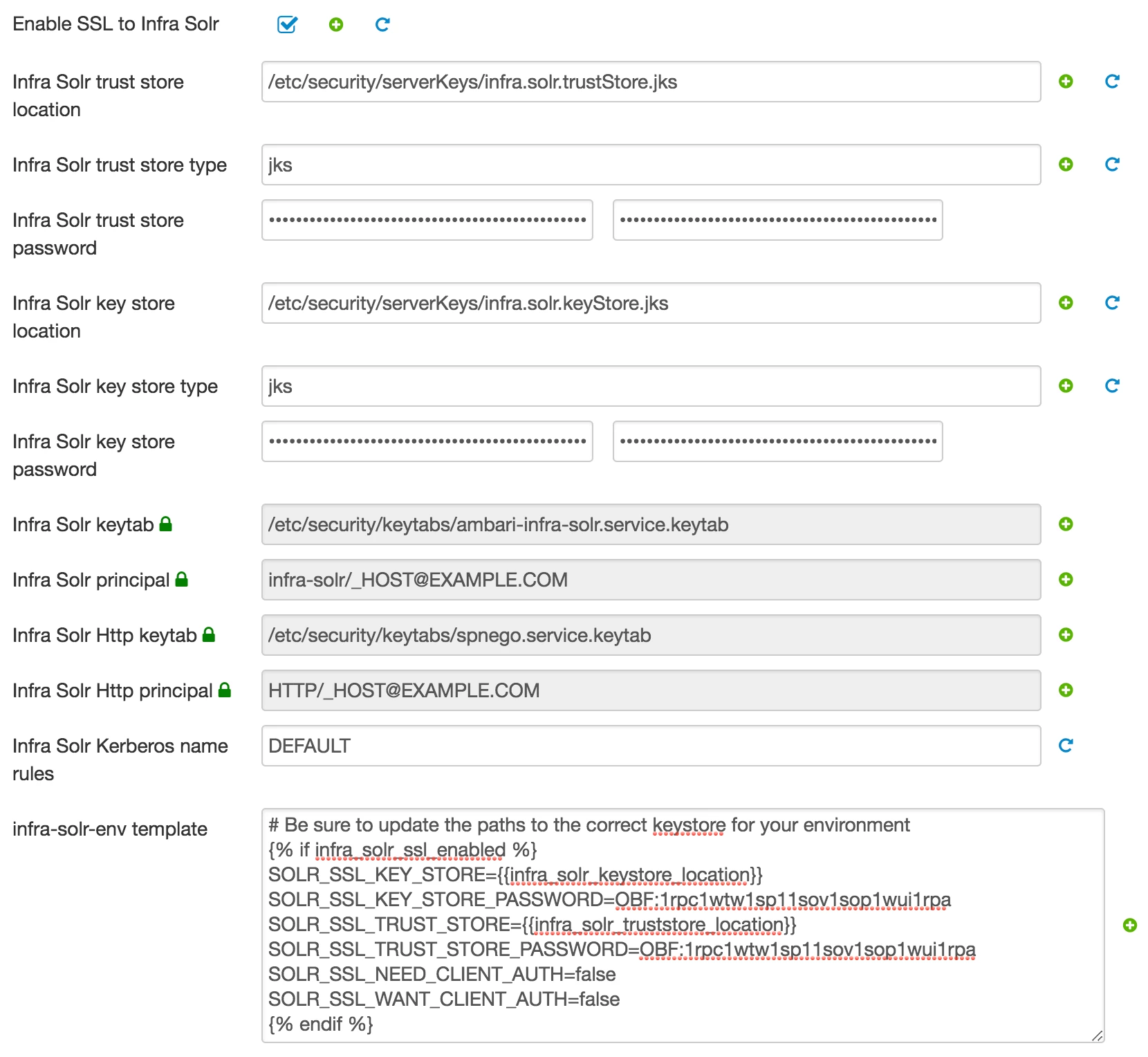
Step-3: Need to restart required services through ambari and verify with grep process of ambari-infra solr process.
$ ps -ef | grep -i 'ambari-infra'1008

17641 17 08:03 ?00:00:10 /usr/jdk64/jdk1.8.0_112/bin/java -server -Xms1024m -Xmx2048m -XX:NewRatio=3 -XX:SurvivorRatio=4 -XX:TargetSurvivorRatio=90 -XX:MaxTenuringThreshold=8 -XX:+UseConcMarkSweepGC -XX:+UseParNewGC -XX:ConcGCThreads=4 -XX:ParallelGCThreads=4 -XX:+CMSScavengeBeforeRemark -XX:PretenureSizeThreshold=64m -XX:+UseCMSInitiatingOccupancyOnly -XX:CMSInitiatingOccupancyFraction=50 -XX:CMSMaxAbortablePrecleanTime=6000 -XX:+CMSParallelRemarkEnabled -XX:+ParallelRefProcEnabled -verbose:gc -XX:+PrintHeapAtGC -XX:+PrintGCDetails -XX:+PrintGCDateStamps -XX:+PrintGCTimeStamps -XX:+PrintTenuringDistribution -XX:+PrintGCApplicationStoppedTime -Xloggc:/var/log/ambari-infra-solr/solr_gc.log -Dcom.sun.management.jmxremote -Dcom.sun.management.jmxremote.local.only=false -Dcom.sun.management.jmxremote.ssl=false -Dcom.sun.management.jmxremote.authenticate=false -Dcom.sun.management.jmxremote.port=18886 -Dcom.sun.management.jmxremote.rmi.port=18886 -Djava.rmi.server.hostname=test2.example.com -DzkClientTimeout=60000 -DzkHost=test1.example.com:2181,test2.example.com:2181,test3.example.com:2181/infra-solr -Djetty.port=8886 -DSTOP.PORT=7886 -DSTOP.KEY=solrrocks -Dhost=test2.example.com -Duser.timezone=UTC -Djetty.home=/usr/lib/ambari-infra-solr/server -Dsolr.solr.home=/opt/ambari_infra_solr/data -Dsolr.install.dir=/usr/lib/ambari-infra-solr -Dlog4j.configuration=file:/etc/ambari-infra-solr/conf/log4j.properties -Dsolr.jetty.keystore=/etc/security/serverKeys/infra.solr.keyStore.jks -Dsolr.jetty.keystore.password=OBF:1rpc1wtw1sp11sov1sop1wui1rpa -Dsolr.jetty.truststore=/etc/security/serverKeys/infra.solr.trustStore.jks -Dsolr.jetty.truststore.password=OBF:1rpc1wtw1sp11sov1sop1wui1rpa -Dsolr.jetty.ssl.needClientAuth=false -Dsolr.jetty.ssl.wantClientAuth=false -Djavax.net.ssl.keyStore=/etc/security/serverKeys/infra.solr.keyStore.jks -Djavax.net.ssl.keyStorePassword=OBF:1rpc1wtw1sp11sov1sop1wui1rpa -Djavax.net.ssl.trustStore=/etc/security/serverKeys/infra.solr.trustStore.jks -Djavax.net.ssl.trustStorePassword=OBF:1rpc1wtw1sp11sov1sop1wui1rpa -Dsolr.jetty.https.port=8886 -Dsolr.authentication.httpclient.configurer=org.apache.solr.client.solrj.impl.Krb5HttpClientConfigurer -DauthenticationPlugin=org.apache.solr.security.KerberosPlugin -Djava.security.auth.login.config=/etc/ambari-infra-solr/conf/infra_solr_jaas.conf -Dsolr.kerberos.principal=HTTP/test2.example.com@EXAMPLE.COM -Dsolr.kerberos.keytab=/etc/security/keytabs/spnego.service.keytab -Dsolr.kerberos.cookie.domain=test2.example.com -Dsolr.kerberos.name.rules=DEFAULT -XX:OnOutOfMemoryError=/usr/lib/ambari-infra-solr/bin/oom_solr.sh 8886 /var/log/ambari-infra-solr -jar start.jar --module=https
Ambari will automatically decrypt password with inbuilt jetty jar.
For more details of jetty you can refer following link, https://wiki.eclipse.org/Jetty/Howto/Secure_Passwords

