
How Do I Distribute Data Across an Apache NiFi Cluster?
In an Apache NiFi cluster, every node runs the same dataflow and data is divided between the nodes. In order to leverage the full processing power of the cluster, the next logical question is - "how do I distribute data across the cluster?".
The answer depends on the source of data. Generally, there are sources that can push data, and sources that provide data to be pulled. This post will describe some of the common patterns for dealing with these scenarios.
Background
A NiFi cluster is made up of a NiFi Cluster Manager (NCM) and one or more nodes. The NCM does not perform any processing of data, but manages the cluster and provides the single point of access to the UI for the cluster. In addition, one of the processing nodes can be designated as a Primary Node. Processors can then be schedule to run on the Primary Node only, via an option on the scheduling tab of the processor which is only available in a cluster.
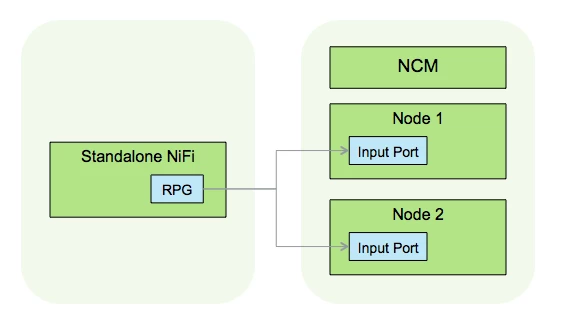
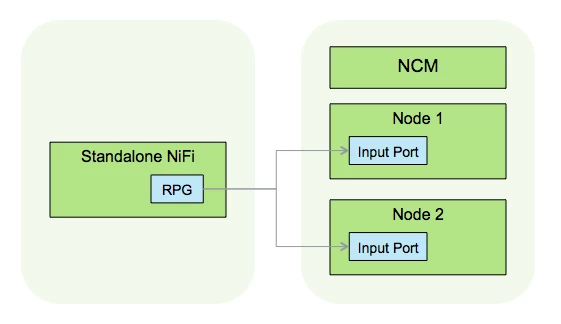
When connecting two NiFi instances, the connection is made with a Remote Process Group (RPG) which connects to an Input Port, or Output Port on the other instance.
In the diagrams below, NCM will refer to the cluster manager, nodes refer to the nodes processing data, and RPG refers to Remote Process Groups.
Pushing
When a data source can push it's data to NiFi, there will generally be a processor listening for incoming data. In a cluster, this processor would be running on each node. In order to get the data distributed across all of the listeners, a load balancer can be placed in front of the cluster, as shown in the following example:
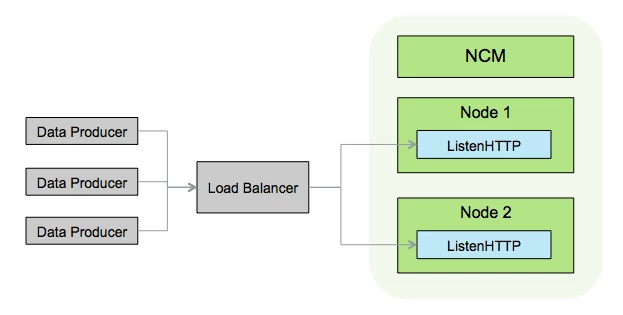
The data sources can make their requests against the url of the load balancer, which redirects them to the nodes of the cluster. Other processors that could be used with this pattern are HandleHttpRequest, ListenSyslog, andListenUDP.
Pulling
If the data source can ensure that each pull operation will pull a unique piece of data, then each node in the NiFi cluster can pull independently. An example of this would be a NiFi cluster with each node running a GetKafka processor:
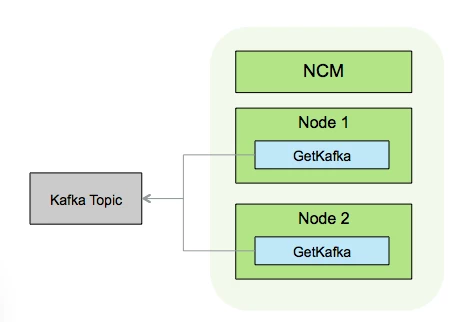
Since each GetKafka processor can be treated as a single client through the Client Name and Group ID properties, each GetKafka processor will pull different data.
A different pulling scenario involves performing a listing operation on the primary node and distributing the results across the cluster via site-to-site to pull the data in parallel. This typically involves "List" and "Fetch" processor where the List processor produces instructions, or tasks, for the Fetch processor to act on. An example of this scenario is shown in the following diagram with ListHDFS and FetchHDFS:
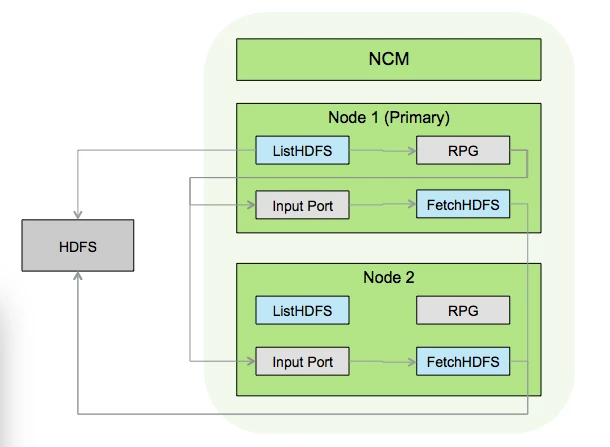
ListHDFS is scheduled to run on primary node and performs a directory listing finding new files since the last time it executed. The results of the listing are then sent out ListHDFS as FlowFiles, where each FlowFile contains one file name to pull from the HDFS. These FlowFiles are then sent to a Remote Process Group connected to an Input Port with in the same cluster. This causes each node in the cluster to receive a portion of the files to fetch. Each FetchFile processor can then fetch the files from HDFS in parallel.
Site-To-Site
If the source of data is another NiFi instance (cluster or standalone), then Site-To-Site can be used to transfer the data. Site-To-Site supports a push or pull mechanism, and takes care of evenly pushing to, or pulling from, a cluster.
In the push scenario, the destination NiFi has one or more Input Ports waiting to receive data. The source NiFi brings data to a Remote Process Group connected to an Input Port on the destination NiFi.
In the pull scenario, the destination NiFi has a Remote Process Group connected to an Output Port on the source NiFi. The source NiFi brings data the Output Port, and the data is automatically pulled by the destination NiFi.
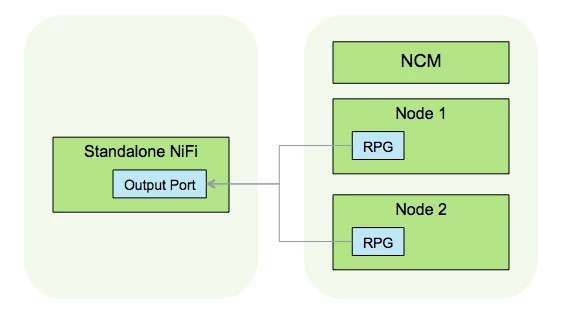
NOTE: These site-to-site examples showed a standalone NiFi communicating with a cluster, but it could be cluster to cluster.