


Bronze ⭐️⭐️⭐️
May 15, 2021
How to create test Livy interactive sessions and batch applications
- October 5, 2026 at 8:51 AM
- 0 replies
- 9642 views
- Translate All
How to test/ create the Livy interactive sessions
The following session is an example of how we can create a Livy session and print out the Spark version:
- Create a session with the following command:
curl -X POST --data '{"kind": "spark"}' -H "Content-Type: application/json" http://172.25.41.3:8998/sessions - Wait for the application to spawn, replace the session ID:
curl -X POST --data '{"kind": "spark","code":"sc.version"}' -H "Content-Type: application/json" http://172.25.41.3:8998/sessions/25/statements - Replace the session ID and get the result:
curl -X GET --data '{"kind": "spark"}' http://172.25.41.3:8998/sessions/25/statements
*Livy objects properties for interactive sessions
How to test the Batch Applications Using the Livy API
Following is the SparkPi test job submitted through Livy API:
To submit the SparkPi job using Livy, you should upload the required jar files to HDFS before running the job. This is the main difference between the Livy API and spark-submit.
>>
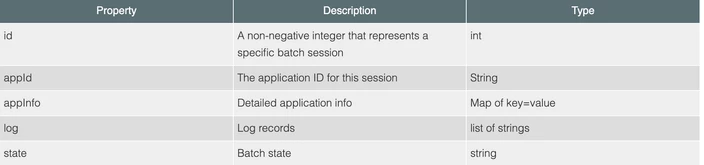
curl -H "Content-Type: application/json" http://172.25.xx.xx:8998/batches -X POST --data ' { "className": "org.apache.spark.examples.SparkPi", "conf": {"spark.executor.memory": "1g"}, "args": [10], "file": "/user/hdfs/spark-examples_2.11-2.4.0.7.1.4.0-203.jar"}'Batch session APIs operate on batch objects, defined as follows:
How to pass job-specific options in POST batches, like we pass to Spark jobs through Spark REPL
curl --negotiate -u:$USER ${LIVY_SERVER}:${LIVY_PORT}/batches -X POST -H 'Content-Type: application/json' -d '{

    "file": "hdfs:///user/livy/depend-jars/example.jar",

    "proxyUser": “sandip”,

    "className": "SparkWordCount",

    "queue": "default",

    "name": "SparkWordCount",

    "jars":["hdfs:///user/livy/depend-jars/hbase-client.jar","hdfs:///user/livy/depend-jars/hbase-common.jar"],

    "files":["hdfs:///user/livy/depend-files/hbase-site.xml","hdfs:///user/livy/depend-files/hive-site.xml"],

    "conf": {

        "spark.driver.memory": "1g",

        "spark.yarn.driver.memoryOverhead": "256",

        "spark.executor.instances": "2",

        "spark.executor.memory": "1g",

        "spark.yarn.executor.memoryOverhead": "256",

        "spark.executor.cores": "1",

        "spark.memory.fraction": "0.2"

    },

    "args":["10"]

}'
Here are the references to pass configurations.
Batch Request:
Interactive Request:
References:
Running an interactive session with the Livy API
Submitting batch applications using the Livy API

