


How to get AWS access keys via IDBroker in CDP?
- October 5, 2026 at 8:48 AM
- 2 replies
- 6374 views
- Translate All
Recently I came around an interesting problem: how to use boto to get data from a secure bucket in a Jupyter notebook in Cloudera Machine Learning.
The missing piece was: I needed to get my code integrated with my AWS permissions given by IDBroker.
Since CML already authenticated me to Kerberos, all I need was getting the goods from IDBroker.
In this article, I will show you pseudo code on how to get these access keys both in bash and python.
Note: Special thanks to @Former Member to whom I owe this article and many more things.
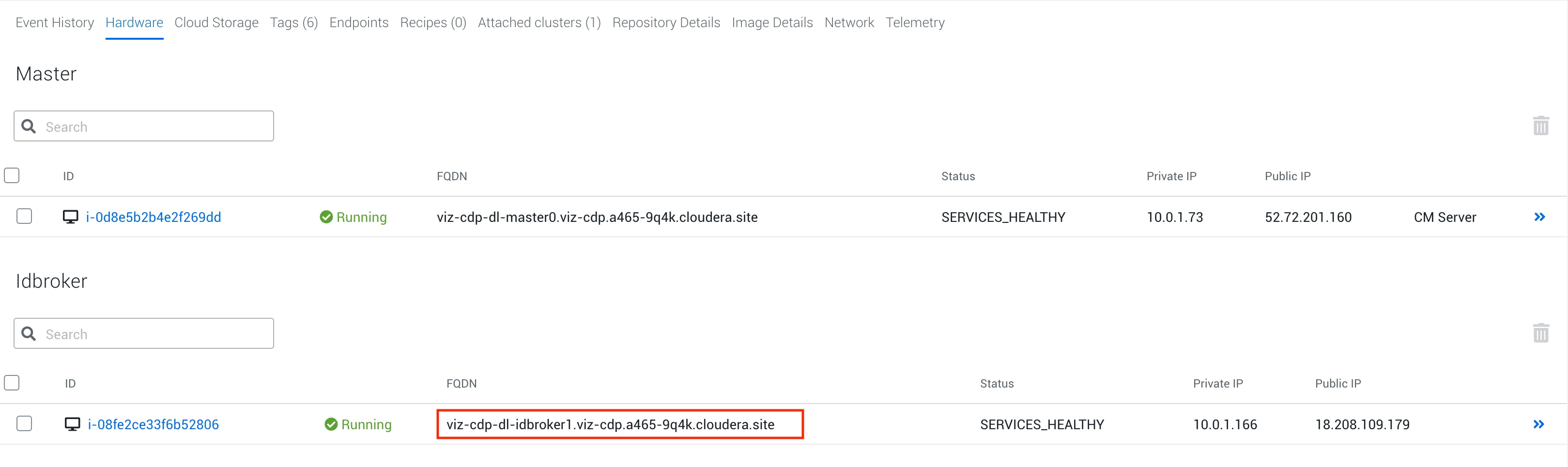
Find your IDBroker URL
Regardless of the method, you will need to get the URL for your IDBroker host. This is done simply in the management console of your datalake. The following is an example:
Getting Access Keys in bash
After you are connected to one of your cluster's node and ensure you kinit, run the following:
IDBROKER_DT="$(curl -s --negotiate -u: "https:/[IDBROKER_HOST]:8444/gateway/dt/knoxtoken/api/v1/token")"
IDBROKER_ACCESS_TOKEN="$(echo "$IDBROKER_DT" | python -c "import json,sys; print(json.load(sys.stdin)['access_token'])")"
IDBROKER_CREDENTIAL_OUTPUT="$(curl -s -H "Authorization: Bearer $IDBROKER_ACCESS_TOKEN" "https://[IDBROKER_HOST]:8444/gateway/aws-cab/cab/api/v1/credentials")"
The credentials can be found in the $IDBROKER_CREDENTIAL_OUTPUT variable.
Getting Access Keys in Python
Before getting started, the following libraries are installed:
pip3 install requests requests-kerberos boto3
Then, run the following code:
import requests

from requests_kerberos import HTTPKerberosAuth
r = requests.get("https://[IDBROKER_URL]:8444/gateway/dt/knoxtoken/api/v1/token", auth=HTTPKerberosAuth())

url = "https://[IDBROKER_URL]:8444/gateway/aws-cab/cab/api/v1/credentials"
headers = {
    'Authorization': "Bearer "+ r.json()['access_token'],
    'cache-control': "no-cache"
    }

response = requests.request("GET", url, headers=headers)

ACCESS_KEY=response.json()['Credentials']['AccessKeyId']
SECRET_KEY=response.json()['Credentials']['SecretAccessKey']
SESSION_TOKEN=response.json()['Credentials']['SessionToken']

import boto3
client = boto3.client(
    's3',
    aws_access_key_id=ACCESS_KEY,
    aws_secret_access_key=SECRET_KEY,
    aws_session_token=SESSION_TOKEN,
)
You can then access your buckets via the following:
data = client.get_object(Bucket='[YOUR_BUCKET]', Key='[FILE_PATH]')
contents = data['Body'].read()
Added on 2022-03-25
If your user is part of multiple groups with different IDBroker mappings, you might get the following error message:
"Ambiguous group role mappings for the authenticated user."
In this case you need to adjust the following line in the code example to specify for which group you would like to get the access credentials:
url = "https://[IDBROKER_URL]:8444/gateway/aws-cab/cab/api/v1/credentials/group/my_cdp_group"

