


MiniFi for Sensor Data Ingest from Devices as Records
See Part 2: https://community.hortonworks.com/articles/108947/minifi-for-ble-bluetooth-low-energy-beacon-data-in.html
We build a flow in Apache NiFi and then export the template. Using the MiniFi tool we convert this into a config.yaml file and send it to our device via scp. You can see this in Part 1. This simple flow calls a shell script that will run a Python script to get our sensor data. This flow will then send the data to our NiFi server via S2S over HTTP.
What I have added in this part is use of the new Record and Schema paradigms and also the ability to SQL queries against incoming flow files using QueryRecord. This requires building an AVRO schema for our data, which is dead easy JSON definition.
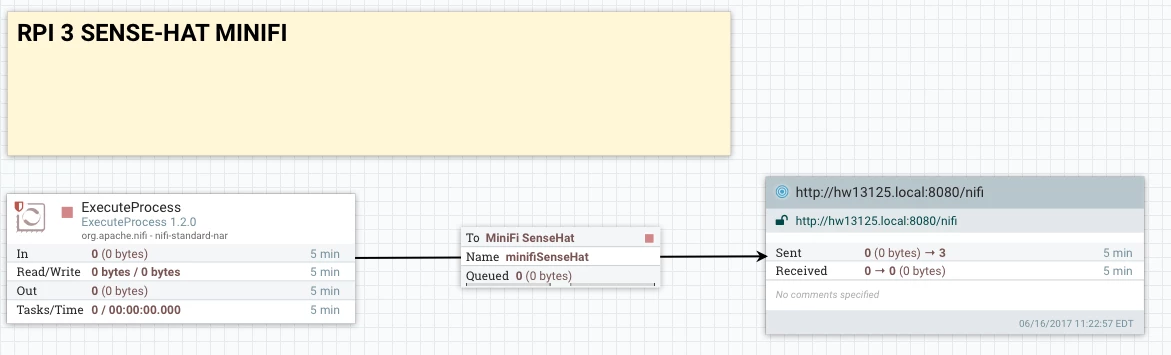
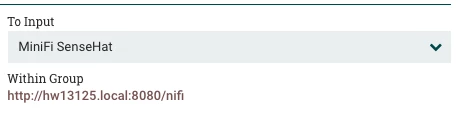
We set out port to connect the minifi agent to our server.

Data quickly starts coming in.
Receive the JSON Messages in NiFi via S2S
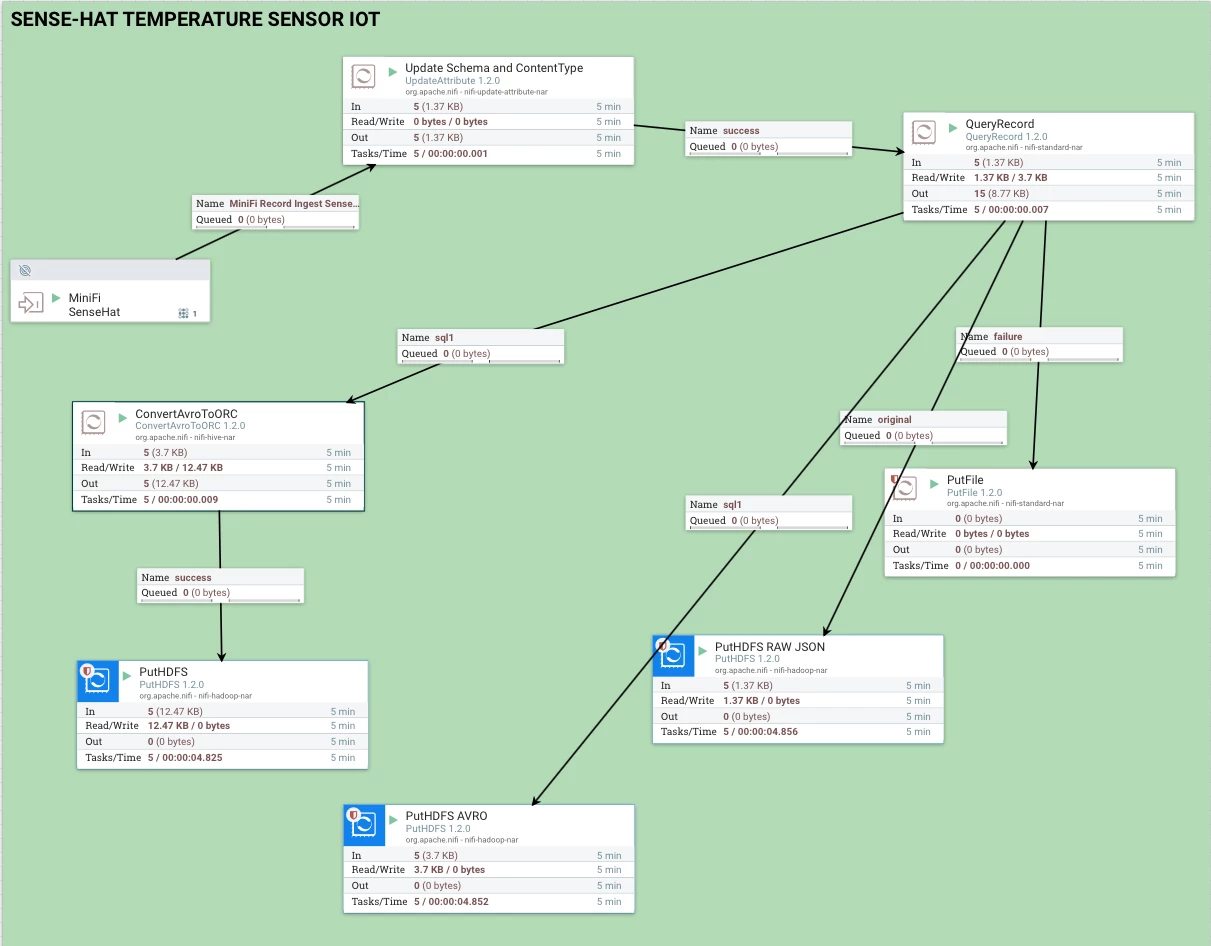

 Top Steps to Ingest Sensor Day in a Few Hours
- Connect to the port
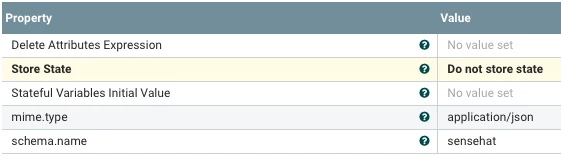
- Set a schema to pull from the registry, also set a mime-type for JSON
- Query the flow file and just take ones over 65 degrees Fahrenheit via Apache Calcite processed SQL These produces an AVRO file using the AvoRecordSetWriter and the schema from the AvroSchemaRegistry
- I store the AVRO file produced to HDFS
- I store the raw JSON file sent in to HDFS
- I convert the AVRO file to ORC
- I store the ORC files to HDFS
- I grab the autogenerated hive.ddl to create the external tables.
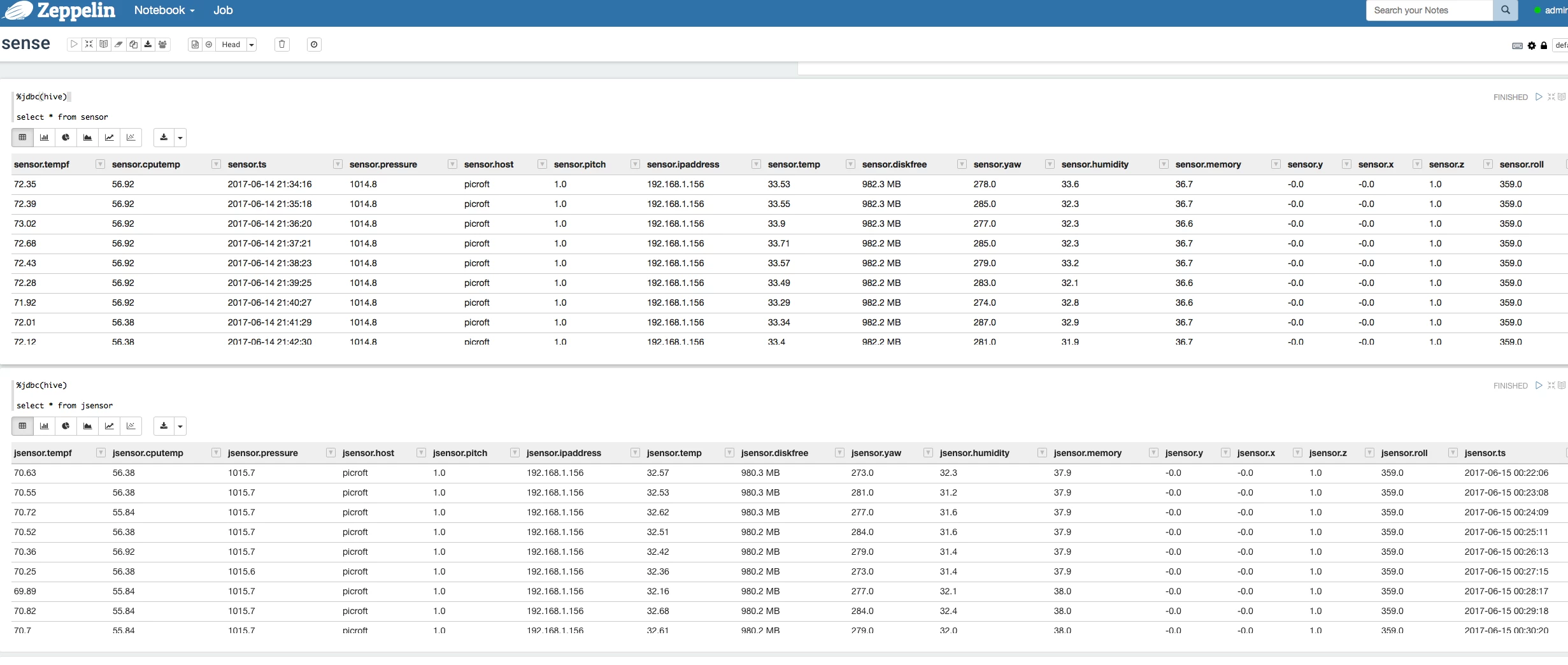
- I query my sensor data in Zeppelin
hive.ddl Automagically Generated Hive Schema
CREATE EXTERNAL TABLE IF NOT EXISTS sensor (tempf FLOAT, cputemp FLOAT, ts STRING, pressure FLOAT, host STRING, pitch FLOAT, ipaddress STRING, temp FLOAT, diskfree STRING, yaw FLOAT, humidity FLOAT, memory FLOAT, y FLOAT, x FLOAT, z FLOAT, roll FLOAT) STORED AS ORC
I grab the HDFS location and add that to the DDL: LOCATION '/sensor'.
For the AVRO and JSON versions of the data, I make similar tables.
ROW FORMAT SERDE 'org.apache.hive.hcatalog.data.JsonSerDe'
LOCATION '/jsonsensor';

ROW FORMAT SERDE 'org.apache.hadoop.hive.serde2.avro.AvroSerDe'
STORED AS AVRO
LOCATION '/avrosensor';
Install Libraries (See Part 1 for MiniFi install)
pip install --upgrade sense-hat<br>pip install --upgrade pillow<br>pip install rtimulib
pip install psutil
sudo apt-get install oracle-java8-jdk
Shell Script
python /opt/demo/rpi-sensehat-mqtt-nifi/sense2.py
Python Script
from sense_hat import SenseHat
import json
import sys, socket
import os
import psutil
import subprocess
import time
import datetime
from time import sleep
from time import gmtime, strftime
# get data
#current_milli_time = lambda: int(round(time.time() * 1000))
# yyyy-mm-dd hh:mm:ss
currenttime= strftime("%Y-%m-%d %H:%M:%S",gmtime())
host = os.uname()[1]
rasp = ('armv' in os.uname()[4])
cpu = psutil.cpu_percent(interval=1)
if rasp:
    f = open('/sys/class/thermal/thermal_zone0/temp', 'r')
    l = f.readline()
    ctemp = 1.0 * float(l)/1000
usage = psutil.disk_usage("/")
mem = psutil.virtual_memory()
diskrootfree =  "{:.1f} MB".format(float(usage.free) / 1024 / 1024)
mempercent = mem.percent
external_IP_and_port = ('198.41.0.4', 53)  # a.root-servers.net
socket_family = socket.AF_INET
#p = subprocess.Popen(['/opt/vc/bin/vcgencmd','measure_temp'], stdout=subprocess.PIPE,
#    stderr=subprocess.PIPE)
#out, err = p.communicate()
def IP_address():
        try:
            s = socket.socket(socket_family, socket.SOCK_DGRAM)
            s.connect(external_IP_and_port)
            answer = s.getsockname()
            s.close()
            return answer[0] if answer else None
        except socket.error:
            return None
ipaddress = IP_address()
sense = SenseHat()
sense.clear()
temp = sense.get_temperature()
temp = round(temp, 2)
humidity = sense.get_humidity()
humidity = round(humidity, 1)
pressure = sense.get_pressure()
pressure = round(pressure, 1)
orientation = sense.get_orientation()
pitch = orientation['pitch']
roll = orientation['roll']
yaw = orientation['yaw']
acceleration = sense.get_accelerometer_raw()
x = acceleration['x']
y = acceleration['y']
z = acceleration['z']
#cputemp = out
x=round(x, 0)
y=round(y, 0)
z=round(z, 0)
pitch=round(pitch,0)
roll=round(roll,0)
yaw=round(yaw,0)
row =  { 'ts': currenttime, 'host': host, 'memory': mempercent, 'diskfree': diskrootfree, 'cputemp': round(ctemp,2), 'ipaddress': ipaddress, 'temp': temp, 'tempf': round(((temp * 1.8) + 12),2), 'humidity': humidity, 'pressure': pressure, 'pitch': pitch, 'roll': roll, 'yaw': yaw, 'x': x, 'y': y, 'z': z }
json_string = json.dumps(row)
print(json_string)
One Record (JSON)
{"tempf": 75.14, "temp": 35.08, "pitch": 1.0, "diskfree": "1211.8 MB", "yaw": 55.0, "cputemp": 52.08, "ts": "2017-06-16 17:39:08", "humidity": 41.5, "pressure": 0.0, "host": "picroft", "memory": 23.0, "y": 0.0, "x": -1.0, "z": 1.0, "ipaddress": "192.168.1.156", "roll": 1.0}
AVRO Schema (JSON Format)
{"type":"record","namespace":"hortonworks.hdp.refapp.sensehat","name":"sensehat","fields":[{"name": "tempf", "type": "float"},{ "name": "cputemp", "type": "float"},{"name":"ts","type":"string"},{ "name": "pressure","type": "float"},{ "name": "host","type": "string"},{ "name": "pitch","type": "float"},{"name": "ipaddress","type": "string"},{"name": "temp","type": "float"},{ "name": "diskfree","type": "string"},{ "name": "yaw","type": "float" },{"name": "humidity","type": "float"},{"name": "memory","type": "float"},{"name": "y", "type": "float"},{"name": "x", "type": "float" },{"name": "z","type": "float"},{"name": "roll", "type": "float"}]}
config.yml
MiNiFi Config Version: 2
Flow Controller:
  name: sense hat
  comment: sense hat 2017
Core Properties:
  flow controller graceful shutdown period: 10 sec
  flow service write delay interval: 500 ms
  administrative yield duration: 30 sec
  bored yield duration: 10 millis
  max concurrent threads: 1
FlowFile Repository:
  partitions: 256
  checkpoint interval: 2 mins
  always sync: false
  Swap:
    threshold: 20000
    in period: 5 sec
    in threads: 1
    out period: 5 sec
    out threads: 4
Content Repository:
  content claim max appendable size: 10 MB
  content claim max flow files: 100
  always sync: false
Provenance Repository:
  provenance rollover time: 1 min
Component Status Repository:
  buffer size: 1440
  snapshot frequency: 1 min
Security Properties:
  keystore: ''
  keystore type: ''
  keystore password: ''
  key password: ''
  truststore: ''
  truststore type: ''
  truststore password: ''
  ssl protocol: ''
  Sensitive Props:
    key:
    algorithm: PBEWITHMD5AND256BITAES-CBC-OPENSSL
    provider: BC
Processors:
- id: db6fbd3b-ddf4-3041-0000-000000000000
  name: ExecuteProcess
  class: org.apache.nifi.processors.standard.ExecuteProcess
  max concurrent tasks: 1
  scheduling strategy: TIMER_DRIVEN
  scheduling period: 60 sec
  penalization period: 30 sec
  yield period: 1 sec
  run duration nanos: 0
  auto-terminated relationships list: []
  Properties:
    Argument Delimiter: ' '
    Batch Duration:
    Command: /opt/demo/rpi-sensehat-mqtt-nifi/sense2.sh
    Command Arguments:
    Redirect Error Stream: 'true'
Process Groups: []
Input Ports: []
Output Ports: []
Funnels: []
Connections:
- id: 5635290a-4cb6-3da7-0000-000000000000
  name: minifiSenseHat
  source id: db6fbd3b-ddf4-3041-0000-000000000000
  source relationship names:
  - success
  destination id: 166616e3-1962-1660-2b7c-2f824584b23a
  max work queue size: 10000
  max work queue data size: 1 GB
  flowfile expiration: 0 sec
  queue prioritizer class: ''
Remote Process Groups:
- id: fdc45649-84be-374b-0000-000000000000
  name: ''
  url: http://hw13125.local:8080/nifi
  comment: ''
  timeout: 30 sec
  yield period: 10 sec
  transport protocol: HTTP
  Input Ports:
  - id: 166616e3-1962-1660-2b7c-2f824584b23a
    name: MiniFi SenseHat
    comment: ''
    max concurrent tasks: 1
    use compression: false
Build our MiniFi Configuration File from the sensorminif.xml
minifi-toolkit-1.0.2.1.4.0-5/bin/config.sh transform sensorminifi.xml config.yml
Then just SCP to your device.
Flows
Source Repository
https://github.com/tspannhw/rpi-sensehat-minifi-python
Example MiniFi Log
dResourceClaim[id=1497645887239-1, container=default, section=1], offset=2501, length=278],offset=0,name=13917785142443,size=278]] (278 bytes) to http://HW13125.local:8080/nifi-api in 116 milliseconds at a rate of 2.32 KB/sec
2017-06-16 20:54:41,827 INFO [Provenance Maintenance Thread-1] o.a.n.p.MiNiFiPersistentProvenanceRepository Created new Provenance Event Writers for events starting with ID 3162
2017-06-16 20:54:41,844 INFO [Provenance Repository Rollover Thread-1] o.a.n.p.MiNiFiPersistentProvenanceRepository Successfully merged 16 journal files (3 records) into single Provenance Log File provenance_repository/3159.prov in 33 milliseconds
2017-06-16 20:54:41,846 INFO [Provenance Repository Rollover Thread-1] o.a.n.p.MiNiFiPersistentProvenanceRepository Successfully Rolled over Provenance Event file containing 5 records
2017-06-16 20:54:43,288 INFO [Write-Ahead Local State Provider Maintenance] org.wali.MinimalLockingWriteAheadLog org.wali.MinimalLockingWriteAheadLog@87eb01 checkpointed with 0 Records and 0 Swap Files in 100 milliseconds (Stop-the-world time = 13 milliseconds, Clear Edit Logs time = 10 millis), max Transaction ID -1
2017-06-16 20:54:48,429 INFO [pool-23-thread-1] o.a.n.c.r.WriteAheadFlowFileRepository Initiating checkpoint of FlowFile Repository
2017-06-16 20:54:48,890 INFO [pool-23-thread-1] org.wali.MinimalLockingWriteAheadLog org.wali.MinimalLockingWriteAheadLog@17461db checkpointed with 0 Records and 0 Swap Files in 460 milliseconds (Stop-the-world time = 190 milliseconds, Clear Edit Logs time = 77 millis), max Transaction ID 2107
2017-06-16 20:54:48,891 INFO [pool-23-thread-1] o.a.n.c.r.WriteAheadFlowFileRepository Successfully checkpointed FlowFile Repository with 0 records in 461 milliseconds
2017-06-16 20:54:51,482 INFO [Http Site-to-Site PeerSelector] o.apache.nifi.remote.client.PeerSelector org.apache.nifi.remote.client.PeerSelector@f69f9d Successfully refreshed Peer Status; remote instance consists of 1 peers
2017-06-16 20:55:07,621 INFO [Timer-Driven Process Thread-9] o.apache.nifi.remote.client.PeerSelector New Weighted Distribution of Nodes:
PeerStatus[hostname=HW13125.local,port=8080,secure=false,flowFileCount=0] will receive 100.0% of data
2017-06-16 20:55:07,957 INFO [Timer-Driven Process Thread-9] o.a.nifi.remote.StandardRemoteGroupPort RemoteGroupPort[name=MiniFi SenseHat,target=http://hw13125.local:8080/nifi] Successfully sent [StandardFlowFileRecord[uuid=b3bcd211-7425-4750-9e4c-ba2d477b9cc1,claim=StandardContentClaim [resourceClaim=StandardResourceClaim[id=1497645887239-1, container=default, section=1], offset=2779, length=278],offset=0,name=13979556432846,size=278]] (278 bytes) to http://HW13125.local:8080/nifi-api in 114 milliseconds at a rate of 2.38 KB/sec
Check the Status of MiniFi
root@picroft:/opt/demo/minifi-1.0.2.1.4.0-5# bin/minifi.sh flowStatus processor:db6fbd3b-ddf4-3041-0000-000000000000:health,stats,bulletins
minifi.sh: JAVA_HOME not set; results may vary
Bootstrap Classpath: /opt/demo/minifi-1.0.2.1.4.0-5/conf:/opt/demo/minifi-1.0.2.1.4.0-5/lib/bootstrap/*:/opt/demo/minifi-1.0.2.1.4.0-5/lib/*
Java home:
MiNiFi home: /opt/demo/minifi-1.0.2.1.4.0-5
Bootstrap Config File: /opt/demo/minifi-1.0.2.1.4.0-5/conf/bootstrap.conf

FlowStatusReport{controllerServiceStatusList=null, processorStatusList=[{name='ExecuteProcess', processorHealth={runStatus='Running', hasBulletins=false, validationErrorList=[]}, processorStats={activeThreads=0, flowfilesReceived=0, bytesRead=0, bytesWritten=1390, flowfilesSent=0, invocations=5, processingNanos=9290051632}, bulletinList=[]}], connectionStatusList=null, remoteProcessGroupStatusList=null, instanceStatus=null, systemDiagnosticsStatus=null, reportingTaskStatusList=null, errorsGeneratingReport=[]}
Output Displayed in Apache Zeppelin Workbook
Using the DDL generated by Apache NiFi, we can create external Hive tables for the raw JSON data, the ORC cleaned up version of the data and also an AVRO version of the data.

We can then query our datasets.
References:
- https://cwiki.apache.org/confluence/display/Hive/AvroSerDe
- https://json-schema-validator.herokuapp.com/avro.jsp
- https://docs.hortonworks.com/HDPDocuments/HDF3/HDF-3.0.0/bk_minifi-administration/content/ch01s01.html
- https://community.hortonworks.com/articles/55839/reading-sensor-data-from-remote-sensors-on-raspber.html
- https://www.thepolyglotdeveloper.com/2016/08/connect-multiple-wireless-networks-raspberry-pi/
- https://community.hortonworks.com/articles/83100/deep-learning-iot-workflows-with-raspberry-pi-mqtt.html

