


Oozie coordinator and based on input data events
Here is an example of scheduling Oozie co-ordinator based on input data events. it starts Oozie workflow when input data is available.
In this example coordinator will start at 2016-04-10, 6:00 GMT and will keep running till 2017-02-26, 23:25GMT (please note start and end time in xml file)
start="2016-04-10T06:00Z" end="2017-02-26T23:25Z" timezone="GMT"
Frequency is 1 day
frequency="${coord:days(1)}"
Below ETL function gives same value as start time which means coordinator will look for input data which has value same as start data in /user/root/output/YYYYMMDD format
<instance>${coord:current(0)}</instance>
Below are the working configuration files.
coordinator.xml:
<coordinator-app name="test"
  frequency="${coord:days(1)}"
  start="2016-04-10T06:00Z" end="2017-02-26T23:25Z" timezone="GMT"
  xmlns="uri:oozie:coordinator:0.2">
  <datasets>
    <dataset name="inputdataset" frequency="${coord:days(1)}"
             initial-instance="2016-04-10T06:00Z" timezone="GMT">
      <uri-template>${nameNode}/user/root/input/${YEAR}${MONTH}${DAY}</uri-template>
      <done-flag></done-flag>
    </dataset>
    <dataset name="outputdataset" frequency="${coord:days(1)}"
             initial-instance="2016-04-10T06:00Z" timezone="GMT">
      <uri-template>${nameNode}/user/root/output/${YEAR}${MONTH}${DAY}</uri-template>
      <done-flag></done-flag>
    </dataset>
  </datasets>
  <input-events>
      <data-in name="inputevent" dataset="inputdataset">
          <instance>${coord:current(0)}</instance>
      </data-in>
  </input-events>
  <output-events>
      <data-out name="outputevent" dataset="outputdataset">
          <instance>${coord:current(0)}</instance>
      </data-out>
  </output-events>
  <action>
    <workflow>
      <app-path>${workflowAppUri}</app-path>
            <configuration>
                <property>
                    <name>inputDir</name>
                    <value>${coord:dataIn('inputevent')}</value>
                </property>
                <property>
                    <name>outputDir</name>
                    <value>${coord:dataOut('outputevent')}</value>
                </property>
            </configuration>
   </workflow>
  </action>
</coordinator-app>
workflow.xml
<workflow-app xmlns="uri:oozie:workflow:0.4" name="shell-wf">
    <start to="shell-node"/>
    <action name="shell-node">
        <shell xmlns="uri:oozie:shell-action:0.2">
            <job-tracker>${jobTracker}</job-tracker>
            <name-node>${nameNode}</name-node>
            <configuration>
                <property>
                    <name>mapred.job.queue.name</name>
                    <value>${queueName}</value>
                </property>
            </configuration>
            <exec>${myscript}</exec>
    <argument>${inputDir}</argument>
    <argument>${outputDir}</argument>
            <file>${myscriptPath}</file>
            <capture-output/>
        </shell>
        <ok to="end"/>
        <error to="fail"/>
    </action>
    <kill name="fail">
        <message>Shell action failed, error message[${wf:errorMessage(wf:lastErrorNode())}]</message>
    </kill>
    <kill name="fail-output">
        <message>Incorrect output, expected [Hello Oozie] but was [${wf:actionData('shell-node')['my_output']}]</message>
    </kill>
    <end name="end"/>
</workflow-app>
job.properties
nameNode=hdfs://sandbox.hortonworks.com:8020
start=2016-04-12T06:00Z
end=2017-02-26T23:25Z
jobTracker=sandbox.hortonworks.com:8050
queueName=default
examplesRoot=examples
oozie.coord.application.path=${nameNode}/user/root
workflowAppUri=${oozie.coord.application.path}
myscript=myscript.sh
myscriptPath=${oozie.wf.application.path}/myscript.sh
myscript.sh
#!/bin/bash
echo "I'm receiving input as $1" > /tmp/output
echo "I can store my output at $2" >> /tmp/output
How to schedule this?
1. Edit above files as per your environment.
2. Validate your workflow.xml and cordinator.xml files using below command
#oozie validate workflow.xml
#oozie validate cordinator.xml
3. Upload your script and these xml files to oozie.coord.application.path and workflowAppUri mentioned in the job.properties
4. Submit coordinator using below command.
oozie job -oozie 
Note - You will see that some coordinator actions are in WAITING state, that's because they are still waiting for input data to be available on hdfs
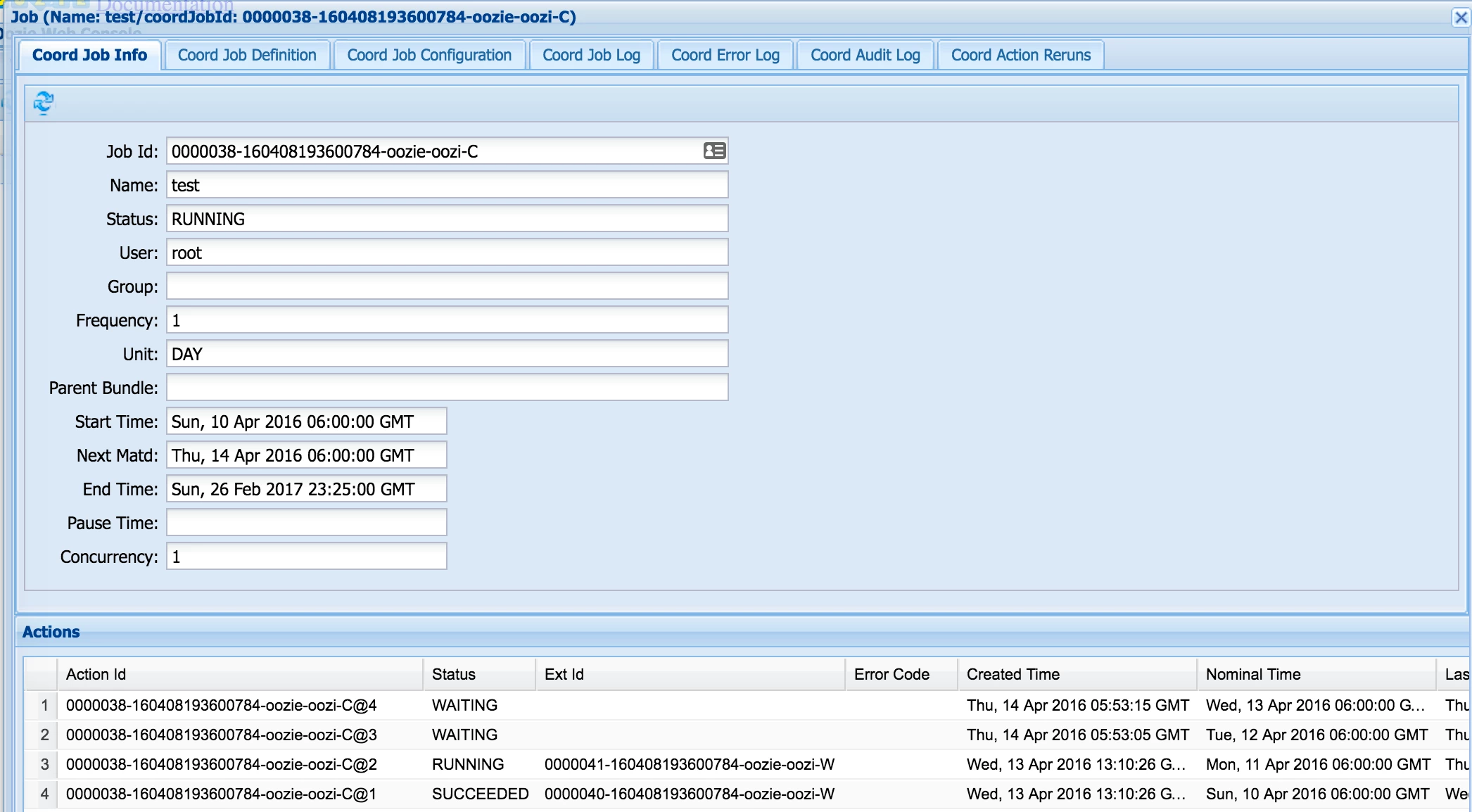
If you check /var/log/oozie.log and grep for WAITING coordinator actions:
2016-04-14 05:54:05,850  INFO CoordActionInputCheckXCommand:520 - SERVER[sandbox.hortonworks.com] USER[-] GROUP[-] TOKEN[-] APP[-] JOB[0000038-160408193600784-oozie-oozi-C] ACTION[0000038-160408193600784-oozie-oozi-C@3] [0000038-160408193600784-oozie-oozi-C@3]::ActionInputCheck:: In checkListOfPaths: hdfs://sandbox.hortonworks.com:8020/user/root/input/20160412 is Missing.

[..]

2016-04-14 05:54:15,601  INFO CoordActionInputCheckXCommand:520 - SERVER[sandbox.hortonworks.com] USER[-] GROUP[-] TOKEN[-] APP[-] JOB[0000038-160408193600784-oozie-oozi-C] ACTION[0000038-160408193600784-oozie-oozi-C@4] [0000038-160408193600784-oozie-oozi-C@4]::ActionInputCheck:: In checkListOfPaths: hdfs://sandbox.hortonworks.com:8020/user/root/input/20160413 is Missing.
On HDFS:
[root@sandbox coord]# hadoop fs -ls /user/root/input/
Found 3 items
-rw-r--r--   3 root hdfs          0 2016-04-13 13:16 /user/root/input/20160410
drwxr-xr-x   - root hdfs          0 2016-04-13 13:07 /user/root/input/20160411
Output:
[root@sandbox coord]# cat /tmp/output
I'm receiving input as hdfs://sandbox.hortonworks.com:8020/user/root/input/20160411
I can store my output at hdfs://sandbox.hortonworks.com:8020/user/root/output/20160411

