

Openldap Setup
Configure Ldap server on Redhat/Centos :-
- Check the ldap packages are installed or not on Server with following command
#rpm –qa|grep openldap
2. If packages are not installed then install the packages with yum command
#yum install openldap-* -y
3. Once pacakge are installed then check with following command
#rpm –qa |grep openldap
4. Create Ldap password with following command
#slappasswd
[Enter the password and copy the md5 formate password for adding the password into the
database file]
5. Edit database files for domain
#vi /etc/openldap/slapd.d/cn=config/olcDatabase={2}bdb.ldif

oldSuffix:dc=example,dc=com
olcRootDN:cn=Manager,dc=example,dc=com
olcRootPW:
copy the password  here which is
generated after set the slpappasswd.
#vi /etc/openldap/slpapd.d/cn=config/olcDatabase={1}monitor.ldif
olcAccess: {0}to *  by dn.base="gidNumber=0+uidNumber=0,cn=peercred,cn=external,cn=auth" read  by dn.base="cn=manager,dc=example,dc=com" read  by * none
6.Run the updatedb command to initialize database. Create or update a database used by locate. It will take a time to update. So keep a patient and wait for few second
#yum install mlocate

#updatedb
7.Copy LDAP example database file
#cp /usr/share/openldap-servers/DB_CONFIG.example /var/lib/ldap/DB_CONFIG
#chown ldap:ldap -Rf /var/lib/ldap

#slaptest –u
8. Start ldap server.
#service slapd start
9. Check the service process is started properly and is running using ps command
#ps -aef |grep slapd
#netstat -tauepn |grep 389
10. Run ldapsearch command
#ldapsearch –x –b "dc=example,dc=com"
11. Install Migration tools. A set of script for migrating user,group,aliases, hosts,netgroups,network,protocols,RPCs, and servicesfrom existing nameserver (flat files, NIS, and NetInfo) to LDAP.
#yum install -y migrationtools

#cd /usr/share/migrationtools
#vi migrate_common.ph

Do the following changes :-

NAMEINGCONTEXT{‘group’}             = ”ou=Groups”;
DEFAULT_MAIL_DOMAIN                 = “example.com”
DEFAULT_BASE                        = “dc=example,dc=com”
EXTENDED_SCHEMA                     = 1;
12. Create LDIF file for base and users
#mkdir /root/ldap/
#/usr/share/migrationtools/migrate_base.pl >/root/ldap/base.ldif
- Create users,password and groups for LDAP user testing.

#mkdir /home/ldap
#useradd –d /home/ldap/user1 user1;passwd user1
#useradd –d /home/ldap/user2 user2;passwd user2
#useradd –d /home/ldap/user3 user3;passwd user3
#getent passwd |tail –n 3   >/root/ldap/users
#getent shadow |tail –n 3  >/root/ldap/passwords
#getent group |tail –n 3   >/root/ldap/groups

- Create LDAP files for users
#./usr/share/migrationtools/migrate_passwd.pl /root/ldap/users > /root/ldap/users.ldif

#./usr/share/migrationtools/migrate_group.pl /root/ldap/groups > /root/ldap/groups.ldif
13. Add data to LDAP server
#ldapadd –x –W –D “cn=Manager,dc=example,dc=com” –f /root/ldap/base.ldif

#ldapadd –x –W –D “cn=Manager,dc=example,dc=com” –f /root/ldap/users.ldif

#ldapadd –x –W –D “cn=Manager,dc=example,dc=com” –f /root/ldap/groups.ldif
14. Test user data in LDAP
#ldapsearch –x –b “dc=example,dc=com”

#ldapsearch –x –b “dc=example,dc=com” |grep user1

#slapcat –v
14.a) Lets map the users to respective group as shown below -
Create a file name groupsmap.ldif and add below lines to it -
#cat  /root/groupsmap.ldif
dn: cn=user1,ou=Groups,dc=example,dc=com
changetype: modify
add: memberUid
memberUid: user1

dn: cn=user2,ou=Groups,dc=example,dc=com
changetype: modify
add: memberUid
memberUid: user2

dn: cn=user3,ou=Groups,dc=example,dc=com
changetype: modify
add: memberUid
memberUid: user3
Use Ldap modify command to modify the entries for user and group mapping -
#ldapmodify -D "cn=Manager,dc=example,dc=com" -W < /root/groupsmap.ldif
15. LDAP Client Configuration
#yum install openldap-clients openldap openldap-devel nss-pam-ldapd pam_ldap authconfig authconfig-gtk –y
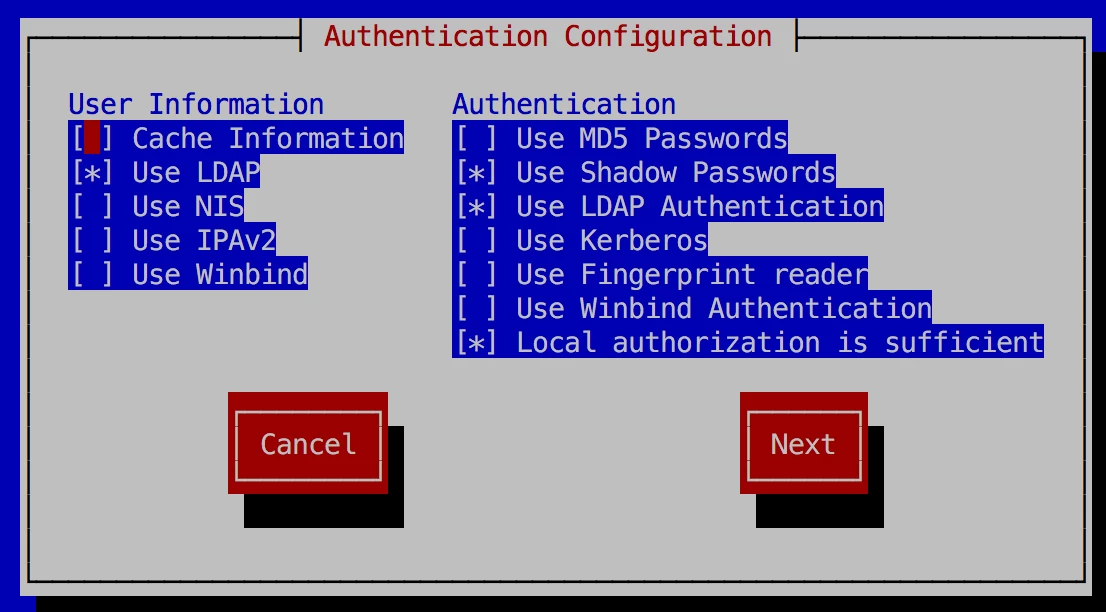
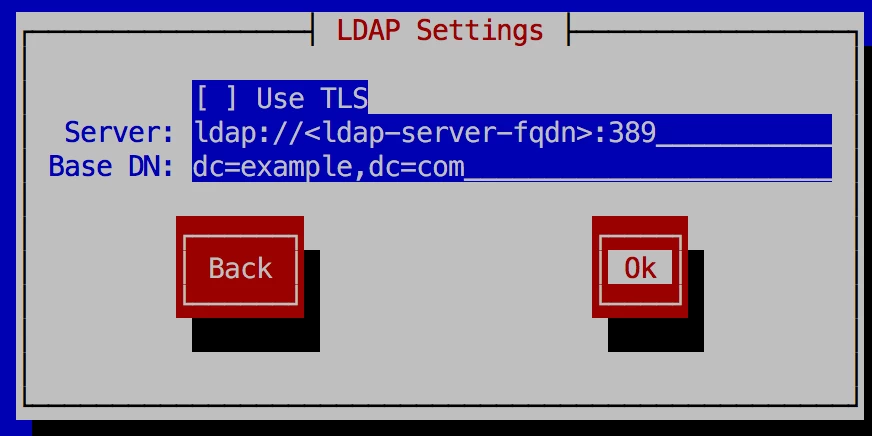
16.Run authconfig command to configure ldap client.
$authconfig-tui
17. Check the configuration set in file
#cat /etc/openldap/ldap.conf
18. Check ldap client configuration at client side
#getent passwd user1
#su - user1
19. If you are not able to see user home directory the use the authconfig command to enable home directory
#authconfig --enableldapauth --enablemkhomedir --ldapserver=ldap://<ldap-server-fqdn>:389 --ldapbasedn="dc=example,dc=com" --update
20. You can also configure home directory on NFS. Add-on step will be required for nfs ldap configuration.

