


Reading/Writing using R to an external table within CML (Two steps - THAT WAS EASY)
create database cloudera_r;

create external table cloudera_r.people_table (id int, name string) location 's3a://ryancicak/people_table';

insert into cloudera_r.people_table values (0,'ryan'), (1, 'paul'), (2, 'oleksandr'), (3, 'oliver'), (4,'jd');

create external table cloudera_r.people_new_table (id int, name string) location 's3a://ryancicak/people_new_table';

insert into cloudera_r.people_new_table values (5,'danielle'), (6,'nilesh');
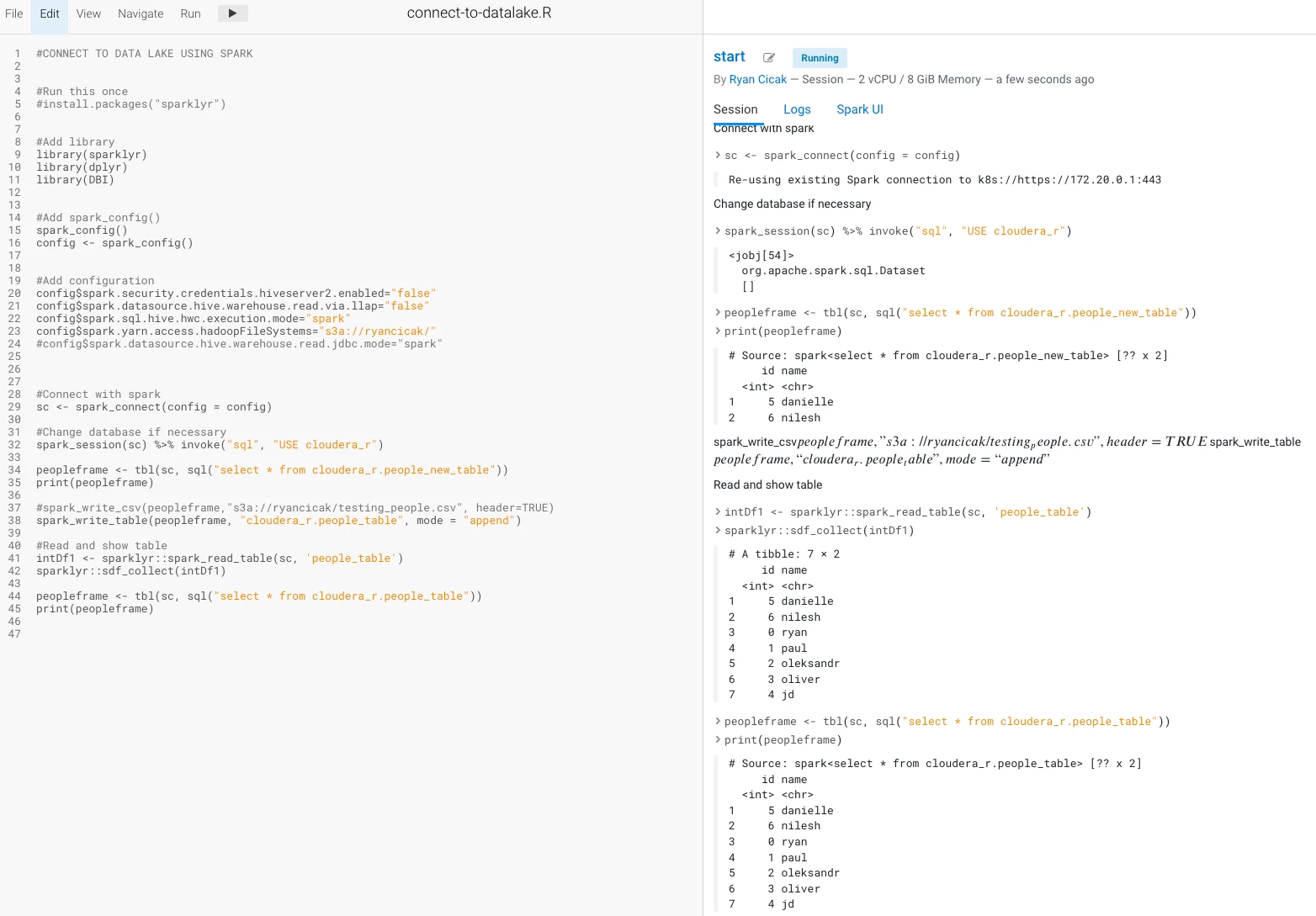
Step 2: Modifying the code in the article above (stripping out HWC) - I'm able to run the code (which I'll include a snippet below so you can copy)
- Since the Hive Metastore contains the S3 location from Impala in Step 1, we do not need to specify the S3 location for Spark to read/write.
- We need the spark.yarn.access.hadoopFileSystem to contain the S3 location that our table is - so Spark has access to read/write. If you make a modification on spark.yarn.access.hadoopFileSystem - it's best to start a new session.
#CONNECT TO DATA LAKE USING SPARK


#Run this once
#install.packages("sparklyr")


#Add library
library(sparklyr)
library(dplyr)
library(DBI)


#Add spark_config()
spark_config()
config <- spark_config()


#Add configuration
config$spark.security.credentials.hiveserver2.enabled="false"
config$spark.datasource.hive.warehouse.read.via.llap="false"
config$spark.sql.hive.hwc.execution.mode="spark"
config$spark.yarn.access.hadoopFileSystems="s3a://ryancicak/"
#config$spark.datasource.hive.warehouse.read.jdbc.mode="spark"


#Connect with spark
sc <- spark_connect(config = config)

#Change database if necessary
spark_session(sc) %>% invoke("sql", "USE cloudera_r")

peopleframe <- tbl(sc, sql("select * from cloudera_r.people_new_table"))
print(peopleframe)

#spark_write_csv(peopleframe,"s3a://ryancicak/testing_people.csv", header=TRUE)
spark_write_table(peopleframe, "cloudera_r.people_table", mode = "append")

#Read and show table
intDf1 <- sparklyr::spark_read_table(sc, 'people_table')
sparklyr::sdf_collect(intDf1)

peopleframe <- tbl(sc, sql("select * from cloudera_r.people_table"))
print(peopleframe)
Notice that the first print table is showing the two rows, Danielle and Nilesh. The second table print is showing the table people_table after we wrote the two new rows, where instead of five initial records, we show seven (since we appended).
- I do print the same table twice - just showing two different ways to read from a table (I prefer the SQL option).
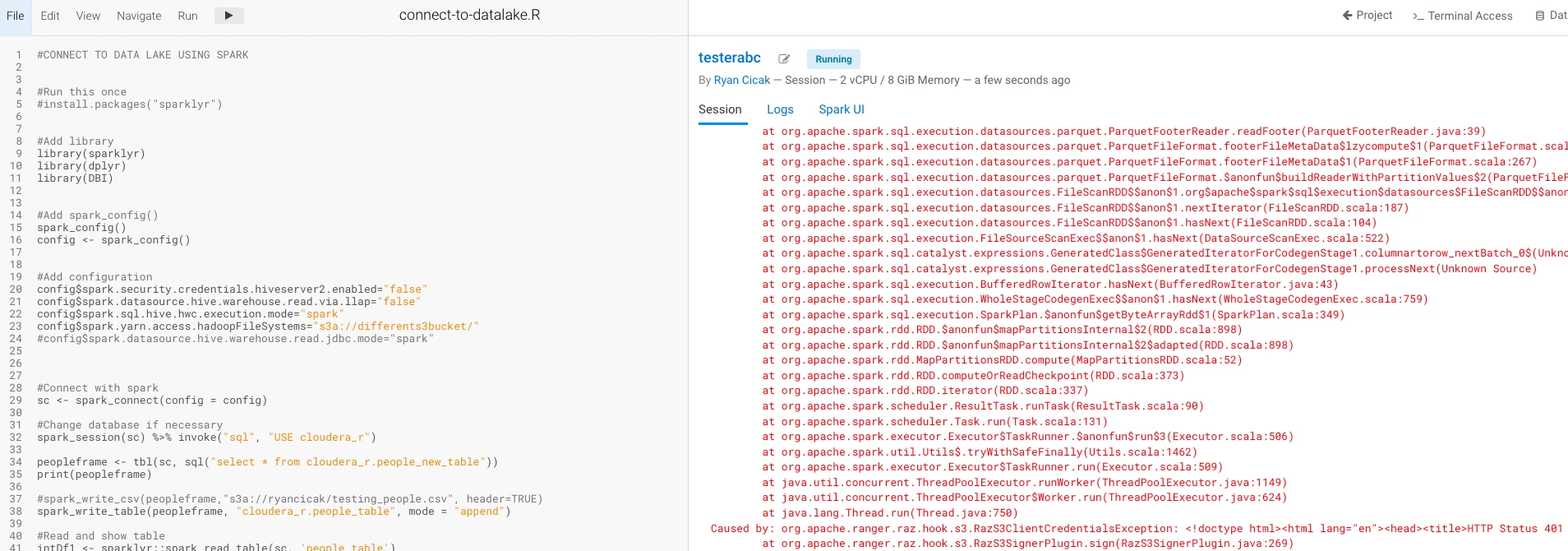
- If you do not choose the correct bucket name (the S3 bucket where you're reading/writing tables) - you'll receive an error. In my case, I receive a RAZ 401 error (since I have RAZ enabled). If I change my bucket after running one in my session, I'll still get the error. I need to stop and then start a new session to take in the correct bucket.
- I can add multiple S3 locations separated with commas.
Notice that I changed my hadoopFileSystems to "differents3bucket" and receive the access error. Even if I change back to "ryancicak", I still receive an access error until I start a new session.
Shout-out to @pauldefusco , @ozarate , @aakulov , and @jagadeesan for helping with these steps!

