Setting up separate Zookeeper Quorum for Kafka
Hi All,
In this article we will talk about how to setup a separate zookeeper quorum for Kafka which is managed by Ambari.
Please note at this moment Amabri only can support one ZK Quorum, in order to have two Quorum in a cluster
Prerequisite: -
- All Servers should have java Installed
- Download the zk tar files:- http://www-eu.apache.org/dist/zookeeper/stable/
- Password less ssh with all the host servers.
Steps (to setup Zookeeper Server) :- Please run all the below command in all the nodes where zookeeper will be installed manually
- Create hadoop group and zookeeper ID
- groupadd hadoop useradd
- zookeeper -g hadoop
2. Setting up the environment variables (ease of deployment)
- export ZOOKEEPER_CONF_DIR=/etc/zookeeper/conf
- export ZOOKEEPER_LOG_DIR=/var/log/zookeeper
- export ZOOKEEPER_PID_DIR=/var/run/zookeeper
- export ZOOKEEPER_DATA_DIR=/hadoop/zookeeper/data
- export ZOOKEEPER_USER=zookeeper
- export HADOOP_GROUP=hadoop
- export ZOOKEEPER_HOME=/usr/hdp/2.6.4.0-91/zookeeper
- export JAVA_HOME:- /usr/lib/jvm/jre-1.8.0-openjdk/bin
3. Setting up the environment with necessary Folders and permission
- mkdir -p $ZOOKEEPER_LOG_DIR;
- chown -R $ZOOKEEPER_USER:$HADOOP_GROUP $ZOOKEEPER_LOG_DIR;
- chmod -R 755 $ZOOKEEPER_LOG_DIR;
- mkdir -p $ZOOKEEPER_PID_DIR;
- chown -R $ZOOKEEPER_USER:$HADOOP_GROUP $ZOOKEEPER_PID_DIR;
- chmod -R 755 $ZOOKEEPER_PID_DIR;
- mkdir -p $ZOOKEEPER_DATA_DIR;
- chmod -R 755 $ZOOKEEPER_DATA_DIR;
- chown -R $ZOOKEEPER_USER:$HADOOP_GROUP $ZOOKEEPER_DATA_DIR
4. Create Zookeeper Home and Configuration Directory
- mkdir -p $ZOOKEEPER_HOME
- chmod -R 755 $ZOOKEEPER_DATA_DIR;
- chown -R $ZOOKEEPER_USER:$HADOOP_GROUP $ZOOKEEPER_DATA_DIR
- rm -r $ZOOKEEPER_CONF_DIR ;
- mkdir -p $ZOOKEEPER_CONF_DIR ;
5. Extract the ZooKeeper configuration files to a temporary directory and Move the files to Home Directory created previously in Step 4
- tar -zxvf zookeeper-3.4.12.tar.gz
- cp -R zookeeper-3.4.12/* $ZOOKEEPER_HOME/
6. Setup of the Configuration files
- You must set up several configuration files for ZooKeeper. Hortonworks provides a set of configuration files that represent a working ZooKeeper configuration , use the files from the link as reference (https://docs.hortonworks.com/HDPDocuments/HDP2/HDP2.4.2/bk_installing_manually_book/content/download-companion-files.html)
- Modify the configuration files.
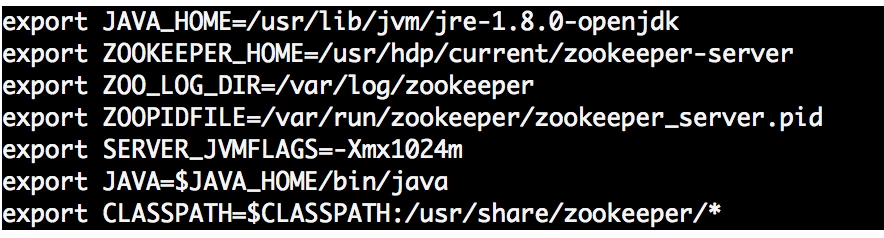
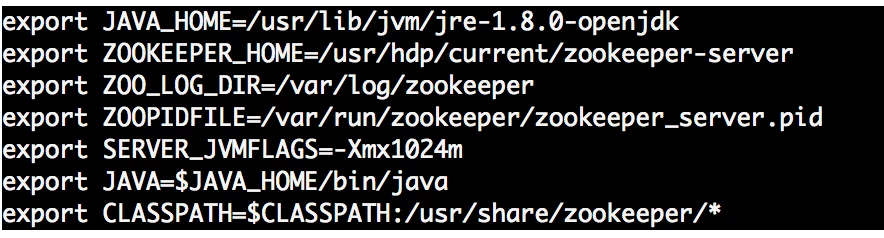
- Edit the zookeeper-env.sh file to match the Java home directory, ZooKeeper log directory, ZooKeeper PID directory in your cluster environment and the directories you set up above.
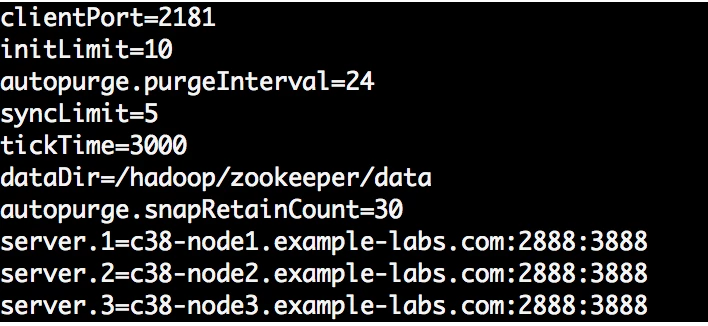
- Edit the zoo.cfg file to match your cluster environment. Below is an example of a typical zoo.cfs file:
7. Copy all the ZooKeeper configuration files (zoo.cfg and zookeeper-env.sh ) to the $ZOOKEEPER_CONF_DIR directory and set appropriate permission
- rm -r $ZOOKEEPER_CONF_DIR ;
- mkdir -p $ZOOKEEPER_CONF_DIR ;
- chmod a+x $ZOOKEEPER_CONF_DIR/;
- chown -R $ZOOKEEPER_USER:$HADOOP_GROUP $ZOOKEEPER_CONF_DIR/../;
- chmod -R 755 $ZOOKEEPER_CONF_DIR/../
8. Initialize the ZooKeeper data directories with the 'myid' file. Create one file per ZooKeeper server, and put the number of that server in each file:
vi $ZOOKEEPER_DATA_DIR/myid
- In the myid file on the first server, enter the corresponding number: 1
- In the myid file on the second server, enter the corresponding number: 2
- In the myid file on the third server, enter the corresponding number: 3
9. Finally start the zookeeper Service on all the servers
sudo -E -u zookeeper bash -c "export ZOOCFGDIR=$ZOOKEEPER_CONF_DIR ; export ZOOCFG=zoo.cfg; source $ZOOKEEPER_CONF_DIR/zookeeper-env.sh ; $ZOOKEEPER_HOME/bin/zkServer.sh start"
10. Validate the ZK Server status , either it will be Leader or follower
sudo -E -u zookeeper bash -c "export ZOOCFGDIR=$ZOOKEEPER_CONF_DIR ; export ZOOCFG=zoo.cfg; source $ZOOKEEPER_CONF_DIR/zookeeper-env.sh ; $ZOOKEEPER_HOME/bin/zkServer.sh status"
Steps (to be ran on Amabri Managed Cluster) :- This is to configure Kafka service to Point the Quorum to the newly setup ZK serves
Please update the “zookeeper.connect” to point to the new ZK servers for example “c38-node1.example-labs.com:2181,c38-node2.example-labs.com:2181,c38-node3.example-labs.com:2181” in Amabri Kafka Config section and restart the services.
Validate Kafka Services using the new ZK quorum :-
[root@c18-node2 zookeeper]# cd /usr/hdp/current/kafka-broker
[root@c18-node2 kafka-broker]# ./bin/kafka-topics.sh --create --zookeeper c38-node1.example-labs.com:2181 --replication-factor 1 --partitions 1 --topic trest_demo
Created topic "test_demo".
[root@c18-node2 kafka-broker]# ./bin/kafka-topics.sh --list --zookeeper c38-node1.example-labs.com:2181
ambari_kafka_service_check
test_demo
Regards.. Sumit