

Syslog Forwarding to NiFi on your Mac
This was tested on Yosemite 10.10.5
1) Install NiFi on your MacOS: http://docs.hortonworks.com/HDPDocuments/HDF1/HDF-1.2/bk_HDF_InstallSetup/content/ch_HDF_installing.html
2) Setup your machine to foward syslog messages to port 1514.
Backup your current syslog configuration.
mv /etc/syslog.conf /etc/syslog.conf.bkp
Edit your syslog.conf file to send all messages to UDP localhost port 1514
sudo vi /etc/syslog.conf
Add the following entry to /etc/syslog.conf
*.* @127.0.0.1:1514
Restart syslogd
sudo launchctl unload /System/Library/LaunchDaemons/com.apple.syslogd.plist
sudo launchctl load /System/Library/LaunchDaemons/com.apple.syslogd.plist
Confirm syslogd is running. A result should display a process id (PID) for /usr/sbin/syslogd
ps -ef | grep syslogd
3) Test with NiFi.
Add a ListenSyslog processor to the canvas with following settings:
Protocol: UDP
Port: 1514
Local Network Interface: lo0
Connect the ListenSyslog process to an output port and have the relationship set to “success”. Start the ListenSyslog processor. You should see data get queued up and the Out statistics should show bytes flowing through the processor.
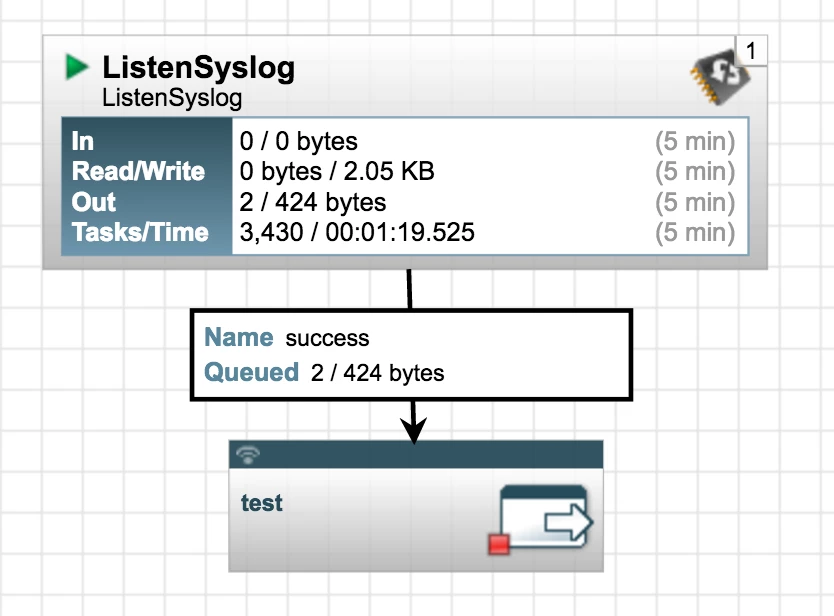
Sometimes you need to help it along and send some messages to the syslogd server. If so, try typing this in the command line and then verify the data flowing in NiFi
syslog -s test message

