

Using Jupyter with Sparkmagic and Livy Server on HDP 2.5
Configure Livy in Ambari
Until https://github.com/jupyter-incubator/sparkmagic/issues/285 is fixed, set
livy.server.csrf_protection.enabled ==> false
in Ambari under Spark Config - Advanced livy-conf
Install Sparkmagic
Details see https://github.com/jupyter-incubator/sparkmagic
Install Jupyter, if you don't already have it:
$ sudo -H pip install jupyter notebook ipython
Install Sparkmagic:
$ sudo -H pip install sparkmagic
Install Kernels:
$ pip show sparkmagic # check path, e.g /usr/local/lib/python2.7/site-packages
$ cd /usr/local/lib/python2.7/site-packages
$ jupyter-kernelspec install --user sparkmagic/kernels/sparkkernel
$ jupyter-kernelspec install --user sparkmagic/kernels/pysparkkernel
Install Sparkmagic widgets
$ sudo -H jupyter nbextension enable --py --sys-prefix widgetsnbextension
Create local Configuration
The configuration file is a json file stored under ~/.sparkmagic/config.json
To avoid timeouts connecting to HDP 2.5 it is important to add
"livy_server_heartbeat_timeout_seconds": 0
To ensure the Spark job will run on the cluster (livy default is local), spark.master needs needs to be set to yarn-cluster. Therefore a conf object needs to be provided (here you can also add extra jars for the session):
"session_configs": {
    "driverMemory": "2G",
    "executorCores": 4,
    "executorMemory": "8G",
    "proxyUser": "bernhard",
    "conf": {
        "spark.master": "yarn-cluster",
        "spark.jars.packages": "com.databricks:spark-csv_2.10:1.5.0"
    }
}
The proxyUser is the user the Livy session will run under.
Here is an example config.json. Adapt and copy to ~/.sparkmagic
Start Jupyter Notebooks
1) Start Jupyter:
$ cd <project-dir>
$ jupyter notebook
In Notebook Home select New -> Spark or New -> PySpark or New -> Python
2) Load Sparkmagic:
Add into your Notebook after the Kernel started
In[ ]: %load_ext sparkmagic.magics
3) Create Endpoint
In[ ]: %manage_spark
This will open a connection widget
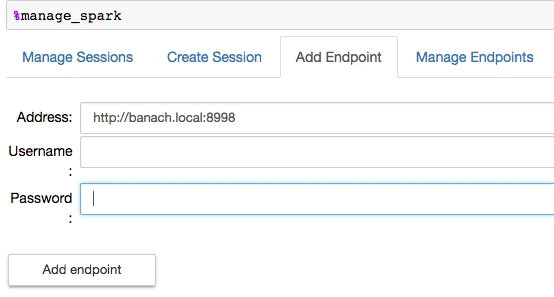
Username and password can be ignored in non secured clusters
4) Create a session:
When this is successful, create a session:
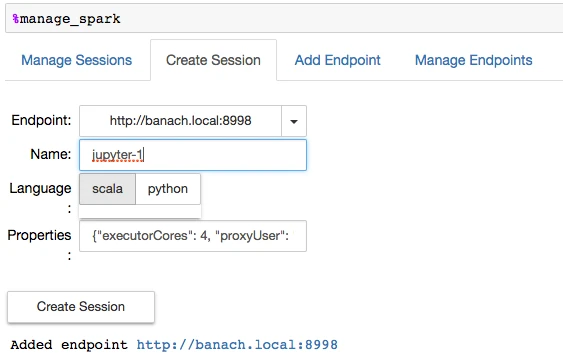
Note that it uses the created endpoint and under properties the configuration on the config.json.
When you see
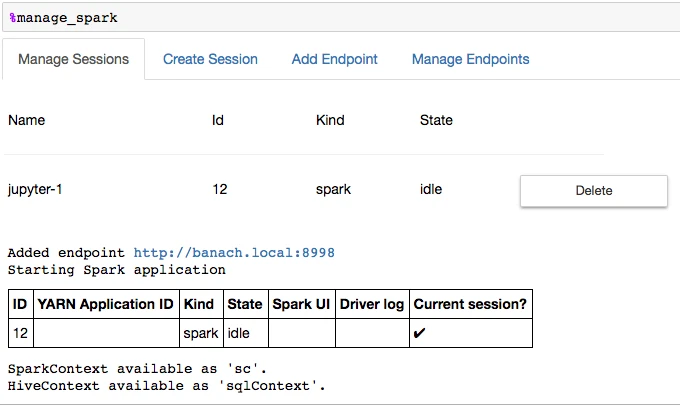
Spark session is successfully started and
Notes
- Livy on HDP 2.5 currently does not return YARN Application ID
- Jupyter session name provided under Create Session is notebook internal and not used by Livy Server on the cluster. Livy-Server will create sessions on YARN called livy-session-###, e.g. livy-session-10. The session in Jupyter will have session id ###, e.g. 10.
- For multiline Scala code in the Notebook you have to add the dot at the end, as in
val df = sqlContext.read.
                format("com.databricks.spark.csv").
                option("header", "true").
                option("inferSchema", "true").
                load("/tmp/iris.csv")
- For more details and example notebooks in Sparkmagic , see https://github.com/bernhard-42/Sparkmagic-on-HDP
Credits
Thanks to Alex (@azeltov) for the discussions and debugging session

