

Using NiFi and Pdfbox to extract images from PDF
In this article we will go over how we can use nifi to ingest PDFs and while we ingest we will use a custom groovy script with executescript processor to extract images from this PDF. The images will be tagged with PDF filename, page num and imagenum , so that it can be indexed in hbase/solr for quick searching and doing some machine learning or other analytics.
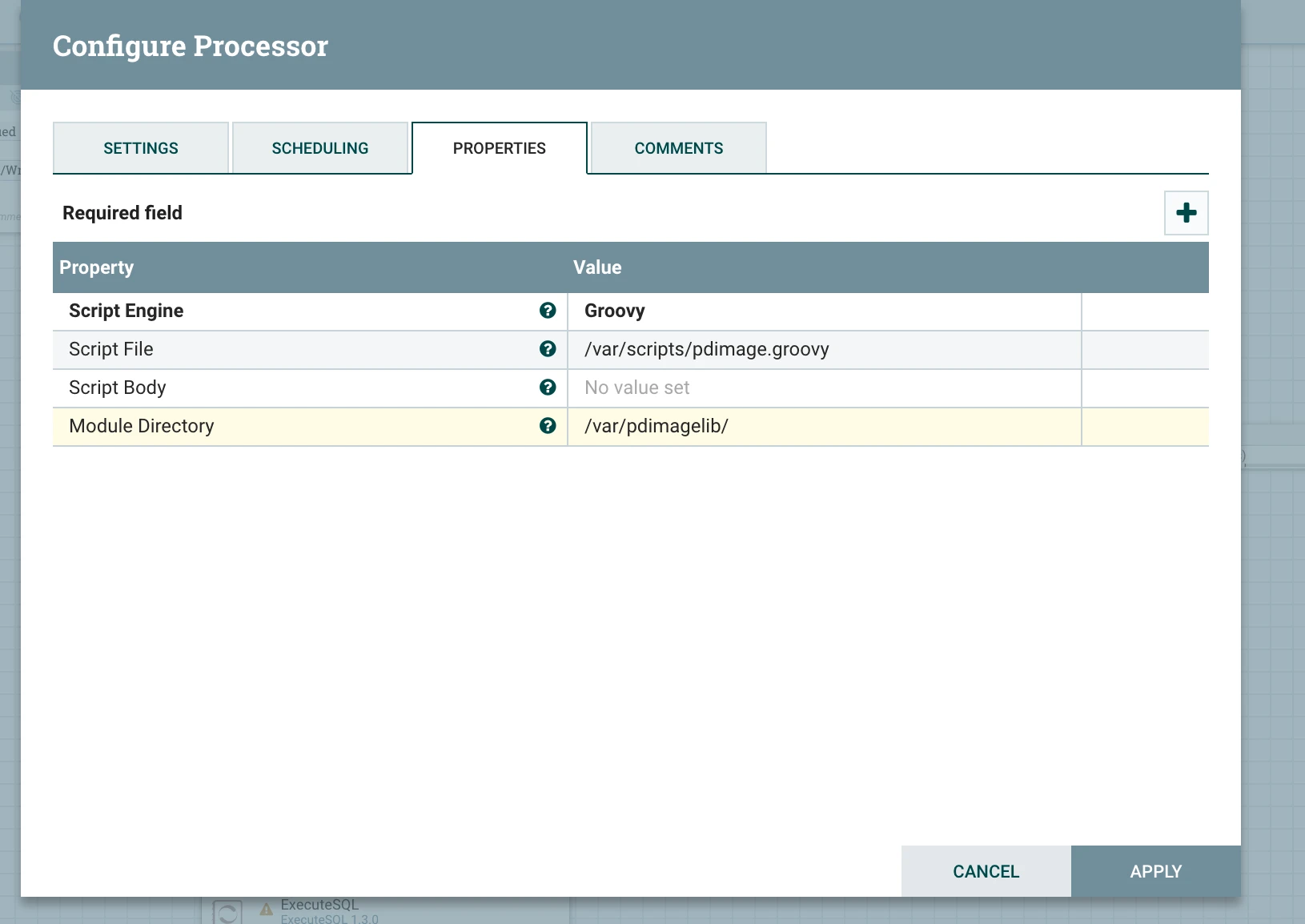
The Groovy code below depends on the following jars. Download and copy them to a folder on your computer. I my case they were under /var/pdimagelib/.
- pdfbox-2.0.7.jar
- fontbox-2.0.7.jar
- jai_imageio.jar
- commons-logging-1.1.1.jar
Copy the code below to a file on your computer, in my case the file was under /var/scripts/pdimage.groovy
import java.nio.charset.*;

import org.apache.commons.io.IOUtils;

import java.awt.image.BufferedImage;

import java.awt.image.RenderedImage;

import java.io.File;

import java.io.FileOutputStream;

import java.util.Iterator;

import java.util.List;

import java.util.ArrayList;

import java.util.Map;

import javax.imageio.ImageIO;

import org.apache.pdfbox.cos.COSName;

import org.apache.pdfbox.pdmodel.PDDocument;

import org.apache.pdfbox.pdmodel.PDPage;

import org.apache.pdfbox.pdmodel.PDPageTree;

import org.apache.pdfbox.pdmodel.PDResources;

import org.apache.pdfbox.pdmodel.graphics.PDXObject;

import org.apache.pdfbox.pdmodel.graphics.image.PDImageXObject;


 def flowFile = session.get();

 if (flowFile == null) {

     return;

 }

def ffList = new ArrayList<FlowFile>()

try {

  session.read(flowFile,

     {inputStream ->

             PDDocument document = PDDocument.load(inputStream);

             int imageNum = 1;

             int pageNum = 1;

             document.getDocumentCatalog().getPages().each(){page ->

                 PDResources pdResources = page.getResources();

                 pdResources.getXObjectNames().each(){ cosName->

                 if (cosName != null) {

                   PDXObject image =pdResources.getXObject(cosName);

                   if(image instanceof PDImageXObject){

                    PDImageXObject pdImage = (PDImageXObject)image;

                   BufferedImage imageStream = pdImage.getImage();

                   imgFF = session.create(flowFile);

                   outputStream = session.write(imgFF,

                   { outputStream->

                           ImageIO.write((RenderedImage)imageStream, "png", outputStream);

                    } as OutputStreamCallback)

                    imgFF = session.putAttribute(imgFF, "imageNum",String.valueOf(imageNum));

                    imgFF = session.putAttribute(imgFF, "pageNum",String.valueOf(pageNum));

                    ffList.add(imgFF);

                    imageNum++;

                  }

                 }

                 }

               pageNum++;


             }

  } as InputStreamCallback)

 session.transfer(ffList, ExecuteScript.REL_SUCCESS)

 session.remove(flowFile);

} catch (Exception e) {

           log.warn(e.getMessage());

           e.printStackTrace();

   session.remove(ffList);

          session.transfer(flowFile, ExecuteScript.REL_FAILURE);

     }
Below is a screenshot of executescript after it has been setup correctly.
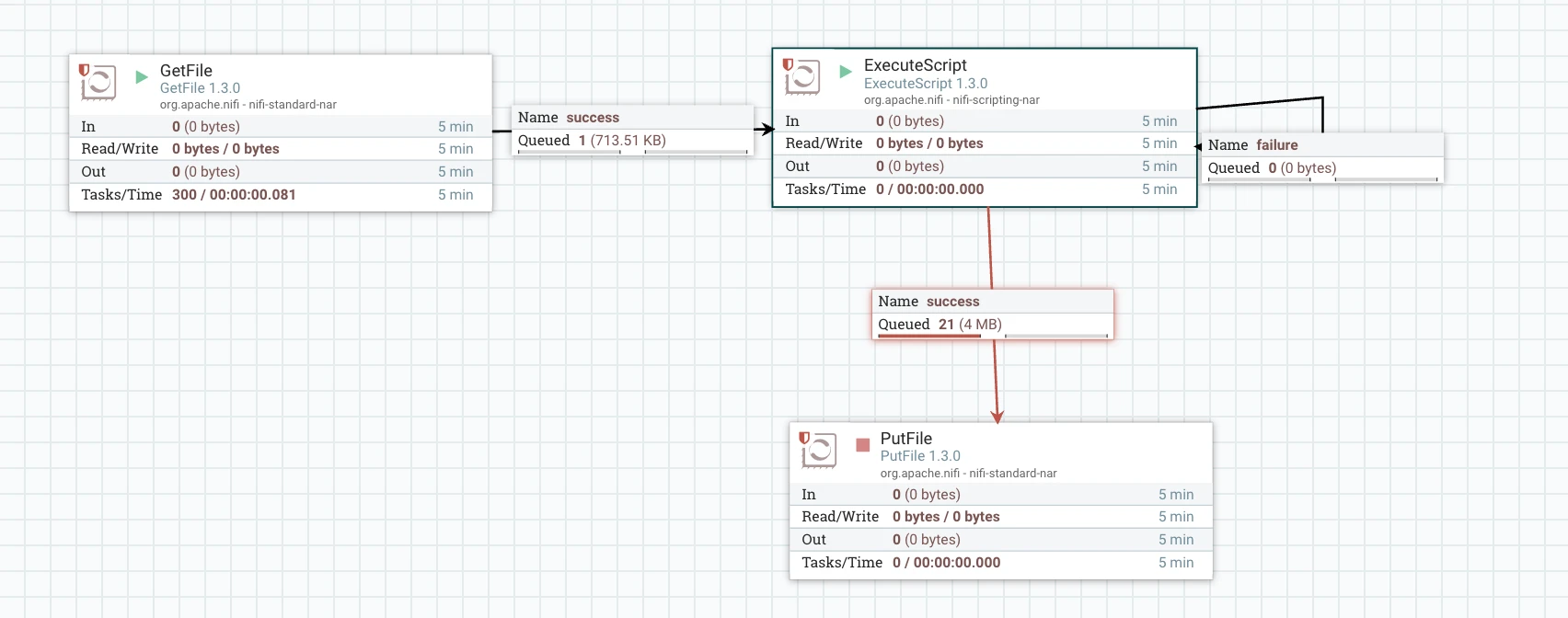
To ingest the PDF, i used a simple GetFile, though this approach should work for pdfs ingested with any other nifi processor. Below is a snapshot of the nifi flow. When a PDF is ingested, executescript will leverage groovy and pdfbox to extract images. The images will be tagged with the pdf filename,pagenum and imagenum. This can now be sent to hbase or any indexing solution for search or analytics.
Hope you find the article useful. Please comment withy your thoughts/questions.

