YARN Preemption with Spark using a Fair Policy
Overview
I recently encountered a question where someone asked to see how you can do preemption across YARN queues when a spark job is beyond it's queue's min guarantee. They had seen this before with the Fair Scheduler and Map Reduce, but wanted to apply the same experience here but with Spark and the Capacity Scheduler. This how-to article describes how to setup this experience.
Goal: Run large Spark jobs in two separate capacity queues to produce an equal share of resources for both jobs.
Hardware: 5 Nodes of AWS EC2 r3.xlarge
Cluster Configuration: HDP: 2.4.2, Spark: 1.6.1, 5 Node Managers, 20GB (20480MB) Yarn Containers
yarn.scheduler.maximum-allocation-mb = 20480
yarn.scheduler.minimum-allocation-mb = 2560
High Level Setup:
1. Add preemption properties as per documentation
2. Create Two YARN Queues with Fair Ordering
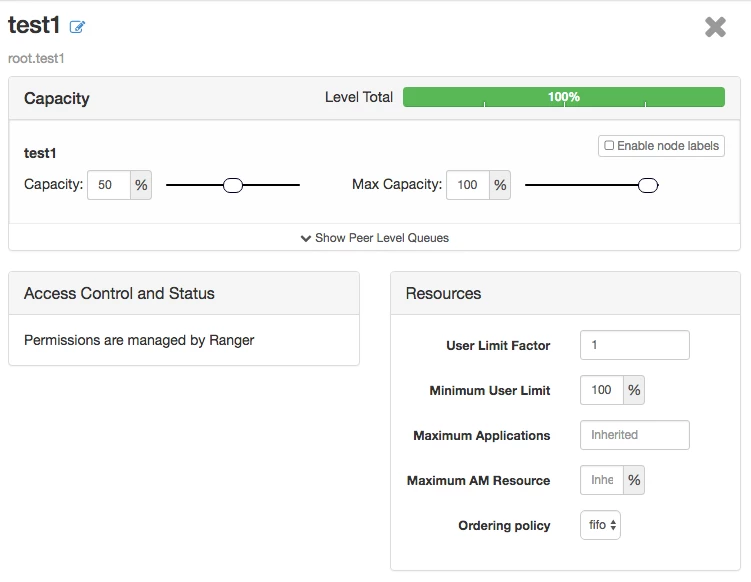
- Child queue “test1” with a min capacity of 50% and a max of 100%
- Child queue “test2” with a min capacity of 50% and a max of 100%
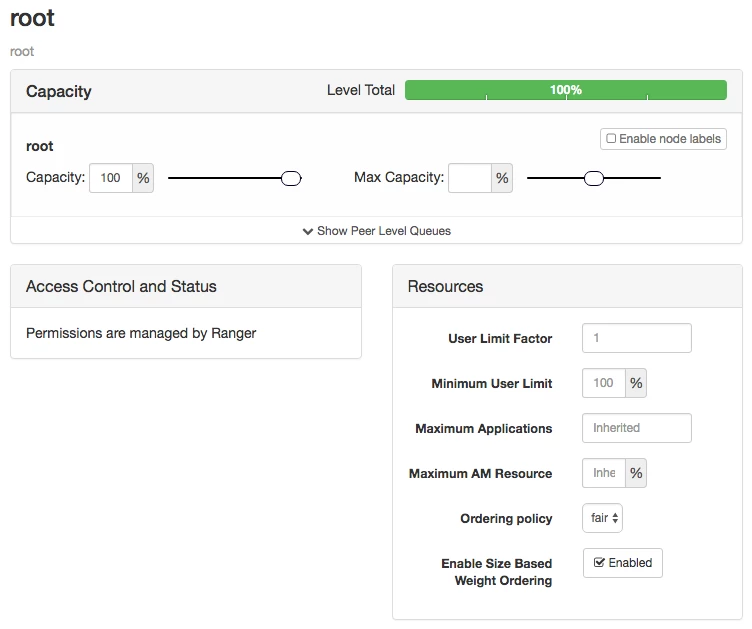
- Root queue with a fair ordering policy
3. Run Spark jobs
- Run Spark job on test1 with a max size container for as many spark executors as possible
- Run Spark job on test2 with a max size containers using dynamic resource allocation
1) Add YARN preemption properties
The following parameters should be applied to the yarn-site.xml file. This can be done manually or through Ambari. These are the default preemption properties as provided per Hortonworks documentation.
The following YARN Preemption Parameters Applied should be applied to yarn-site.xml:
yarn.resourcemanager.scheduler.monitor.enable=true
yarn.resourcemanager.scheduler.monitor.policies=org.apache.hadoop.yarn.server.resourcemanager.monitor.capacity.ProportionalCapacityPreemptionPolicy
yarn.resourcemanager.monitor.capacity.preemption.monitoring_interval=3000
yarn.resourcemanager.monitor.capacity.preemption.max_wait_before_kill=15000
yarn.resourcemanager.monitor.capacity.preemption.total_preemption_per_round=0.1
Option 1: Manual
Backup /etc/hadoop/conf/yarn-site.xml
Update the /etc/hadoop/conf/yarn-site.xml with the following parameters.
Note: You must put these settings in an xml format.
Restart YARN
Option 2: Ambari
To do this in Ambari, follow the instructions below:
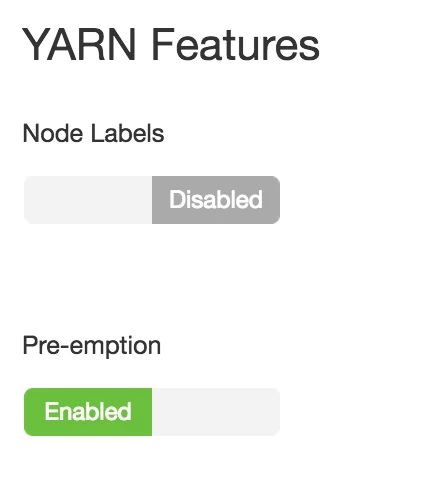
The following parameters were added to yarn-site.xml, which can be done thru Ambari -> Yarn -> Config. You can turn preemption on in the Settings tab. This will set yarn.resourcemanager.scheduler.monitor.enable=true.
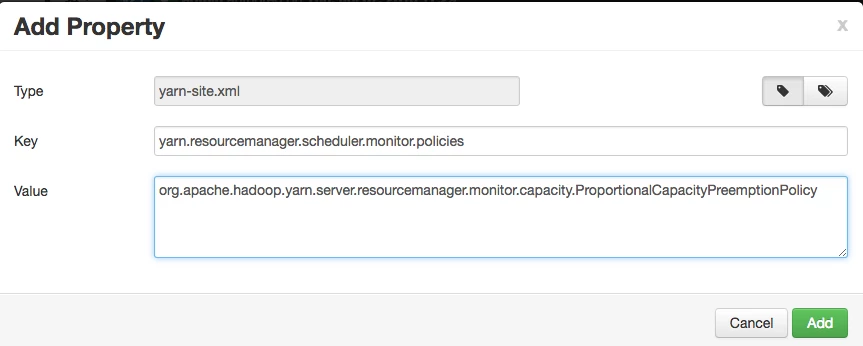
The remaining properties need to be added in the Advanced config tab in Ambari under “Custom yarn-site”. Click “Add Property”. Then add the following properties:
yarn.resourcemanager.scheduler.monitor.policies=org.apache.hadoop.yarn.server.resourcemanager.monitor.capacity.ProportionalCapacityPreemptionPolicy
yarn.resourcemanager.monitor.capacity.preemption.monitoring_interval=3000
yarn.resourcemanager.monitor.capacity.preemption.max_wait_before_kill=15000
yarn.resourcemanager.monitor.capacity.preemption.total_preemption_per_round=0.1
Restart YARN
2) Create Two YARN Queues with Fair Ordering
The following parameters are then added to the capacity-scheduler.xml file. You can do this manually or through the Ambari View – Yarn Queue Manager.
yarn.scheduler.capacity.maximum-am-resource-percent=0.2
yarn.scheduler.capacity.maximum-applications=10000
yarn.scheduler.capacity.node-locality-delay=40
yarn.scheduler.capacity.resource-calculator=org.apache.hadoop.yarn.util.resource.DefaultResourceCalculator
yarn.scheduler.capacity.queue-mappings-override.enable=false
yarn.scheduler.capacity.root.acl_administer_queue=*
yarn.scheduler.capacity.root.capacity=100
yarn.scheduler.capacity.root.queues=test1,test2
yarn.scheduler.capacity.root.ordering-policy=fair
yarn.scheduler.capacity.root.ordering-policy.fair.enable-size-based-weight=true
yarn.scheduler.capacity.root.accessible-node-labels=*
yarn.scheduler.capacity.root.test1.acl_submit_applications=*
yarn.scheduler.capacity.root.test1.minimum-user-limit-percent=100
yarn.scheduler.capacity.root.test1.maximum-capacity=100
yarn.scheduler.capacity.root.test1.user-limit-factor=1
yarn.scheduler.capacity.root.test1.state=RUNNING
yarn.scheduler.capacity.root.test1.capacity=50
yarn.scheduler.capacity.root.test1.ordering-policy=fifo
yarn.scheduler.capacity.root.test2.acl_administer_queue=*
yarn.scheduler.capacity.root.test2.acl_submit_applications=*
yarn.scheduler.capacity.root.test2.minimum-user-limit-percent=100
yarn.scheduler.capacity.root.test2.maximum-capacity=100
yarn.scheduler.capacity.root.test2.user-limit-factor=1
yarn.scheduler.capacity.root.test2.state=RUNNING
yarn.scheduler.capacity.root.test2.capacity=50
yarn.scheduler.capacity.root.test2.ordering-policy=fifo
Option 1: Manually
Backup the original file: /etc/hadoop/conf/capacity-scheduler.xml
Update the file with settings above: /etc/hadoop/conf/capacity-scheduler.xml
Run the following command to refresh the queues from the /etc/hadoop/conf directory
yarn rmadim –refreshQueues
Option 2: Ambari View
Using the YARN Queue Manager in Ambari, you can also apply the following settings to the capacity-scheduler.xml using the GUI.

Set up the YARN queues as follows. Both the test1 and test2 queues should look exactly the same and rollup to the root queue.
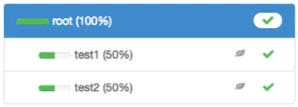
The test1 and test2 queues should have the same configuration as below:
The root queue should have an Ordering Policy of Fair and Enable Sized Based Weight Ordering.
Restart YARN
3) Run Spark Jobs
sudo su - hdfscd
/usr/hdp/current/spark-client
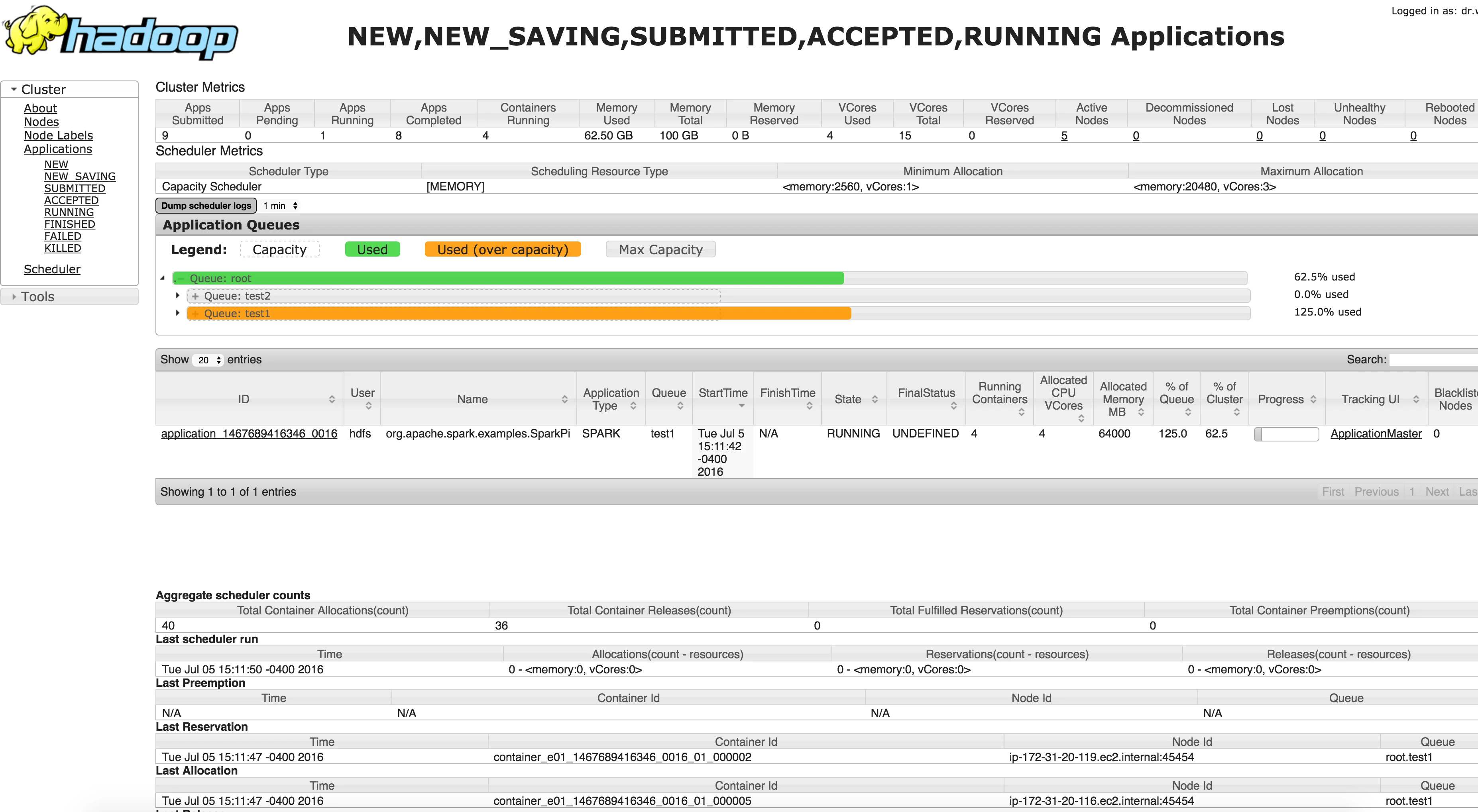
Run the following Spark job and make sure it runs over-capacity on the test1 queue. Notice how we specify 5 executors and large containers.
./bin/spark-submit --class org.apache.spark.examples.SparkPi --master yarn --deploy-mode cluster --queue test1 --num-executors 5 --executor-memory 18G --executor-cores 2 lib/spark-examples*.jar 1000000
Confirm in the Resource Manager UI (http://resource-manager-node:8088/cluster) that it’s running over-capacity in test1 queue
Run a second Spark job on test2 queue. Notice how this job does not specify the number of executors. That's because we are using Dynamic Resource Allocation in Spark which became available in Spark 1.6.
./bin/spark-submit --class org.apache.spark.examples.SparkPi --master yarn --deploy-mode cluster --queue test2 --executor-memory 18G --executor-cores 2 lib/spark-examples*.jar 1000000
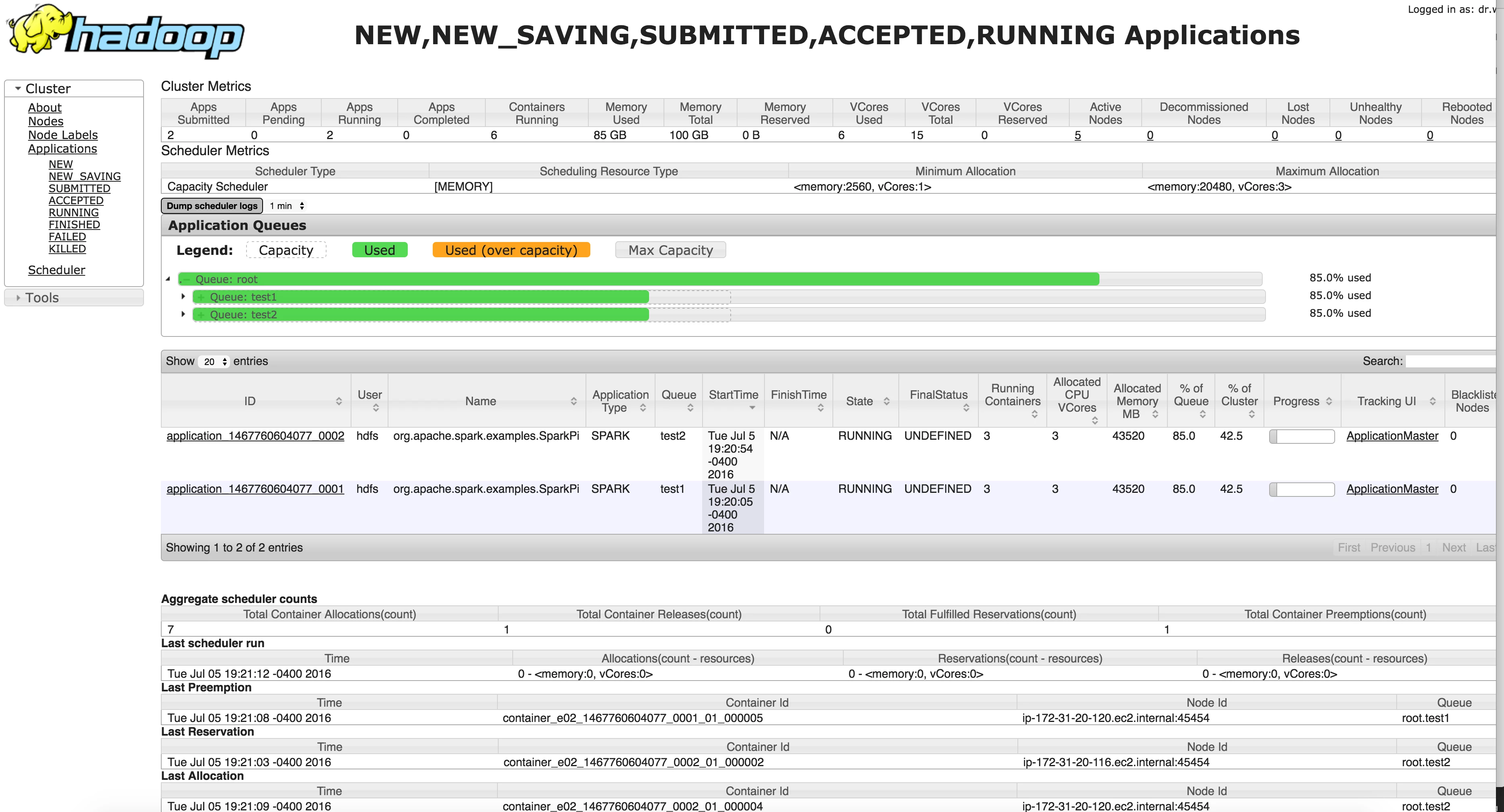
Initially you should see the following behavior in the resource manager:
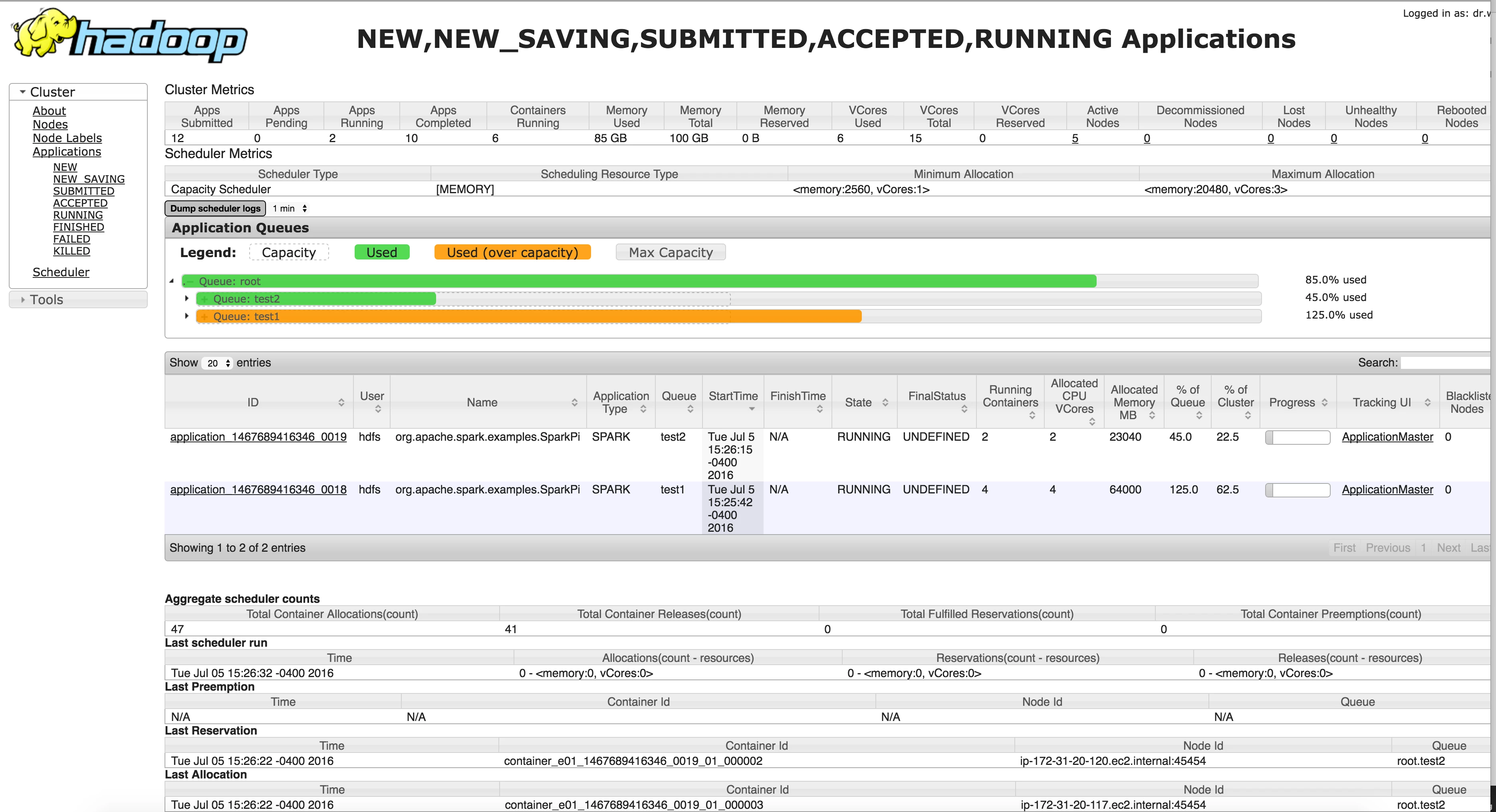
And then…viola - In a few seconds, YARN will preempt and the 2nd Spark job will take some containers from the first job so that you have a fair balance of resources across a root queue.