Seaport
Gold ⭐️
September 12, 2019
Solved

List of questions I posted

Where can I see the list of questions I posted? I tried the two buttons - My Account and My Profile. They do not have a list of questions. Also, I actually got the same "My Profile" page from the two buttons. Is it supposed to be like that?


In addition, I am from HCC and I could not find my list of questions posted in HCC either.


Thanks.

    denloe
    denloeAnswer
    Community Manager
    September 12, 2019

    Hi @Seaport 


    To make sure we understand, you are accessing your community profile by clicking your avatar and selecting "My Profile"?
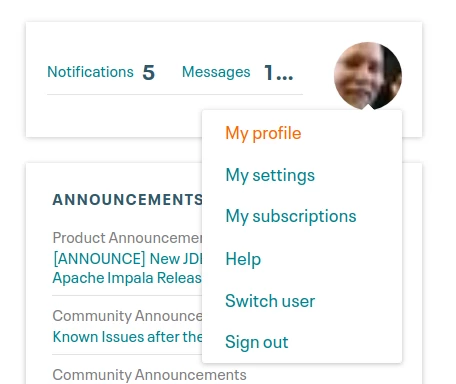
     

    Screenshot_20190912_145718.png


    Once on your profile page, scroll down to where you see "Topics I've Participated In" and change it to "My Latest Contributions"
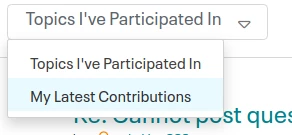
    Screenshot_20190912_145841.png


    Let us know if that helps.


    David Wilder, Community Manager Was your question answered? Make sure to mark the answer as the accepted solution. If you find a reply useful, say thanks by clicking on the thumbs up button. Learn more about the Cloudera Community: Terms of Service (http://www.cloudera.com/content/cloudera/en/terms-of-service.html) Community Guidelines (https://community.cloudera.com/t5/custom/page/page-id/Community_Guidelines) How to use the forum (https://community.cloudera.com/t5/help/faqpage)


    4 replies

    denloe
    Community Manager
    denloeAnswer
    Community Manager
    September 12, 2019

    Hi @Seaport 


    To make sure we understand, you are accessing your community profile by clicking your avatar and selecting "My Profile"?


    Screenshot_20190912_145718.png


    Once on your profile page, scroll down to where you see "Topics I've Participated In" and change it to "My Latest Contributions"

    Screenshot_20190912_145841.png


    Let us know if that helps.


    Translate
    David Wilder, Community Manager Was your question answered? Make sure to mark the answer as the accepted solution. If you find a reply useful, say thanks by clicking on the thumbs up button. Learn more about the Cloudera Community: Terms of Service (http://www.cloudera.com/content/cloudera/en/terms-of-service.html) Community Guidelines (https://community.cloudera.com/t5/custom/page/page-id/Community_Guidelines) How to use the forum (https://community.cloudera.com/t5/help/faqpage)

    Seaport
    SeaportAuthor
    Gold ⭐️
    September 16, 2019

    @denloe Thanks for the reply. Apparently I got confused with the two Profile icons - one is the MyCloudera Profile icon at the top right corner of the page, and the other is the Community Avatar icon (the community profile icon) you referred to. 

    Translate

