


Apache Iceberg Branches and Tags: A Modern Approach to Dataset Isolation and Version Management
INTRODUCTION
Branching and tagging concepts in Apache Iceberg were introduced in version 1.2.0.
With this feature one can carry out a lot of experiments on data without making copies and discarding them whenever they are not needed. The experiments work in isolation from production workloads without impacting production data. The concepts of tags and branches are very similar to source code version control systems like Git. As in, Git we know we can create multiple development branches on top of the production branch wherein we do our independent code changes, get it reviewed and merge them into the development branch. Later once all development is done we finally merge the branch into the production/release branch. The same concept is applicable in the case of branches created on an Iceberg table.
Similarly, tag in Git refers to a specific commit which helps us to go to any release. The concept helps us to go to any specific version of the table using named references. Branching and tagging in Apache Iceberg refer to creating distinct versions and labels for table snapshots. These features are useful for managing parallel workflows on the same dataset.
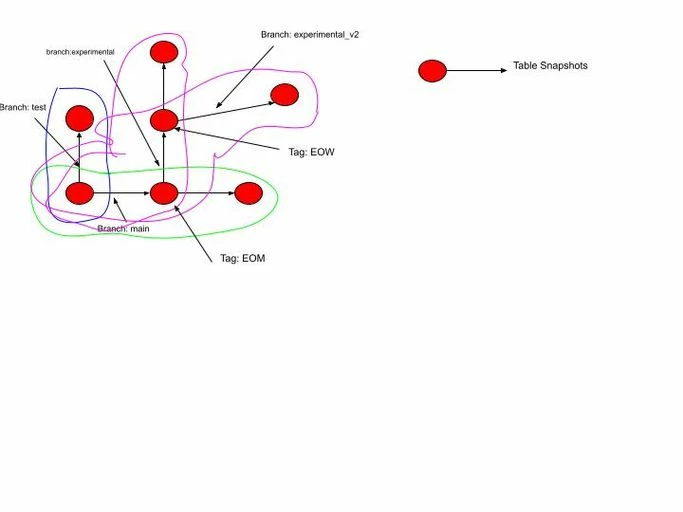 This article will help you understand:
- What are Iceberg table branches.
- How do they provide logical data set isolation.
- How to create, inspect, query and manage iceberg branches.
- How branches create independent snapshot lineages while sharing underlying table data.
- What are Iceberg tags and how do they provide named references to specific table snapshots.
- How do tags help preserve important points in a table's history and,
- How to create, inspect, and query tags.
Branching
- Branching allows you to create a separate version of a table’s snapshot lineage.
- Each branch has its own history, enabling multiple development lines on the same dataset.
- This is helpful for scenarios like experimenting on a data subset, testing new transformations, or running ETL processes in isolation without affecting the main branch (typically called main or default).
- For example, you could create a branch called experiment from the current state of the main branch. Any changes made on experiment (e.g., new inserts, updates, or deletes) won’t affect the main branch.
- Later, you may choose to either merge the changes from experiment back to the main branch or discard the branch if it’s no longer needed.
Tagging
- Tagging is a way to label specific snapshots in the table’s history. A tag acts as a named reference to a specific snapshot, enabling you to return to that exact point in time if needed.
- Tags are often used to mark significant points in time, like release_1.0, data_quality_passed, or pre_migration. This makes it easier to revert to a stable state or to track major changes in the table’s history.
- Unlike branches, tags are immutable, meaning they are fixed references to snapshots and don't change over time.
Example use case
Developing and Releasing a New ETL Pipeline Using Branches and Tags
Assume we have an Iceberg table called customer_analytics.
Initial State: The production (main) branch contains:
SELECT * FROM customer_analytics;
| customer_id | name | city |
| 101 | Alice | New York |
| 102 | Bob | Chicago |
| 103 | Carol | Seattle |
Current Snapshot:
| Branch | Snapshot-ID |
| main | S-100 |
- Step 1: Create an ETL Branch
ALTER TABLE customer_analytics CREATE BRANCH etl_pipeline;
Both branches now point to the same snapshot. No data is copied.Branch
Snapshot-ID
main
S-100
etl_pipeline
S-100
- Step 2: Execute ETL on the Branch.
- Instead of writing to main, write to the branch.Iceberg creates a new snapshot.
Insert new records
INSERT INTO customer_analytics.branch_etl_pipeline VALUES(104,'David','Boston');Branch
Snapshot-ID
main
S-100
etl_pipeline
S-101
- Update existing records. Suppose the ETL standardizes city names.
UPDATE customer_analytics.branch_etl_pipeline SET city='New York City' WHERE city='New York'; - New snapshot created.
Branch
Snapshot-ID
main
S-100
etl_pipeline
S-101—>S-102
- Delete duplicate records
DELETE FROM customer_analytics.branch_etl_pipeline WHERE customer_id=102; - Another snapshot.
Branch
Snapshot-ID
main
S-100
etl_pipeline
S-101—>S-102—>S-103
- Add a derived column: Suppose the ETL introduces a new column.
New snapshot.ALTER TABLE customer_analytics.branch_etl_pipeline ADD COLUMN region STRING;Branch
Snapshot-ID
main
S-100
etl_pipeline
S-101—>S-102—>S-103—>S-
- Populate it.
Another snapshot.UPDATE customer_analytics.branch_etl_pipeline SET region='East' WHERE city IN ('Boston','New York City');Branch
Snapshot-ID
main
S-100
etl_pipeline
S-101—>S-102—>S-103—>S-104—>S-105
- Instead of writing to main, write to the branch.Iceberg creates a new snapshot.
- Step 3: Validate the Branch:
- Business users still query production.
Result:SELECT * FROM customer_analytics;customer_id
name
city
101
Alice
New York
102
Bob
Chicago
103
Carol
Seattle
- Nothing has changed.
- Meanwhile engineers inspect the branch.
Result:SELECT * FROM customer_analytics.branch_etl_pipeline;
This shows how branch (e.g. etl_pipeline) helped to apply transformations without risking the integrity of your main dataset thereby demonstrating logical dataset isolation.customer_id
name
city
region
101
Alice
New York City
East
103
Carol
Seattle
NULL
104
David
Boston
East
- Business users still query production.
- Step 4: Merge into Main
- Once validation succeeds:
NowCALL catalog_name.system.fast_forward(
table => 'customer_analytics',
branch => 'main',
to => 'etl_pipeline'
);Branch
Snapshot-ID
main
S-105
etl_pipeline
S-105
Production now contains the ETL changes.
- Once validation succeeds:
- Step 5: Tag the Release
- Mark this successful ETL deployment.
ALTER TABLE customer_analytics CREATE TAG etl_v1_complete;
- Mark this successful ETL deployment.
- Step 6: Future ETL Runs-
- A month later another ETL starts.
- Create another branch.
ALTER TABLE customer_analytics CREATE BRANCH etl_pipeline_v2;Branch
Snapshot-ID
main
S-105
etl_pipeline_v2
S-105
- Perform writes.
INSERT INTO customer_analytics.branch_etl_pipeline_v2 VALUES(105,'Emma','Denver','West');Branch
Snapshot-ID
main
S-105
etl_pipeline_v2
S-105—>S-106
- Production is still unaffected.
- Step 7: Reproduce Historical Data -
- Six months later an auditor asks: "Show me the exact data that existed after ETL version 1." Simply query the tag.
Iceberg returns exactly snapshot S105, regardless of how much the table has evolved since then.SELECT * FROM customer_analytics VERSION AS OF 'etl_v1_complete';
- Six months later an auditor asks: "Show me the exact data that existed after ETL version 1." Simply query the tag.
This shows Tags capture important milestones, enabling reproducibility, auditing, and easy access to historical versions of the dataset.
Branch vs. Tag: Key Differences
Although both branches and tags are table references in Apache Iceberg, they serve different purposes. A branch is designed for ongoing development and independent dataset evolution, whereas a tag acts as a permanent bookmark to a specific snapshot. The following table summarizes their key differences.
| Feature | Branch | Tag |
| Purpose | Create an independent line of table evolution | Mark a specific snapshot in the table’s history |
| Mutable | Yes | No |
| Accepts New Commits | Yes | No |
| Snapshot Lineage | Maintains its own evolving snapshot lineage | Always references a single snapshot |
| Typical Use Cases | ETL development, testing, data validation, experimentation | Data releases, auditing, compliance, rollback points |
| Supports Data Changes | INSERTS, UPDATE, DELETE, MERGE | Read-only |
Throughout the ETL workflow, we created and used both a branch (etl_pipeline) and a tag (etl_v1_complete). Before performing operations on these references, it's useful to know how to discover and inspect the branches and tags associated with an Iceberg table. The next section demonstrates how to list all table references and examine their associated snapshots.
Listing table references (Branches and Tags)
SPARK or HIVE SQL
Check Metadata File Directly:
- Iceberg maintains a metadata JSON file for each table, which includes information about branches and snapshots.
- You can open this metadata file to see if there are any branch entries under the "refs" section. Each branch is stored as a reference and points to a specific snapshot.
- The metadata file typically has a structure similar to json as follows:
{"format-version":2,"table-uuid":"e3c9ef15-82f4-4345-b81a-90e2fb93764e",
"Refs":{"test":{"snapshot-id":261722011430761267,"type":"branch"},"main":{"snapshot-id":261722011430761267,"type":"branch"}}}]}
Using Iceberg Catalog APIs:
- If you're using a programming language with an Iceberg client (e.g., Java, Python, or Spark), you can use Iceberg’s catalog APIs to retrieve information about branches programmatically.
- For instance, in Java, you might use code as below:
Table table = catalog.loadTable(TableIdentifier.of("source", "t1"));
Map<String, SnapshotRef> refs = table.refs();
for (String refName : refs.keySet()) {
System.out.println("Branch or tag: " + refName);
}
Summary
To check if an Iceberg table has branches and tags:
- Inspect the metadata JSON file to see references under "refs".
- Use Iceberg APIs in supported languages to programmatically list references.
- Run SQL commands in supported query engines to list references on the table.
These methods allow you to confirm if a table has branches and identify each branch by name and associated snapshot
Conclusion
Branches in Apache Iceberg are mutable references to table snapshots, allowing independent development, testing, backfills, and isolated data changes without impacting the main table lineage.
Tags are immutable references to specific snapshots, mainly used for checkpointing, auditing, backup retention, reproducibility, and point-in-time recovery.
Branches behave similarly to Git branches and can continue evolving with new commits, whereas tags permanently pin a snapshot for historical access.
Both features are available in Iceberg V2+ tables and enable safer data operations, experimentation, governance, and time-travel workflows.
Branches and tags help organizations implement production-grade data engineering workflows with controlled snapshot management and reproducible analytics.

