

CaptainJa
Gold ⭐️
August 10, 2021
Solved

Active Directory Group to Role Mapping CDP 7.1.6

Hello,


I am facing a challenge with authentication and authorizing Active Directory users on Cloudera CDP 7.1.6. I followed the steps here to make the necessary configurations (https://docs.cloudera.com/cdp-private-cloud-base/7.1.6/security-kerberos-authentication/topics/cm-security-external-authentication-ad.html).

The challenge is that I am able to login with AD users but there is no group to role mapping, which results in a blank page for the user.

I checked this other page (https://docs.cloudera.com/cdp-private-cloud-base/7.1.6/managing-clusters/topics/cm-security-authorization-user-roles.html) which handles mapping external authentication to roles. However, it skips Active Directory instructions and mentions only that of external programs and SAML scripts.


Does anyone have an idea of how to map groups from an Active Directory source to Cloudera Roles? or is there some other documentation I should refer to?


Thanks in advance for the support.
 

CaptainJa
CaptainJaAnswer
Gold ⭐️
August 10, 2021

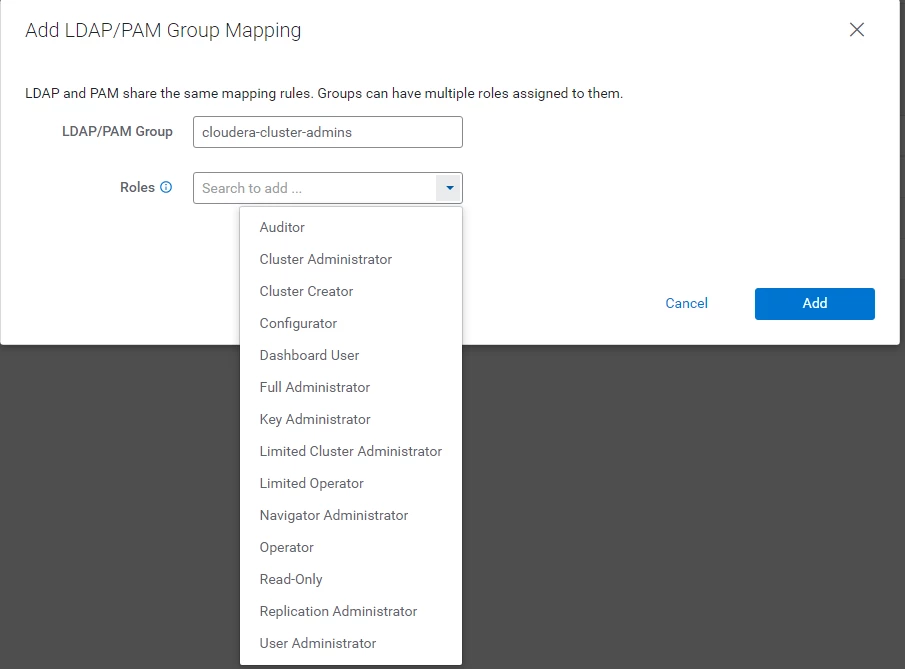
With some help from a colleague, we figured out that all I needed to do was go into Administration > Users & Roles > LDAP/PAM Groups.

There, I clicked on the "Add LDAP/PAM Group Mapping" and added the group I expected to be synced from Active Directory, along with a role assignment. 

CaptainJa_0-1628589033903.png

This was enough to make sure that the user after being authenticated, was able to login in with the right role privileges.

1 reply

CaptainJa
CaptainJaAuthorAnswer
Gold ⭐️
August 10, 2021

With some help from a colleague, we figured out that all I needed to do was go into Administration > Users & Roles > LDAP/PAM Groups.

There, I clicked on the "Add LDAP/PAM Group Mapping" and added the group I expected to be synced from Active Directory, along with a role assignment. 

CaptainJa_0-1628589033903.png

This was enough to make sure that the user after being authenticated, was able to login in with the right role privileges.

Translate

