

GaryS
Gold ⭐️
June 26, 2019
Solved

Adding nodes to a cluster post creation via an Altus Configuration file

The scenario:

Working within Azure... 

I was able to deploy a cluster via an Altus Director Configuration File

The problem is that Altus is having some trouble connecting to the Cloudera Manager... 
When I tried to later add nodes, via Altus Web-UI, I get the following error: 
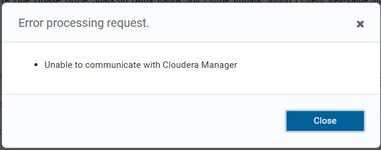
2019-06-26_17h01_55.png

The questions:
1) Is this a bug or did I miss something in the configuration file?

2) As a work-around, can I add additional nodes via a new configuration file?


Thank you

GaryS
GarySAnswer
Gold ⭐️
June 28, 2019

Just found the feature in Altus that updates creds'. 
This issue is solved! 


4 replies

aarman
Gold ⭐️
Gold ⭐️
June 27, 2019

Hi GaryS,


(1) Can you verify connectivity between Director host and Cloudera Manager host (maybe try pinging Cloudera Manager from Director host). The Director server logs may also contain more information on why the connection validation failed. You can refer here to see how to access the server logs:


https://www.cloudera.com/documentation/director/latest/topics/director_troubleshoot.html


(2) Unfortunatly, nodes can only be added/removed through the UI, it can't be done via config files. Though in your case since Director server can't reach Cloudera Manager, it would fail regardless, since this connectivity is required to properly add nodes to a cluster.


Translate
GaryS
GarySAuthor
Gold ⭐️
June 28, 2019

Thanks for the quick reply. 

I'm now able to reliably reproduce the issue. And, workaround is minor... 

Scenario:
1) Create a cluster via Altus cloudera-director bootstrap-remote (note the Cloudera Manager password if set)

2) Login to the new Cloudera manager

3) Change the password

* Altus then can no longer communicate with Cloudera Manager *  (401 error)

Workaround to get Altus communicating with Cloudera Manager:
1) Change Cloudera Manager back to previosu
2) Altus can now communicate... 

Is there a way to update the user/pass Altus uses to communicate to Cloudera Manager? 
... there must be a property file somewhere? 

Thanks.


Translate
GaryS
GarySAuthorAnswer
Gold ⭐️
June 28, 2019

Just found the feature in Altus that updates creds'. 
This issue is solved! 


Translate
