

mike_bronson7
Gold ⭐️⭐️⭐️
February 12, 2020
Solved

Ambari REST API + how to capture the active namenode IP from API

hi all


we have HDP version - 2.6.4 


with active and standby namenode


is it possible to capture the active namenode IP by REST API?


we try by the following API , but API not return any output 


curl -sH "X-Requested-By: ambari" -u admin:admin -H "X-Requested-By: ambari" -X GET http://master:8080/api/v1/clusters//services/HDFS
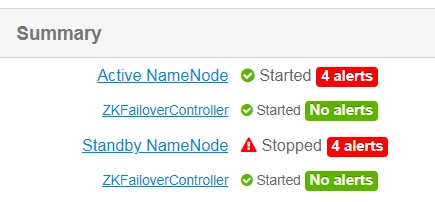

 

Capture.PNG


Scharan
ScharanAnswer
Gold ⭐️
April 8, 2021

@mike_bronson7  Use the following API to find out the node & state of the active/standby


# curl -u <User name>:<Password> -H 'X-Requested-By: ambari' -X GET 'http://test1:8080/api/v1/clusters/c186/host_components?HostRoles/componentname=NAMENODE&metrics/dfs/FSNamesystem/HAState=active'

# curl -u <User name>:<Password> -H 'X-Requested-By: ambari' -X GET 'http://test1:8080/api/v1/clusters/c186/host_components?HostRoles/componentname=NAMENODE&metrics/dfs/FSNamesystem/HAState=standby”


3 replies

sarvan_rallev
Silver ⭐️
April 7, 2021

You are hitting with wrong values.


Find below example:

curl -u admin:password "http://{hostname}:8080/api/v1/clusters/{cluster _name}/host_components?HostRoles/"

Translate
Scharan
Gold ⭐️
ScharanAnswer
Gold ⭐️
April 8, 2021

@mike_bronson7  Use the following API to find out the node & state of the active/standby


# curl -u <User name>:<Password> -H 'X-Requested-By: ambari' -X GET 'http://test1:8080/api/v1/clusters/c186/host_components?HostRoles/componentname=NAMENODE&metrics/dfs/FSNamesystem/HAState=active'

# curl -u <User name>:<Password> -H 'X-Requested-By: ambari' -X GET 'http://test1:8080/api/v1/clusters/c186/host_components?HostRoles/componentname=NAMENODE&metrics/dfs/FSNamesystem/HAState=standby”


Translate
MeowBot
Silver ⭐️
November 13, 2023

fix: `componentname` should be `component_name`

Translate

