

Darryl
Silver ⭐️⭐️⭐️
February 11, 2025
Question

Apache nifi listen to multicast messages without separator characters

Trying to demonstrate that nifi can listen to multicast traffic.

I have this python script:

import socket
import struct
import sys

# Multicast group details
multicast_group = '224.1.1.1'
server_address = ('', 10000)

# Create a UDP socket
sock = socket.socket(socket.AF_INET, socket.SOCK_DGRAM)

# Set the time-to-live for multicast packets
ttl = struct.pack('b', 1)
sock.setsockopt(socket.IPPROTO_IP, socket.IP_MULTICAST_TTL, ttl)

try:
    # Send data to the multicast group
    message = b'Hello, multicast!'
    print(f"sending {message} to {multicast_group}:{server_address[1]}")
    sent = sock.sendto(message, (multicast_group, server_address[1]))

except Exception as e:
    print(f"Error occurred: {e}")

finally:
    sock.close()

And then my listenudp processor is: 
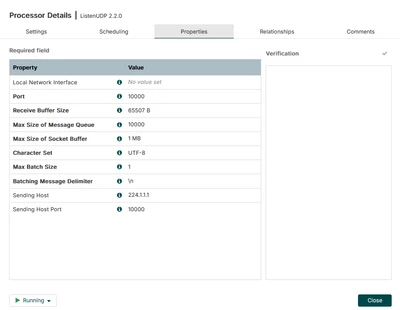
Darryl_0-1739306340674.png


I can receive the message if I change the multicast_group to 127.0.0.1. 
How do I get it to receive it with 224.1.1.1.
 
I also added this to my nifi properties
# Site to Site properties
nifi.remote.input.host=224.1.1.1
nifi.remote.input.secure=true
nifi.remote.input.socket.port=10000

 
@MattWho 

7 replies

MattWho
Titanium ⭐️⭐️⭐️
Titanium ⭐️⭐️⭐️
February 12, 2025

@Darryl 

The ListenUDP processor will listen on a specific port and can be configured to listen on a specific network interface on the NiFi host.

The question is what network interface on the NiFi host is assigned and address associated with your multicast 224.1.1.1 ip address?

You can't bind any NiFi processor to a specific IP address. NiFi supports multi-node clusters where every node runs the exact same dataflows. 

Lets assume your multicast group is sending datagrams to port 10000 on the eth3 network interface on your NiFi host, then you would configure the listenUDP to create a listener using port 10000 for eth3.

The Site to Site properties from the nifi.properties have absolutely nothing to do with any processor components you add to the NiFi UI.  Site-to-Site (S2S) NiFi protocol is used for the transfer of NiFi FlowFiles between NiFi nodes.   This S2S protocol is utilized by Remote Process Groups and Load Balanced connections capability only.  

You'll want to unset 10000 in the S2S settings since you want your listenUDP processor to bind to that port number.  You'll also want to unset 224.1.1.1 as the S2S input host.  S2S can't bind to host that does not resolve to one of the NiFi network interfaces. 

S2S reference documentation:

Please help our community grow and grow. If you found any of the suggestions/solutions provided helped you with solving your issue or answering your question, please take a moment to login and click "Accept as Solution" on one or more of them that helped.

Thank you,
Matt

Translate
Darryl
DarrylAuthor
Silver ⭐️⭐️⭐️
February 12, 2025

hey @MattWho My nifi instance and little python script run on local host.
My python script sends a packet as ip address 224.1.1.1 on port 10000.
When i configure my processor, omitting the sending host and sending port, it still doesn't receive the packet from 224.1.1.1.

If i omit the send host and port, and just have 10000 for port. It also doesn't work, since that assumes the packet is being sent from 127.0.0.1 (localhost).

I removed the site to site properties like you recommended.
Essentially i am just trying to send a multicast message to nifi, and trying to figure out how to configure the current processor to do that. Or I will just try and create a custom udp listener to handle multicast messages.


Thanks!

Translate
