
janis-ax
Silver ⭐️⭐️⭐️
July 14, 2021
Solved

Apache NiFi : QueryRecord JSON Select child field

Is it possible to select with the QueryRecord processor also child fields of an given JSON structrue?


E.g. following JSON: 

{
"name" : "Max",
"id" : 1,
"location" : {
"city" : "Frankfurt"
}
}


And I would do the following query: 

SELECT name, location.city FROM FLOWFILE


But this throws an error: 

QueryRecord[id=a4744340-017a-1000-6944-73fe4d362d90] Unable to query StandardFlowFileRecord[uuid=706e8ae8-f76c-4ebb-9c65-c46cb7026c89,claim=StandardContentClaim [resourceClaim=StandardResourceClaim[id=1626251405764-2, container=default, section=2], offset=790026, length=67],offset=0,name=55b72cfd-5308-4e83-9304-166193e76478,size=67] due to java.sql.SQLException: Error while preparing statement [SELECT "name", "location.city" FROM FLOWFILE]: org.apache.nifi.processor.exception.ProcessException: java.sql.SQLException: Error while preparing statement [SELECT "name", "location.city" FROM FLOWFILE]


Is there something that I'm doing wrong? Here is the configuration:
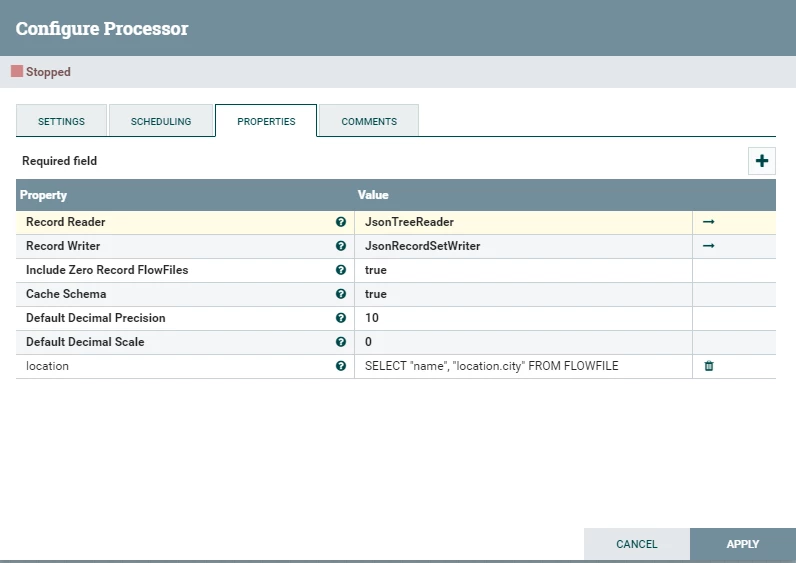
janis-ax_0-1626258776077.png


mkohs
mkohsAnswer
Gold ⭐️
July 28, 2022

Hi @janis-ax , 


This reply comes a bit late but I was just researching the same issue. According to the official NiFi documentation, this should be possible using the "RPath" function in the 'Where' clause. 


Check out the "SQL over hierarchical data" section here: https://nifi.apache.org/docs/nifi-docs/components/org.apache.nifi/nifi-standard-nar/latest/org.apache.nifi.processors.standard.QueryRecord/additionalDetails.html 

10 replies

stevenmatison
Platinum ⭐️⭐️
July 15, 2021

Your sample query has no "quotes" but the one configured does.  Just wanted to make sure you tried without those quotes ?

Translate
janis-ax
janis-axAuthor
Silver ⭐️⭐️⭐️
July 16, 2021

I tried both ways. For keys on the root level, it doesn't matter if you use quotes. If I want to access child keys I got following error: 


janis-ax_0-1626422128111.png


Translate
stevenmatison
Platinum ⭐️⭐️
July 16, 2021

Understood, had to make sure!    Next for good measure, make sure flow works for just name.  This will show you if the issue is the entire setup or with just "location.city".  


Next look at the configurations for the Reader/Writer and share those for us to see incase they are not default configs,etc.  I believe the particular error:

SQLException: Error while preparing statement

occurs with a schema conflict or issue with flowfile being different than expected schema. 

Translate
mkohs
Gold ⭐️
mkohsAnswer
Gold ⭐️
July 28, 2022

Hi @janis-ax , 


This reply comes a bit late but I was just researching the same issue. According to the official NiFi documentation, this should be possible using the "RPath" function in the 'Where' clause. 


Check out the "SQL over hierarchical data" section here: https://nifi.apache.org/docs/nifi-docs/components/org.apache.nifi/nifi-standard-nar/latest/org.apache.nifi.processors.standard.QueryRecord/additionalDetails.html 

Translate
janis-ax
janis-axAuthor
Silver ⭐️⭐️⭐️
August 2, 2022

Thanks this works! I just have to use RPATH_STRING

Translate
araujo
Platinum ⭐️⭐️⭐️
Platinum ⭐️⭐️⭐️
August 1, 2022

As @mkohs mentioned, using the RPATH function is the way to go here.

It can be used on the SELECT clause, for projection, as well as on the WHERE cause, for filtering.


You can see a similar use of it in this post here: https://community.cloudera.com/t5/Support-Questions/QueryRecord-processor-issue-with-nested-JSON/td-p/338556


Cheers,

André


Translate
-- Was your question answered? Please take some time to click on "Accept as Solution" below this post. If you find a reply useful, say thanks by clicking on the thumbs up button.