

ipson
Gold ⭐️
March 25, 2024
Solved

Automated Exporting of Data Flow Definition/Config

I'd like to have a process for automatically exporting the data flow definition and configuration without needing to go into the CDF UI.

Right now, if I wanted the configuration, I'd click here in the UI:
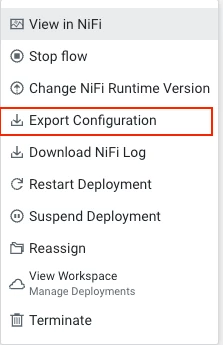
Screenshot 2024-03-25 at 9.22.18 AM.png

My thought was to use the CDP CLI, but under the df section, there doesn't appear to be a command for this.

Any suggestions?

smdas
smdasAnswer
Gold ⭐️⭐️
April 15, 2024

Hello @ipson 

Thanks for using Cloudera Community. 

To the Q, Kindly use "dfworkload" Commands [1]. The concerned Command has the Sub-Command to address the requirement of fetching Definition & Configurations. If any of the requirement isn't met via [1], Kindly Submit a Support Case for us to get the same included in the CLI with the Collaboration of DFX Engineering.

- Smarak

[1] https://cloudera.github.io/cdp-dev-docs/cli-docs/dfworkload/index.html 

2 replies

smdas
Gold ⭐️⭐️
smdasAnswer
Gold ⭐️⭐️
April 15, 2024

Hello @ipson 

Thanks for using Cloudera Community. 

To the Q, Kindly use "dfworkload" Commands [1]. The concerned Command has the Sub-Command to address the requirement of fetching Definition & Configurations. If any of the requirement isn't met via [1], Kindly Submit a Support Case for us to get the same included in the CLI with the Collaboration of DFX Engineering.

- Smarak

[1] https://cloudera.github.io/cdp-dev-docs/cli-docs/dfworkload/index.html 

Translate
ipson
ipsonAuthor
Gold ⭐️
April 15, 2024

When I run this command via the cdp cli, it just returns a JSON like this:

```

{

    "archiveName": "[MY_FLOW_NAME].tar.gz"

}

```

I want to get the actual flow definition.

Translate

