

a_gulshani
Gold ⭐️
June 20, 2019
Solved

awk command in ExecuteStreamCommand

Hi!

I need to execute following awk command on flow file via ExecuteStreamCommand processor

awk -F"," '{OFS=","; $4=substr($4,1,19); print $0}'

When run it throws an error: Executable command awk ended in an error: awk: fatal: cannot open file `print $0}" for reading (No such file or directory).


Flow file comes from ListFTP -> FetchFTP -> ExecuteStreamCommand


Could you please help to solve this issue!!

Thank you!!


When running the same awk command on server it works fine:

awk -F"," '{OFS=","; $4=substr($4,1,19); print $0}' myfile.csv
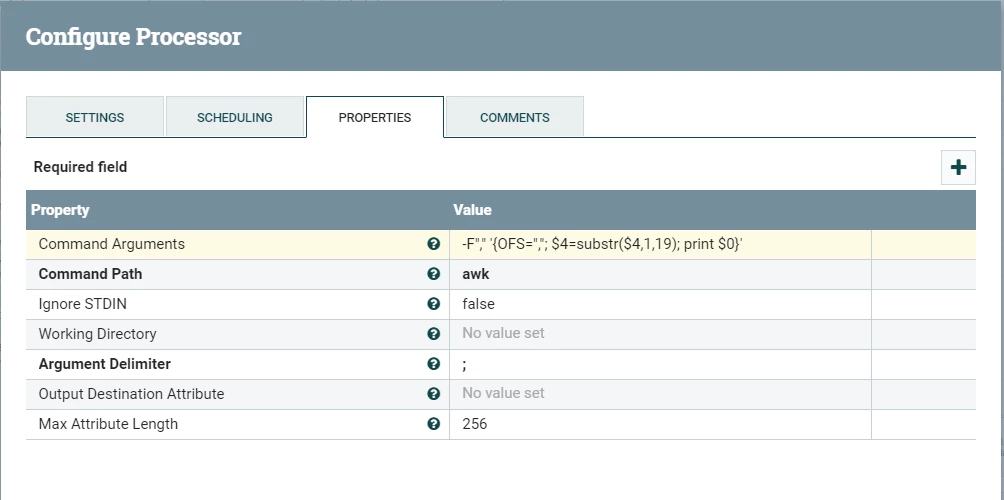


ecs.png
jsensharma
Platinum ⭐️⭐️
June 20, 2019

@Gulshan Agivetova

At least one problem i see in your config which is causing the following error:

Executable command awk ended in an error: awk: fatal: cannot open file `print $0}" for reading (No such file or directory


Thsis is because in your . "Command Arguments" you are using semicolon. And in "ExecuteStreamCommand" the "Argument Delimiter" is also set to ";" (which is default delimiter)

May be you can try changing the "Argument Delimiter" to something else then check if you are still getting the same error or not?


1 reply

jsensharma
Platinum ⭐️⭐️
Platinum ⭐️⭐️
June 20, 2019

@Gulshan Agivetova

At least one problem i see in your config which is causing the following error:

Executable command awk ended in an error: awk: fatal: cannot open file `print $0}" for reading (No such file or directory


Thsis is because in your . "Command Arguments" you are using semicolon. And in "ExecuteStreamCommand" the "Argument Delimiter" is also set to ";" (which is default delimiter)

May be you can try changing the "Argument Delimiter" to something else then check if you are still getting the same error or not?


Translate


