

Bug when copying a SplitJson processor
Hello All,
I have encountered a rather weird bug with NiFi's SplitJson processor. I am using NiFi 1.18 and it's a three node cluster. I think the best way of explaining it will be to use as example, so here is how to recreate this bug:
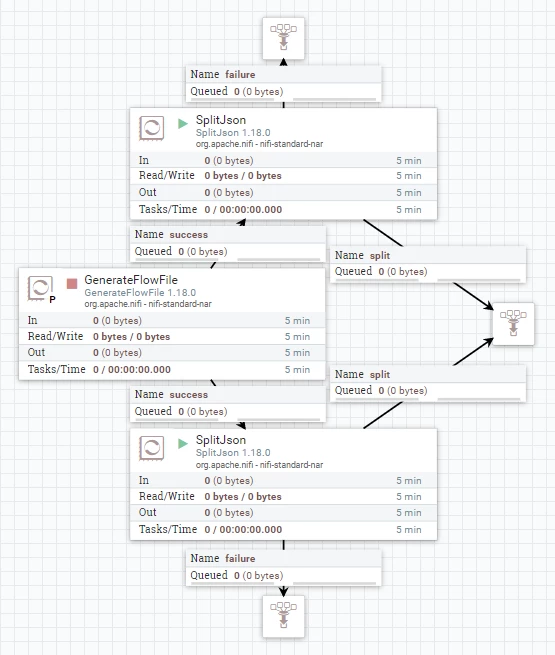
I created this flow with the following sequence of steps:
- Create a GenerateFlowFile and set the custom text to: { "test": [ { "A": 1 } ], "test2": [ { "B": 1 } ] }
- Create the top SplitJson and set the path to: $.test.*
- Create all connections for the top SplitJson (original is terminated), start it and run GenerateFlowFile once -> The output queue should show a single flow file with this content: { "A": 1 }
- Now select the top SplitJson, Crtl+C, Crtl+V, move the copy down create its connections and set the path to: $.test2.*
- Start the bottom SplitJson, and run GenerateFlowFile once again
- Both output queues have a new flow file and the contents of both flow files are: { "A": 1 }, which is correct for the top SplitJson, but for the bottom one the value should be { "B": 1 }
It seems that, for some reason, the copied SplitJson continues operating using the path that it had at the moment of copying and not the one that is present in the settings of the processor. I've checked that after refreshing the view or even the page, the settings of the bottom SplitJson show $.test2.* (so it is not a issue of my browser client not conveying the change to the cluster successfully, as the value stays) and yet the output of the copied SplitJson continuous to be { "A": 1 } instead of { "B": 1 }.
Is this a known issue? If so is there a fix for it?
Perhaps someone could quickly check if this issue is still present on 1.19, we could update our cluster if it was fixed.
Best regards,
Aleksander


