

willytk
Silver ⭐️⭐️
January 12, 2023
Solved

Building JSON object for invoke-http

Hi,

I'm looking at using Apache Nifi as a data integration hub for our case/archive management solution used in the Nordics and our rest-based API.


One use case is to first read an XML from one source with a few values and then use these values in a larger JSON payload that creates a new case in our solution with InvokeHTTP.

All values in the JSON arrays are inside a parameter{} node and can have objects with child properties.


I've done a lot of research and testing with the different processors, like ReplaceText, and AttributesToJSON, but can't find how I easily can do this.


Is it needed to use some complex JSON generator like Groovy or Jolt to achieve this with ExecuteScript?


With a online tool like make.com I was able to do this really easy, but find it complex to just replace multiple single values in the JSON payload before InvokeHHTP when the JSON payload is nested.


Example of a JSON payload for the API can be something like below, but can also contain many other values and nested objects. I want to replace a few of these values, like those in <bold> with values/parameters from the XML input

 

{
  "parameter": {
    "Title": "<titlefromXML>",
    "Casetype":"recno:18",
        "ExternalId": {
      "Id": "<guid>",
      "Type": "NiFi"
    },
 "UnregisteredContacts": [
      {
        "Role": "recno:17",
        "ContactName": "Organization name"
      },
        {
        "Role": "recno:9",
        "ContactName": "<Contact Name>"
      }
    ],
    "SubArchive":"Test archive",
        "ArchiveCodes": [
      {
        "ArchiveCode": "22",
        "ArchiveType": "recno:60001",
        "Sort": "1"
      }
    ]
  }
}
 
Thank you for any pointers!
 
Regards,
Willy T. Koch
Norway
linssab
linssabAnswer
Gold ⭐️
January 12, 2023

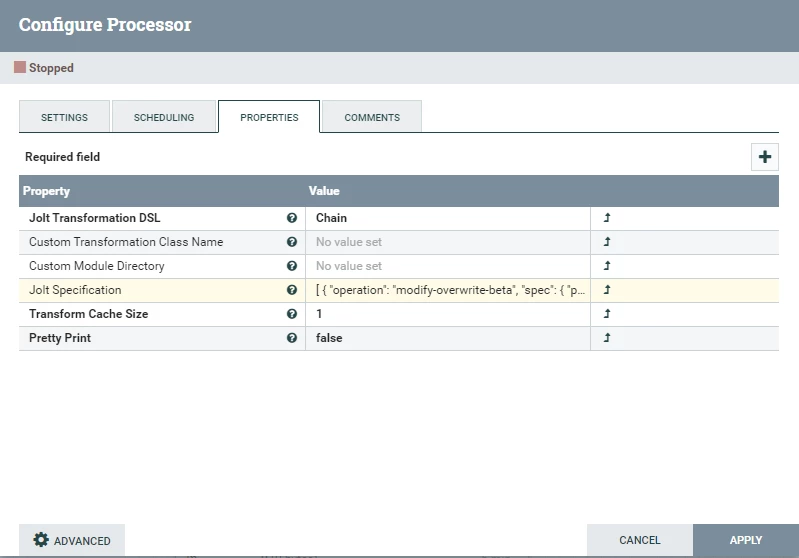
You have a few options here. Replace text could do the trick with some regex expression but it can get quite complex. I would suggest you use the JoltTransformJSON processor.

linssab_0-1673534871175.png


The follow JOLT Specification will work for you considering your flowfile have the title, id, and contact-name attributes. Replace accordingly.

[
{
"operation": "modify-overwrite-beta",
"spec": {
"parameter": {
"Title": "${title}",
"ExternalId": { "Id": "${id}" }
}
}
},
{
"operation": "modify-overwrite-beta",
"spec": {
"*": {
"UnregisteredContacts": { "[1]": { "ContactName": "${contact-name}" } }
}
}
}
]


5 replies

linssab
linssabAnswer
Gold ⭐️
January 12, 2023

You have a few options here. Replace text could do the trick with some regex expression but it can get quite complex. I would suggest you use the JoltTransformJSON processor.

linssab_0-1673534871175.png


The follow JOLT Specification will work for you considering your flowfile have the title, id, and contact-name attributes. Replace accordingly.

[
{
"operation": "modify-overwrite-beta",
"spec": {
"parameter": {
"Title": "${title}",
"ExternalId": { "Id": "${id}" }
}
}
},
{
"operation": "modify-overwrite-beta",
"spec": {
"*": {
"UnregisteredContacts": { "[1]": { "ContactName": "${contact-name}" } }
}
}
}
]


Translate
willytk
willytkAuthor
Silver ⭐️⭐️
January 13, 2023

Perfect, thank you! That was as simple as I'd hoped 🙂


Then I just need to get the properties from another flowfile that reads an XML file, uses EvaluateXPath to set some new parameters, like caseno, docno which will be used in the Invoke-HTTP request.


What's the trick on getting only those properties into the scope of the JoltTransformJSON object so I can use them in the JSON payload for Invoke-HTTP?


I tried some variants of AttributesToJSON and MergeContent, but can't seem to only get the properties.


Regards,

Willy

Translate
linssab
Gold ⭐️
January 13, 2023

Hey Willy,

I'm glad I was able to help.


As for the properties, I'm assuming you meant attributes. The JoltTransformJSON supports Expression Language (EL) with Variable Registry and FlowFile attributes. This means you can access any attribute in your flowfile with EL syntax, as 


${attributeName}


If your flowfile (that reads the XML file) Content is a JSON, you can extract values from the JSON and turn them into attributes with the EvaluateJsonPath processor as below:

linssab_0-1673601006469.png

Then you can use these attributes in the JoltTransform with the syntax written above.

However, if the flowfile content is not a JSON and EvaluateJsonPath does not serve the purpose, you can try extracting the information within the FlowFile and turn them into attributes using the ExtractText processor.


Let's say teh XLM FLowFile content is:


<property1="FieldValue1"> 
<caseno="foobar">
<property2="FieldValue2">


You can use the syntax below to extract the caseno field and set it as an attribute in the FlowFile 


caseno=\s*"(\w+)"


linssab_1-1673602033370.png


--
Was your question answered? Please take some time to click on "Accept as Solution" below this post.
If you find a reply useful, say thanks by clicking on the thumbs up button.

Translate

