@Paul Yang
A couple observation based on provided information:
1. You have need clientAuth enabled
nifi.registry.security.needClientAuth=true
With this enabled in NiFi-Registry the only authentication method supported will be 2-way TLS. If you want to support other authentication methods lik Spnego, LDAP, and/or kerberos, this property must be false.
2. Your users.xml (used for user authorization and not authentication) only contains one user. I am assuming the user is :
CN=arch-fndtf04.beta1.fn, OU=NIFI
And your authorizations.xml also show that this is the only user that has been authorized to a bunch of policies. Your ldap user you want to authorize must exist in the users.xml file. My guess here is that you did not set the "Initial admin" user in your authorizers.xml (which you did not share). There are two possible providers in the authorizers were you can set the initial admin (file-user-group-provider - Only set here if your initial admin user is NOT coming from the ldap-user-group-provider. file-access-provider - initial admin must be set here so initial admin policies are created for this user.
3. The users.xml and authorizations.xml files are only generated if they do not already exist. If you go back and add an initial admin to your authorizers.xml, you will need to delete/rename the existing users.xml and authorizations.xml files o new ones can be generated in startup.
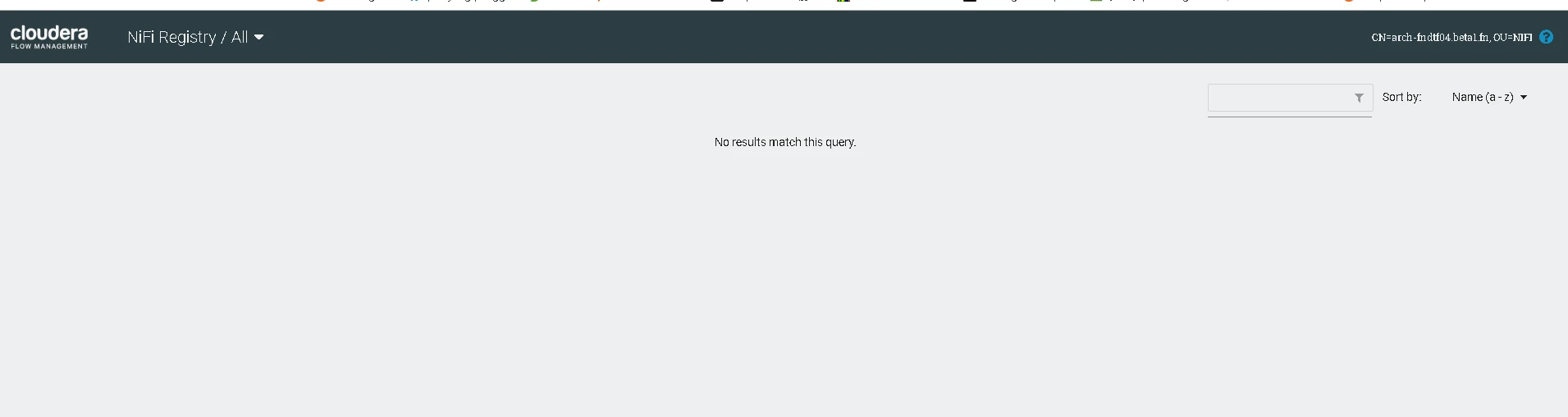
4. Since need clientAuth was set to true and UI clearly shows that user string:
CN=arch-fndtf04.beta1.fn, OU=NIFI
successfully authenticated, your browser must have this client certificate loaded and presented to the server when you navigated to the URL for your NiFi-Registry. I really see no reason why this certificate was loaded int to your browser. NiFi-Registry, even when need clientAuth is false, will always try mutual TLS authentication first (becomes a WANT instead of REQUIRE when need clientAuth is false). If no client certificate is provided in TLS handshake, next auth method tried is Spnego (if configured), and finally a configured login provider from the identity-providers.xml.
Hope this info helps with correcting your setup issues.
Thanks,
Matt