bgumis
Silver ⭐️⭐️⭐️
Nov 21, 2024 6:03 PM UTC
Solved

Cannot use json as a body in invokehttp.

Hi,

I am trying to create json, that is always the same, 

{"status":"APPROVED"}

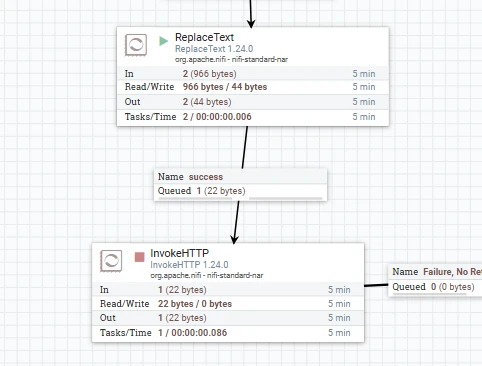
I have used replace text, used alwaysreplace and put that text there.

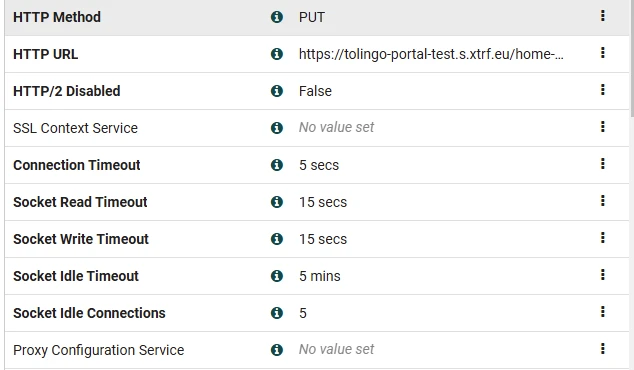
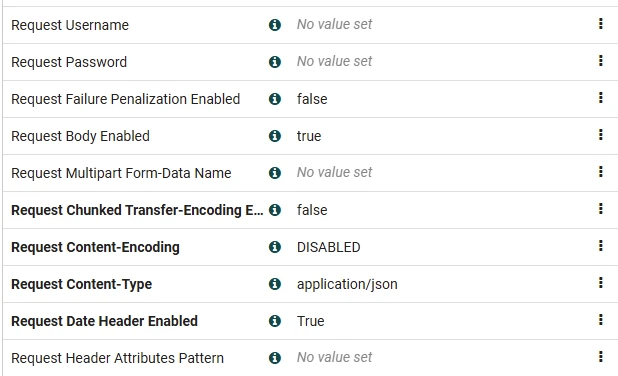
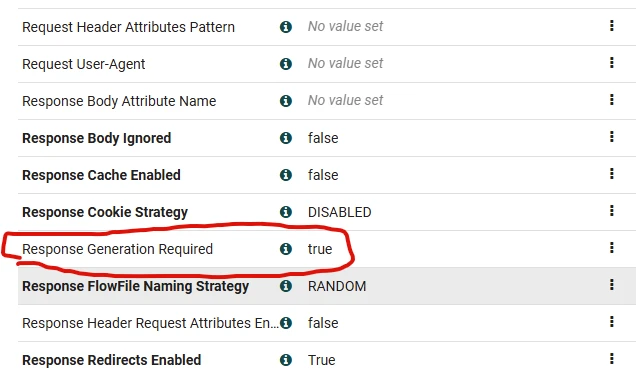
Here is the specification of the invokehttp
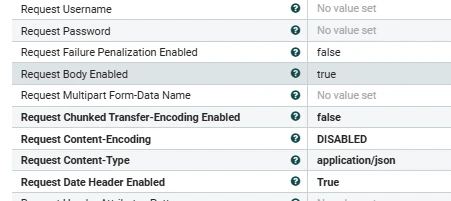
bgumis_0-1732212097773.png


bgumis_1-1732212169265.png

Am I missing something? 


SAMSAL
SAMSALAnswer
Platinum ⭐️⭐️⭐️
Nov 22, 2024 11:12 AM UTC

Hi,

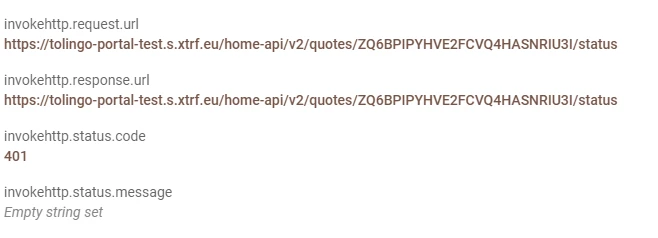
It seems like the Url you have in the invokehttp is invalid compared to the one in postman:

invokehttp:

 https://tolingo-portal-test.s.xtrf.eu/home-api/quotes/ZQ6BPIPYHVE2FCVQ4HASNRIU3I/status

Postman:

https://tolingo-portal-test.s.xtrf.eu/home-api/v2/quotes/ZQ6BPIPYHVE2FCVQ4HASNRIU3I/status

It seems like you are missing the v2 in invokehttp.


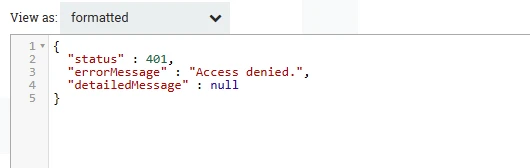
When I try the correct url with the following configuration it works but I dont have access ofcourse 🙂

SAMSAL_0-1732273812744.png

SAMSAL_1-1732273840556.pngSAMSAL_2-1732273879405.pngSAMSAL_3-1732273934256.pngSAMSAL_4-1732273961295.png


5 replies

DianaTorres
Community Manager
Community Manager
Nov 21, 2024 7:27 PM UTC

@bgumis Welcome to the Cloudera Community!

To help you get the best possible solution, I have tagged our NiFi experts @MattWho @SAMSAL  who may be able to assist you further.

Please keep us updated on your post, and we hope you find a satisfactory solution to your query.

Translate
Regards, Diana Torres, Senior Community Moderator
SAMSAL
Platinum ⭐️⭐️⭐️
Nov 21, 2024 9:41 PM UTC

Hi,

Can you elaborate more about the API call and what method its using? if you also can provide how the API works using postman or curl that would be helpful too. Just FYI, if you are trying to send json body with Get method its not going to work using this processor and you have to write custom code using ExecuteScript to work around it.

Translate
bgumis
bgumisAuthor
Silver ⭐️⭐️⭐️
Nov 22, 2024 6:24 AM UTC

Hi, 

I am using PUT method, the URL is #{xtrf_api}/quotes/${quote_id}/status which correctly resolves itself with https://tolingo-portal-test.s.xtrf.eu/home-api/quotes/ZQ6BPIPYHVE2FCVQ4HASNRIU3I/status.


The error message is 404, <html><head><title>Error</title></head><body>Not


bgumis_0-1732256346348.png


Found</body></html> which suggests that the json was not ingested by InvokeHTTP (as far as I understand).


When I use Postman (If there is a better way to share the results, I am happy to provide but I am still a beginner)

2024-11-22_07h20_48.png


2024-11-22_07h22_43.png


Translate
SAMSAL
SAMSALAnswer
Platinum ⭐️⭐️⭐️
Nov 22, 2024 11:12 AM UTC

Hi,

It seems like the Url you have in the invokehttp is invalid compared to the one in postman:

invokehttp:

 https://tolingo-portal-test.s.xtrf.eu/home-api/quotes/ZQ6BPIPYHVE2FCVQ4HASNRIU3I/status

Postman:

https://tolingo-portal-test.s.xtrf.eu/home-api/v2/quotes/ZQ6BPIPYHVE2FCVQ4HASNRIU3I/status

It seems like you are missing the v2 in invokehttp.


When I try the correct url with the following configuration it works but I dont have access ofcourse 🙂

SAMSAL_0-1732273812744.png

SAMSAL_1-1732273840556.pngSAMSAL_2-1732273879405.pngSAMSAL_3-1732273934256.pngSAMSAL_4-1732273961295.png


Translate
bgumis
bgumisAuthor
Silver ⭐️⭐️⭐️
Nov 22, 2024 1:44 PM UTC

@SAMSAL 

Jeez... I should not have prepared that flow at the end of 12 hour work...

Of course, it works now, sorry for troubles and thanks for quick support

Translate