

stale
Silver ⭐️⭐️⭐️
June 29, 2022
Question

CDP 7.6.5 - Canary test failed to write file in directory /tmp/.cloudera_health_monitoring_canary_files.

Hello,

I'm facing a problem with HDFS is in bad state because of Canary test failed.


ERROR com.cloudera.cmon.firehose.polling.hdfs.HdfsCanary: (9 skipped) com.cloudera.cmon.firehose.polling.hdfs.HdfsCanary@70164e31 for hdfs://nameservice1: Failed to write to /tmp/.cl
oudera_health_monitoring_canary_files/.canary_file_2022_06_29-15_20_26.3f6b5657894eb2c0. Error: {}
java.io.IOException: Could not get block locations. Source file "/tmp/.cloudera_health_monitoring_canary_files/.canary_file_2022_06_29-15_20_26.3f6b5657894eb2c0" - Aborting...block==null
at org.apache.hadoop.hdfs.DataStreamer.setupPipelineForAppendOrRecovery(DataStreamer.java:1491)
at org.apache.hadoop.hdfs.DataStreamer.processDatanodeOrExternalError(DataStreamer.java:1271)
at org.apache.hadoop.hdfs.DataStreamer.run(DataStreamer.java:667)
WARN org.apache.hadoop.hdfs.DataStreamer: Could not get block locations. Source file "/tmp/.cloudera_health_monitoring_canary_files/.canary_file_2022_06_29-15_24_31.ba376573face8227" - Aborting...block==null


Canary settings:
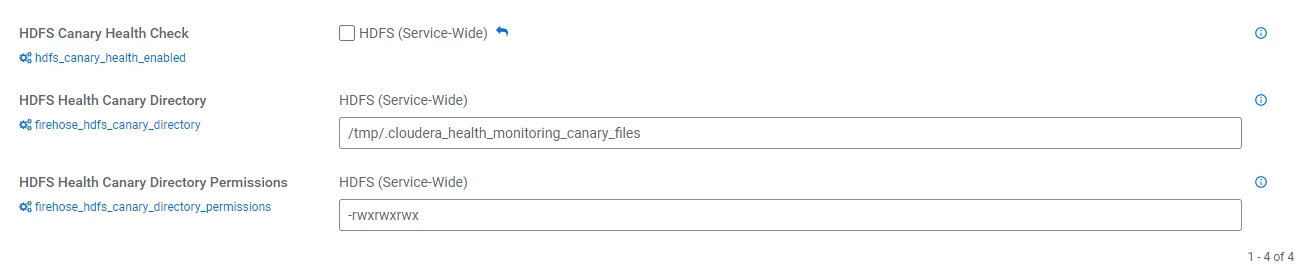
image001.png

but when run command:


hdfs dfs -ls /tmp/


output is:


d---------   - hdfs   supergroup      	0 2022-06-29 15:24 /tmp/.cloudera_health_monitoring_canary_files


so no permissions are set. If I try to set right permissions manually it still won’t work...


When I disable Canary Health Check and remove .cloudera_health_monitoring_canary_files, and re-enable Canary again HDFS will create folder with no permissions although right permissions are set in HDFS Configuration. And strange thing is that I can find some files written despite of wrong permissions:


/tmp/.cloudera_health_monitoring_canary_files/.canary_file_2022_06_29-15_24_31.ba376573face8227


Help please 🙂

9 replies

stale
staleAuthor
Silver ⭐️⭐️⭐️
June 30, 2022

I forgot to mention that the Kerberization failed and then I disabled it. But when I go to Add Cluster there is a message: KDC is already setup...

Screenshot at Jun 30 11-34-05.png


Translate
stale
staleAuthor
Silver ⭐️⭐️⭐️
July 5, 2022

New update:

Cluster is fully Kerberized but problem still exist... Health status changes from bad to good every minute.

Any hint on this?

Translate
araujo
Platinum ⭐️⭐️⭐️
Platinum ⭐️⭐️⭐️
July 5, 2022

@stale 


What did you do to fix the Kerberos issue?

Would you be able to share the SERVICE_MONITOR log under /var/log/cloudera-scm-firehose?


Cheers,

Andre

Translate
-- Was your question answered? Please take some time to click on "Accept as Solution" below this post. If you find a reply useful, say thanks by clicking on the thumbs up button.
araujo
Platinum ⭐️⭐️⭐️
Platinum ⭐️⭐️⭐️
July 5, 2022

@stale ,


Could you please also share the output of this? hdfs dfs -ls /


Cheers,

André

Translate
-- Was your question answered? Please take some time to click on "Accept as Solution" below this post. If you find a reply useful, say thanks by clicking on the thumbs up button.
stale
staleAuthor
Silver ⭐️⭐️⭐️
July 5, 2022

Hi @araujo 
There was a mismatch between Kerberos and AD encryption types.


Service monitor log:

2022-07-05 14:35:17,917 WARN org.apache.hadoop.hdfs.DFSClient: Connection failure: Failed to connect to /X.X.X.225:9866 for file /tmp/.cloudera_health_monitoring_canary_files/.canary_file_2022_07_05-14_34_59.8565a95826ef54f9 for block BP-1398826736-X.X.X.220-1656342421752:blk_1073752440_11616:com.google.protobuf.InvalidProtocolBufferException$InvalidWireTypeException: Protocol message tag had invalid wire type.
com.google.protobuf.InvalidProtocolBufferException$InvalidWireTypeException: Protocol message tag had invalid wire type.
at com.google.protobuf.InvalidProtocolBufferException.invalidWireType(InvalidProtocolBufferException.java:111)
at com.google.protobuf.UnknownFieldSet$Builder.mergeFieldFrom(UnknownFieldSet.java:557)
at com.google.protobuf.GeneratedMessage.parseUnknownField(GeneratedMessage.java:275)
at org.apache.hadoop.hdfs.protocol.proto.DataTransferProtos$PacketHeaderProto.<init>(DataTransferProtos.java:20614)
at org.apache.hadoop.hdfs.protocol.proto.DataTransferProtos$PacketHeaderProto.<init>(DataTransferProtos.java:20572)
at org.apache.hadoop.hdfs.protocol.proto.DataTransferProtos$PacketHeaderProto$1.parsePartialFrom(DataTransferProtos.java:20675)
at org.apache.hadoop.hdfs.protocol.proto.DataTransferProtos$PacketHeaderProto$1.parsePartialFrom(DataTransferProtos.java:20670)
at com.google.protobuf.AbstractParser.parsePartialFrom(AbstractParser.java:158)
at com.google.protobuf.AbstractParser.parseFrom(AbstractParser.java:191)
at com.google.protobuf.AbstractParser.parseFrom(AbstractParser.java:203)
at com.google.protobuf.AbstractParser.parseFrom(AbstractParser.java:208)
at com.google.protobuf.AbstractParser.parseFrom(AbstractParser.java:48)
at org.apache.hadoop.hdfs.protocol.proto.DataTransferProtos$PacketHeaderProto.parseFrom(DataTransferProtos.java:20951)
at org.apache.hadoop.hdfs.protocol.datatransfer.PacketHeader.setFieldsFromData(PacketHeader.java:130)
at org.apache.hadoop.hdfs.protocol.datatransfer.PacketReceiver.doRead(PacketReceiver.java:179)
at org.apache.hadoop.hdfs.protocol.datatransfer.PacketReceiver.receiveNextPacket(PacketReceiver.java:102)
at org.apache.hadoop.hdfs.client.impl.BlockReaderRemote.readTrailingEmptyPacket(BlockReaderRemote.java:268)
at org.apache.hadoop.hdfs.client.impl.BlockReaderRemote.readNextPacket(BlockReaderRemote.java:233)
at org.apache.hadoop.hdfs.client.impl.BlockReaderRemote.read(BlockReaderRemote.java:169)
at org.apache.hadoop.hdfs.DFSInputStream.actualGetFromOneDataNode(DFSInputStream.java:1072)
at org.apache.hadoop.hdfs.DFSInputStream.fetchBlockByteRange(DFSInputStream.java:1014)
at org.apache.hadoop.hdfs.DFSInputStream.pread(DFSInputStream.java:1373)
at org.apache.hadoop.hdfs.DFSInputStream.read(DFSInputStream.java:1337)
at org.apache.hadoop.fs.FSInputStream.readFully(FSInputStream.java:124)
at org.apache.hadoop.fs.FSDataInputStream.readFully(FSDataInputStream.java:125)
at com.cloudera.cmf.cdh7client.hdfs.FSDataInputStreamImpl.readFully(FSDataInputStreamImpl.java:24)
at com.cloudera.cmon.firehose.polling.hdfs.HdfsCanary.readFile(HdfsCanary.java:205)
at com.cloudera.cmon.firehose.polling.hdfs.HdfsCanary.doWork(HdfsCanary.java:105)
at com.cloudera.cmon.firehose.polling.hdfs.HdfsCanary.doWork(HdfsCanary.java:47)
at com.cloudera.cmon.firehose.polling.AbstractFileSystemClientTask.doWorkWithClientConfig(AbstractFileSystemClientTask.java:55)
at com.cloudera.cmon.firehose.polling.AbstractCdhWorkUsingClientConfigs.doWork(AbstractCdhWorkUsingClientConfigs.java:45)
at com.cloudera.cmon.firehose.polling.CdhTask$InstrumentedWork.doWork(CdhTask.java:231)
at com.cloudera.cmf.cdhclient.util.ImpersonatingTaskWrapper.runTask(ImpersonatingTaskWrapper.java:72)
at com.cloudera.cmf.cdhclient.util.ImpersonatingTaskWrapper.access$000(ImpersonatingTaskWrapper.java:21)
at com.cloudera.cmf.cdhclient.util.ImpersonatingTaskWrapper$1.run(ImpersonatingTaskWrapper.java:107)
at java.base/java.security.AccessController.doPrivileged(Native Method)
at java.base/javax.security.auth.Subject.doAs(Subject.java:423)
at org.apache.hadoop.security.UserGroupInformation.doAs(UserGroupInformation.java:1898)
at com.cloudera.cmf.cdh7client.security.UserGroupInformationImpl.doAs(UserGroupInformationImpl.java:42)
at com.cloudera.cmf.cdhclient.util.ImpersonatingTaskWrapper.doWork(ImpersonatingTaskWrapper.java:104)
at com.cloudera.cmf.cdhclient.CdhExecutor$SecurityWrapper$1.run(CdhExecutor.java:189)
at java.base/java.security.AccessController.doPrivileged(Native Method)
at java.base/javax.security.auth.Subject.doAs(Subject.java:423)
at org.apache.hadoop.security.UserGroupInformation.doAs(UserGroupInformation.java:1898)
at com.cloudera.cmf.cdh7client.security.UserGroupInformationImpl.doAs(UserGroupInformationImpl.java:42)
at com.cloudera.cmf.cdhclient.CdhExecutor$SecurityWrapper.doWork(CdhExecutor.java:186)
at com.cloudera.cmf.cdhclient.CdhExecutor$1.call(CdhExecutor.java:125)
at java.base/java.util.concurrent.FutureTask.run(FutureTask.java:264)
at java.base/java.util.concurrent.ThreadPoolExecutor.runWorker(ThreadPoolExecutor.java:1128)
at java.base/java.util.concurrent.ThreadPoolExecutor$Worker.run(ThreadPoolExecutor.java:628)
at java.base/java.lang.Thread.run(Thread.java:829)
2022-07-05 14:35:17,917 WARN org.apache.hadoop.hdfs.DFSClient: No live nodes contain block BP-1398826736-X.X.X.220-1656342421752:blk_1073752440_11616 after checking nodes = [DatanodeInfoWithStorage[X.X.X.226:9866,DS-13ee530f-1bf7-4752-8e4b-c7dfc8d760c7,DISK], DatanodeInfoWithStorage[X.X.X.228:9866,DS-de389cd6-5b67-4e37-b6d5-40b945699832,DISK], DatanodeInfoWithStorage[X.X.X.225:9866,DS-0e7334d6-8fcd-4ee6-b554-fd2287465e02,DISK]], ignoredNodes = null
2022-07-05 14:35:17,917 WARN org.apache.hadoop.hdfs.DFSClient: Could not obtain block: BP-1398826736-X.X.X.220-1656342421752:blk_1073752440_11616 file=/tmp/.cloudera_health_monitoring_canary_files/.canary_file_2022_07_05-14_34_59.8565a95826ef54f9 No live nodes contain current block Block locations: DatanodeInfoWithStorage[X.X.X.226:9866,DS-13ee530f-1bf7-4752-8e4b-c7dfc8d760c7,DISK] DatanodeInfoWithStorage[X.X.X.228:9866,DS-de389cd6-5b67-4e37-b6d5-40b945699832,DISK] DatanodeInfoWithStorage[X.X.X.225:9866,DS-0e7334d6-8fcd-4ee6-b554-fd2287465e02,DISK] Dead nodes: DatanodeInfoWithStorage[X.X.X.226:9866,DS-13ee530f-1bf7-4752-8e4b-c7dfc8d760c7,DISK] DatanodeInfoWithStorage[X.X.X.228:9866,DS-de389cd6-5b67-4e37-b6d5-40b945699832,DISK] DatanodeInfoWithStorage[X.X.X.225:9866,DS-0e7334d6-8fcd-4ee6-b554-fd2287465e02,DISK]. Throwing a BlockMissingException


How can I use command line after Kerberos was enabled?

hdfs dfs -ls / #is not possible anymore
22/07/05 14:34:38 WARN ipc.Client: Exception encountered while connecting to the server : org.apache.hadoop.security.AccessControlException: Client cannot authenticate via:[TOKEN, KERBEROS]

ls: DestHost:destPort FQDN_02:8020 , LocalHost:localPort FQDN_01/X.X.X.220:0. Failed on local exception: java.io.IOException: org.apache.hadoop.security.AccessControlException: Client cannot authenticate via:[TOKEN, KERBEROS]


Translate
araujo
Platinum ⭐️⭐️⭐️
Platinum ⭐️⭐️⭐️
July 5, 2022

I believe that the HDFS bad state is not related to the permissions set by the canary test. The problem seems to be related to the process to kerberize your cluster.


It seems that something didn't work correctly and your 3 data nodes are listed as dead in the SMON log.


To use the command line after kerberos you need first to authenticate using the knit command.


Cheers

Andre


Translate
-- Was your question answered? Please take some time to click on "Accept as Solution" below this post. If you find a reply useful, say thanks by clicking on the thumbs up button.
stale
staleAuthor
Silver ⭐️⭐️⭐️
July 5, 2022

@araujo thank you for a fast response.

What could be solution in your opinion?

Translate
araujo
Platinum ⭐️⭐️⭐️
Platinum ⭐️⭐️⭐️
July 5, 2022

@stale ,


Hard to say. It could be a number of things. You'll need to dig into the log files to find the root cause.

Start looking into the DataNodes and NameNodes logs to understand whether the DataNodes really stopped/crashed or if they are running but cannot communicate with the NN for some reason. Then go from there, depending on what you find.


Also make sure all you service Kerberos credentials were generated correctly. Maybe quickly try to generate them in Administration > Security > Kerberos credentials > Regenerate button.


Good luck!

André

Translate
-- Was your question answered? Please take some time to click on "Accept as Solution" below this post. If you find a reply useful, say thanks by clicking on the thumbs up button.
Nghia
Silver ⭐️⭐️
July 7, 2022

Hello @stale ,

Have you already fix this issue? I am facing the same problem with same version 7.6.5 on kerberized cluster

Translate
