

Baris
Gold ⭐️
Oct 15, 2019 3:44 PM UTC
Solved

CDSW 1.6 does not recognize NVIDA GPUs

I'm struggling with enabling GPU Support on our CDSW 1.6. We have a CDSW Cluster with 1 Master-Node and 2 Woker-Nodes (one of the Worker-Nodes is equipped with NVIDIA GPUs)
What I did so far:

  • Successfully upgraded our CDSW Cluster to CDSW 1.6
  • Prepared the GPU-Host regarding this CDSW NVIDIA-GPU Guide
  • Disabled Nouveau on the GPU-Host
  • Installed successfully the NVIDIA Driver with respect to the right kernel header version.
    (This NVIDIA-Guide was very useful)
  • Checked that the NVIDIA driver is correct installed with the command 

    nvidia-smi

    The output shows the correct number of NVIDIA GPUs which are installed on the GPU-Host. 
  • Added the GPU-Host with Cloudera-Manager to the CDSW-Cluster and added the worker and docker daemon role instances to the GPU-Host.
  • Enable GPU Support for CDSW on Cloudera-Manager.
  • Restarted the CDSW Service with Cloudera-Manager successfully.

When I log into the CDSW Web-GUI I don't see any available GPUs as shown in the CDSW NVIDIA-GPU Guide.

But what I can see is that my CDSW-Cluster now has more CPU and memory available since I added the GPU-Host to the CDSW-Cluster. That means that CDSW does recognize the new Host but unfortunately not my GPUs.


Also, when I type the command on the GPU-Host

cdsw status

 I can see that CDSW does not recognize the GPUs -> 0 GPUs available.
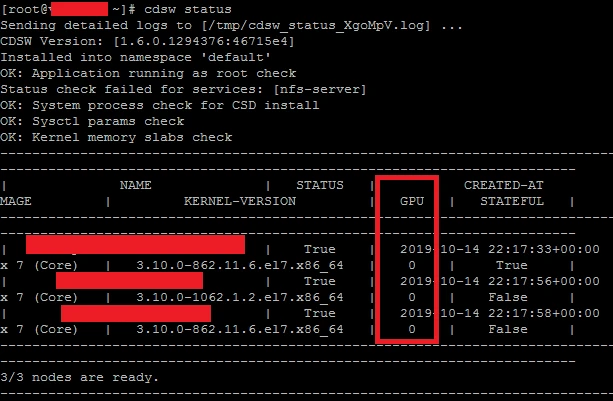
Output of cdsw statusOutput of cdsw status


Can someone please help me out?
Thanks!

GangWar
GangWarAnswer
Platinum ⭐️⭐️
Oct 17, 2019 3:01 PM UTC

@Baris We’ve known issue where in air-gapped environment the nvidia-device-plugin-daemonset pod will throw ImagePullBackOff due to inability to find a k8s-device-plugin:1.11 image in the cache. Eventually it tries to looks up to the public repository over internet and fails because the env doen’t have public access. The workaround for that is to tag the image on CDSW hosts.

Please run the below command on the CDSW hosts.

# docker tag docker-registry.infra.cloudera.com/cdsw/third-party/nvidia/k8s-device-plugin:1.11 nvidia/k8s-device-plugin:1.11

Let me know if your environment is outside internet. Try the above command  and keep us posted.

Cheers! Was your question answered? Make sure to mark the answer as the accepted solution. If you find a reply useful, say thanks by clicking on the thumbs up button.

7 replies

GangWar
Platinum ⭐️⭐️
Platinum ⭐️⭐️
Oct 15, 2019 10:28 PM UTC

@Baris Can you paste a CDSW home page's screenshot here? Also check the latest cdsw.conf file on the master role host like below and upload here.

/run/cloudera-scm-agent/process/xx-cdsw-CDSW_MASTER/cdsw.conf (Where xx is the greatest number)

Translate
Cheers! Was your question answered? Make sure to mark the answer as the accepted solution. If you find a reply useful, say thanks by clicking on the thumbs up button.
Baris
BarisAuthor
Gold ⭐️
Oct 15, 2019 11:34 PM UTC

Hello @GangWar,

thank you for the fast reply.
Here is a screenshot from our CDSW home page

cdsw_site.png

And this my cdsw.conf file:

JAVA_HOME="/usr/java/jdk1.8.0_181"
KUBE_TOKEN="34434e.107e63749c742556"
DISTRO="CDH"
DISTRO_DIR="/opt/cloudera/parcels"
AUXILIARY_NODES="ADDRESS_OF_GPU-HOST"
CDSW_CLUSTER_SECRET="CLUSTER_SECRET_KEY"
DOMAIN="workbench.company.com"
LOGS_STAGING_DIR="/var/lib/cdsw/tmp"
MASTER_IP="ADDRESS_OF_CDSW-MASTER"
NO_PROXY=""
NVIDIA_GPU_ENABLE="true"
RESERVE_MASTER="false"

Regards! 

Translate
GangWar
Platinum ⭐️⭐️
Platinum ⭐️⭐️
Oct 16, 2019 10:05 PM UTC

@Baris Things looks good and the steps you followed looks also fine. Can you stop CDSW service and reboot the host and restart the CDSW again. 

Check if the CDSW detecting GPU, If not then please run below command send us the cdsw logs from the cdsw master role host.

cdsw logs


Translate
Cheers! Was your question answered? Make sure to mark the answer as the accepted solution. If you find a reply useful, say thanks by clicking on the thumbs up button.

