

Galih
Silver ⭐️⭐️
January 18, 2023
Solved

Change timestamp format field in nifi

I have json file like this and want send it to hive using nifi, how can i change the timestamp type because when i send it to hive, in hive table the column type is string, and I read in hive DDL format for timestamp "yyyy-MM-dd HH:mm:ss.SSS"


{"nama": "d", "alamat": "jkt", "_ab_cdc_updated_at": "2023-01-05T05:57:43.499Z", "_ab_cdc_lsn": 1640844128, "_ab_cdc_deleted_at": null}
{"nama": "a", "alamat": null, "_ab_cdc_updated_at": "2023-01-05T05:57:43.510Z", "_ab_cdc_lsn": 1640844256, "_ab_cdc_deleted_at": "2023-01-05T05:57:43.510Z"}
{"nama": "c", "alamat": "semarang", "_ab_cdc_updated_at": "2023-01-12T03:38:32.136Z", "_ab_cdc_lsn": 1684930552, "_ab_cdc_deleted_at": null}
{"nama": "f", "alamat": null, "_ab_cdc_updated_at": "2023-01-12T04:11:53.329Z", "_ab_cdc_lsn": 1685073792, "_ab_cdc_deleted_at": "2023-01-12T04:11:53.329Z"}

SAMSAL
SAMSALAnswer
Platinum ⭐️⭐️⭐️
January 18, 2023

Hi,

I was able to obtain the required result using the following processor:


1- SplitText : this is to help you split each json record into its own flowfile

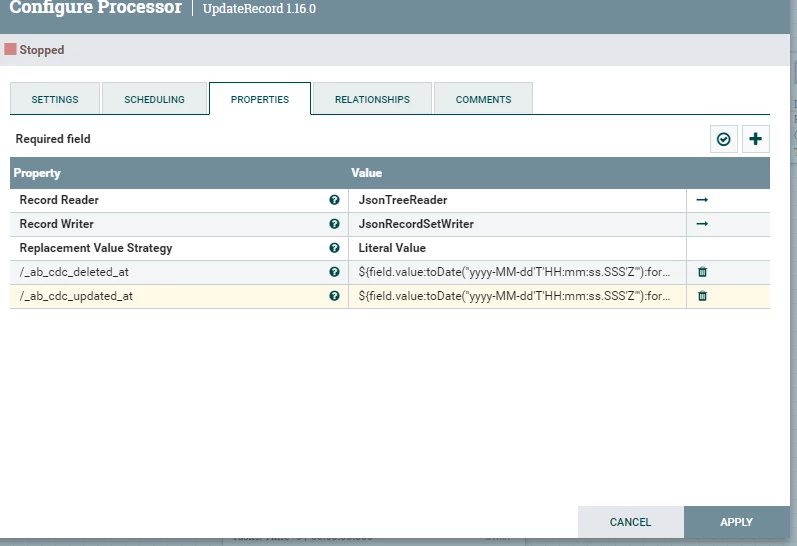
2- UpdateRecord: This is used to update the dates fields and convert to the required format using Json Record Reader\Writer:


SAMSAL_0-1674073246414.png

The value used to convert the time for each field :

${field.value:toDate("yyyy-MM-dd'T'HH:mm:ss.SSS'Z'"):format("yyyy-MM-dd HH:mm:ss.SSS")}


More info on UpdateRecord: https://nifi.apache.org/docs/nifi-docs/components/org.apache.nifi/nifi-standard-nar/1.7.1/org.apache.nifi.processors.standard.UpdateRecord/additionalDetails.html


Note: The only problem I noticed is that null values will be converted to "" . Not sure if that will cause you a problem but you can use replace text or json jolt to convert the values back to null.

If you need the records to be merged back together before inserting into Hive, you can use MergeRecord processor.


If that helps please accept solution.

Thanks


1 reply

SAMSAL
SAMSALAnswer
Platinum ⭐️⭐️⭐️
January 18, 2023

Hi,

I was able to obtain the required result using the following processor:


1- SplitText : this is to help you split each json record into its own flowfile

2- UpdateRecord: This is used to update the dates fields and convert to the required format using Json Record Reader\Writer:


SAMSAL_0-1674073246414.png

The value used to convert the time for each field :

${field.value:toDate("yyyy-MM-dd'T'HH:mm:ss.SSS'Z'"):format("yyyy-MM-dd HH:mm:ss.SSS")}


More info on UpdateRecord: https://nifi.apache.org/docs/nifi-docs/components/org.apache.nifi/nifi-standard-nar/1.7.1/org.apache.nifi.processors.standard.UpdateRecord/additionalDetails.html


Note: The only problem I noticed is that null values will be converted to "" . Not sure if that will cause you a problem but you can use replace text or json jolt to convert the values back to null.

If you need the records to be merged back together before inserting into Hive, you can use MergeRecord processor.


If that helps please accept solution.

Thanks


Translate

