GTA
Gold ⭐️
Mar 26, 2020 2:27 PM UTC
Solved

Cloudera Navigator

Hi friends,


I have CDH 6.2.1 setted up in my local server. I can login to cloudera manager to monitor all the components and its running status. Meanwhile im trying to found how to access Cloudera navigator and stuck with it. Can you guide me how to access the same.


Even i followed the below steps, it dint help as i couldnt locate the navigator

How can I access the Cloudera Navigator console?

The Cloudera Navigator console can be accessed from the Cloudera Manager Admin Console or directly on the Navigator Metadata Server instance. Using the Cloudera Manager Admin Console as a starting point requires the Cloudera Manager roles of either Navigator Administrator or Full Administrator.

From the Cloudera Manager Admin Console:
  1. Select Clusters > Cluster-n.
  2. Select Cloudera Navigator from the menu.
To access the Cloudera Navigator console directly:
  1. Open the browser to the host name of the node in the cluster that runs the Cloudera Navigator Metadata Server. For example, if node 2 in the cluster is running the Navigator Metadata Server role, the URL to the Cloudera Navigator console (assuming the default port of 7187) might look as follows

http://fqdn-2.example.com:7187/login.html


  1. :Log in to the Cloudera Navigator console using the credentials assigned by your administrator.

Regards, GTA

lwang
lwangAnswer
Platinum ⭐️
Mar 27, 2020 10:31 PM UTC

Hi @GTA ,


Please follow this to check if you have installed Navigator or not.

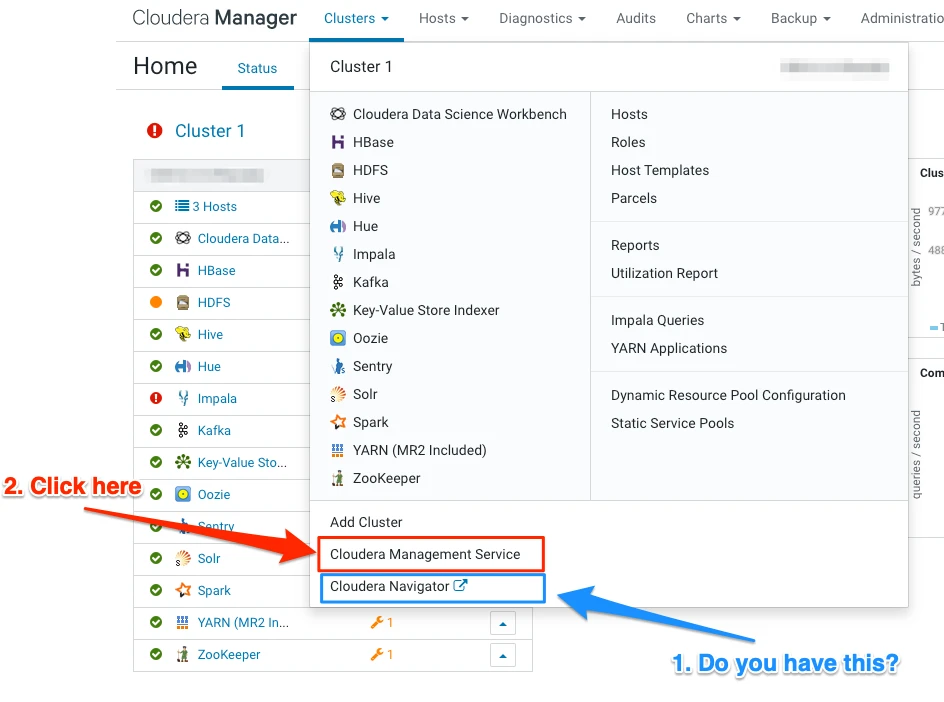
Step 1, check if you have the short cut link named "Cloudera Navigator" from Cloudera Manager UI > Clusters.

Step 2, if not, then click "Cloudera Management Service" 


step1_2.png


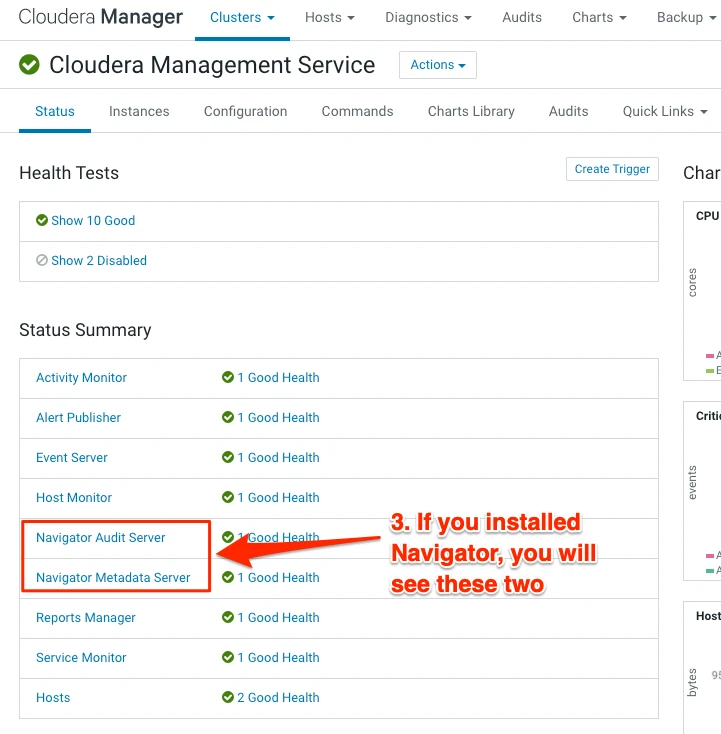
Step 3: The screenshot shows you what it will look like if you installed Navigator.


step3.png


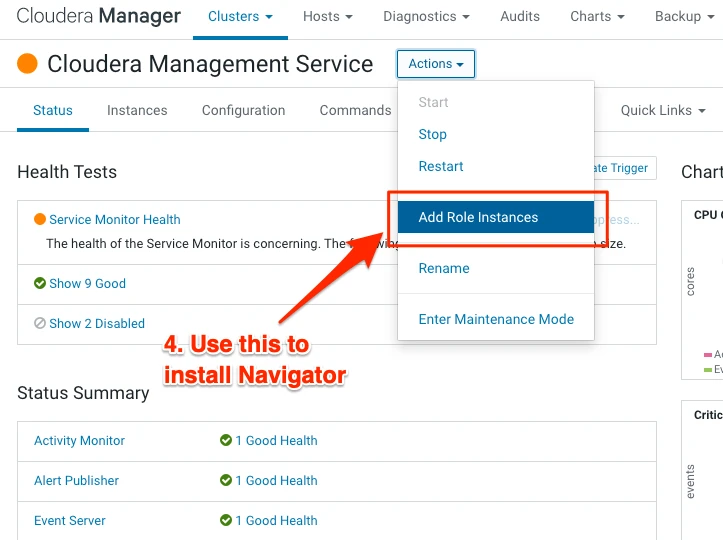
Step 4: If you have not installed Navigator, then you need to install it. Here is the doc of how to do that:


https://docs.cloudera.com/documentation/enterprise/6/6.3/topics/cm_ag_mgmt_service.html#xd_583c10bfdbd326ba-3ca24a24-13d80143249--7f1a__section_pgy_ngy_jk


step4.png


Hope this helps!

Li


Li Wang, Technical Solution Manager

6 replies

lwang
Platinum ⭐️
Platinum ⭐️
Mar 26, 2020 4:53 PM UTC

Hi @GTA ,


Cloudera Navigator requires a Cloudera Enterprise license. Please see this doc for details:

https://docs.cloudera.com/documentation/enterprise/6/6.2/topics/cm_ag_licenses.html#cmug_topic_13_7__section_b3q_pvz_qm

Check the license page from Cloudera Manger to make sure you have a Cloudera Enterprise license.


Thanks,

Li

Translate
Li Wang, Technical Solution Manager
GTA
GTAAuthor
Gold ⭐️
Mar 27, 2020 6:03 AM UTC

Hi Li,


Thanks for the reply. I do have cloudera enterprise trial version. Hope cloudera navigator will be not be accessible in the trail version.


Brgds,

GTA

Translate
lwang
Platinum ⭐️
Platinum ⭐️
Mar 27, 2020 6:25 AM UTC

Hi @GTA ,


If your Cloudera Enterprise Trial has not ended yet, then the enterprise features should be there and that includes Navigator.


Could you please check if the trial license expired? If not, please provide some more information about the issue then. For example, what do you see when you try to access Navigator home page? What are the Navigator instances installed where you can find out from Cloudera Manager UI? Some screenshots may help out here. Also, if you see any error messages, it will help to share that error with log files (CM server log, Navigator metadata server log etc). 


Thanks,

Li

Translate
Li Wang, Technical Solution Manager