

paulfg
Gold ⭐️
Nov 12, 2024 3:46 PM UTC
Solved

CML Application Status

I’ve a question about my application on CML if someone could help!

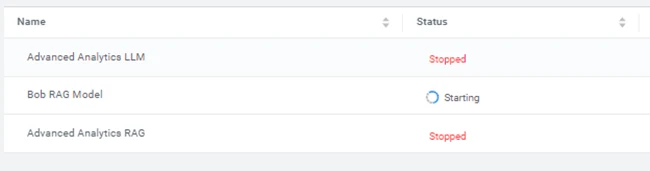
In the ‘Bob RAG Model’ application below, the status doesn’t change from ‘Starting’ even after the full script has been run successfully and my Gradio app has been created.

I’m using the exact same settings (including instance parameters) as I have in the ‘Advanced Analytics LLM’ application, and that status changes to ‘Running’ when it’s gone through its script.

The scripts are different, but the structure is pretty much the same – load the LLM/RAG model, define functions to query, open a Gradio app.

Has anyone seen this before?

Thanks
paulfg_0-1731426344269.png


paulfg
paulfgAnswer
Gold ⭐️
Nov 13, 2024 8:26 AM UTC

Hey, in the application logs everything looks fine. Instead of being able to click on the application name like I would normally do when the status is running, I have to go into the application logs and find the gradio app link at the bottom. 

When I look at the container logs, the last 3 lines are:


2024-11-13 08:22:14.557 18 INFO JupyterWSGLauncher ngh4jdz5m3ua258n Finish running startup chunks: success. data = {"user":"cdsw"}
2024-11-13 08:22:14.557 18 INFO JupyterWSGLauncher ngh4jdz5m3ua258n Proxying to livelog data = {"user":"cdsw"}
2024-11-13 08:22:14.557 18 INFO JupyterWSGTimeoutHandler ngh4jdz5m3ua258n idleTimeoutInMinutes data = {"idleTimeoutInMinutes":60,"user":"cdsw"}
 
Suggesting everything is as expected?
 
Edited:
I found the problem. It was how I was defining the port for the application. Instead of using 'os.getenv('CDSW_APP_PORT')'  I was using a manually set one. 
 
Thank you!

3 replies

DianaTorres
Community Manager
Community Manager
Nov 12, 2024 5:15 PM UTC

@Mike @smdas Hi! Do you have some insights here? Thanks.

Translate
Regards, Diana Torres, Senior Community Moderator
Gopinath
Gold ⭐️⭐️
Gold ⭐️⭐️
Nov 13, 2024 2:35 AM UTC

@paulfg Application getting stuck at "starting" status can occur when underlying script execution has not completed or the process flow does not think it had completed what it supposed to. 
Please  check/share the "Application logs" pane for any error/concerning events.  

Translate
paulfg
paulfgAuthorAnswer
Gold ⭐️
Nov 13, 2024 8:26 AM UTC

Hey, in the application logs everything looks fine. Instead of being able to click on the application name like I would normally do when the status is running, I have to go into the application logs and find the gradio app link at the bottom. 

When I look at the container logs, the last 3 lines are:


2024-11-13 08:22:14.557 18 INFO JupyterWSGLauncher ngh4jdz5m3ua258n Finish running startup chunks: success. data = {"user":"cdsw"}
2024-11-13 08:22:14.557 18 INFO JupyterWSGLauncher ngh4jdz5m3ua258n Proxying to livelog data = {"user":"cdsw"}
2024-11-13 08:22:14.557 18 INFO JupyterWSGTimeoutHandler ngh4jdz5m3ua258n idleTimeoutInMinutes data = {"idleTimeoutInMinutes":60,"user":"cdsw"}
 
Suggesting everything is as expected?
 
Edited:
I found the problem. It was how I was defining the port for the application. Instead of using 'os.getenv('CDSW_APP_PORT')'  I was using a manually set one. 
 
Thank you!
Translate

