@basant sinhaI am not sure I am completely following your use case.
With a NiFi cluster configuration it does not matter which nodes UI you access, the canvas you are looking at is what is running on all nodes in your cluster. The Node(s) that are the currently elected cluster coordinator and/or primary node may change at any time.
A Remote Process Group (RPG) is used to send or retrieve FlowFiles from another NiFi instance/cluster. It is not used to list files on a system. So I am not following you there.
When it comes to configuring a RPG, not all fields are required.
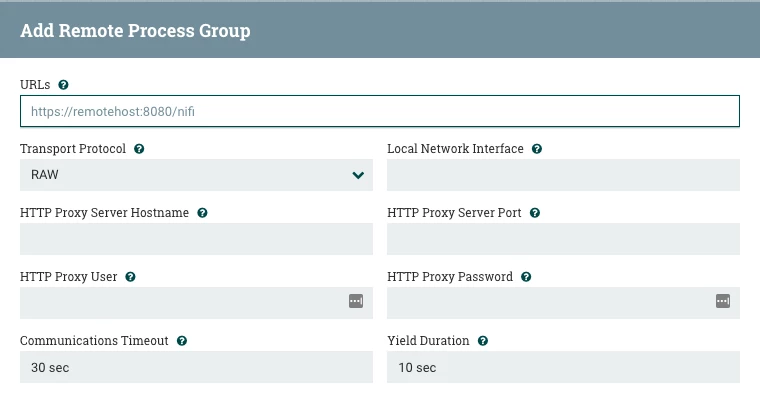
- You must provide the URL of the target NiFi instance/cluster (with a cluster, this URL can be anyone of the nodes).
- You must choose either "RAW" (default) or "HTTP" as you desired Transport Protocol. No matter which is chosen, the RPG will connect to the target URL over HTTP to retrieve Site-To-Site (S2S) details about the target instance/cluster. (number of nodes if cluster, available remote input/output ports, etc...). When it comes to the actual data transmission:
----- If configured for "RAW" (which uses a dedicated S2S port configured in the nifi.properties property nifi.remote.input.socket.port on target NiFi), data will be sent over that port.
----- If configured for "HTTP", data will be transmitted over same port used in the URL for the target NiFi's UI. (This requires that nifi.remote.input.http.enabled property in nifi.properties file is set to "true")
The other properties are optional:
- Configure the Proxy properties if an external proxy server is sitting between your NiFi and the target NiFi preventing any direct connection between your NiFi instance over the above used configured ports (defaults: unset). Since NiFi RPG will be sending data directly to each target node (if target is cluster), none of the NiFi nodes themselves are acting as a proxy in this process.
- Configure the Local Network Interface, if your NiFi nodes have multiple network ports and you want to force your RPG to only use a specific interface (default: unset).
Additional documentation resources from Apache:
https://nifi.apache.org/docs/nifi-docs/html/user-guide.html#site-to-site
https://nifi.apache.org/docs/nifi-docs/html/administration-guide.html#site_to_site_properties
If you find this answer addresses your question, please take a moment to click "Accept" below the answer.
Thanks,
Matt




